General Tips and Tricks for App Inventor

This list was made by @Taifun

  1. Use different screens wisely
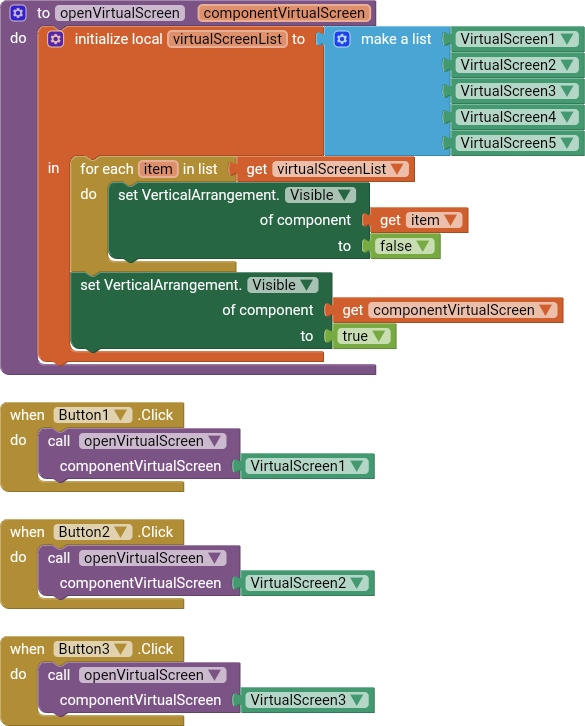
    Before starting to create another screen, first you should think about is it really necessary? See also Building apps with many screens and SteveJG's post about advantages/disadvantages, because in only one screen you also can use vertical arrangements to simulate different screens, just set the arrangements to visible = true/false as needed...
    If you decided to use different screens, then you should switch them correctly, else you will run out of memory after a while... The recommended method of switching screens in App Inventor

  2. App Inventor works best if you use images whose size matches the size you want them to appear on your screen. If you import larger images into your app, your app may run out of system memory. Using Images with App Inventor

    by @Italo
    First, you need to understand that the file size of an image is not the amount of memory it uses when it's being displayed. The file size is the compressed size, much like a zip or rar file. When viewed, the image needs to be decompressed.
    For example, if your image says its file size is 100 kb, and its dimensions are 1024 x 768, 32 bit color, then that image uses over 3 mb of RAM (not 100 kb!) when you show it on the screen. ((1024 * 768 ) * 32) / 8 = 3,145,728 kb (3 mb)

    Now, this is a mistake most people make when using arrangements as "virtual screens": They set different image components with their images loaded but hidden, instead of having only one image component and changing the picture according to the user's selection or app events, not knowing that apparently the hidden image components are also using the ram, (yes, even though they are invisible!).

  3. Avoid redundancy
    Probably it helps to read chapter 19 - 21 in Dave's book App Inventor 2 Book: Create Your Own Android Apps to get an idea how to do DRY programming with App Inventor - Don't repeat yourself

  4. See SteveJG's monster list of tips and tricks

  5. How to overcome the App Inventor project limit of 30 MB

  6. Backup your project frequently Back up your work with an aia file! By @Enis
14 Likes
How to make a global variable that can be accessed by all screens?
Changing the Order Of Screens/Changing Screen1
App crashing as screen changes
How to read a specific cell in google sheet by using App inventor then make it as a started value for Sreen 2?
How do I input the data to screen 1 to scren
Low RAM and Crash issues
Mp3 Sound play Problem in emulator
How to store many tinyDB in one DB
I can't open a screen
Se des habilita algunas opciones
The screen is no longer displayed correctly
java.lang.OutOfMemoryError
Uploading image with comment to cloud and showing these into seperate page
Dos datos entre dos screen
Duda en general
Is there something wrong with MIT App Inventor?
Why do we need to select 2 times from spinner?
How can i make my screen2 open first when i install the app not screen1. Is this possible?
Server error: could not upload file. Please try again later!
Limits on number of Views in App Inventor?
Problem with TinyDB and multiple screen
I want to build a multilanguage app but i am facing issues
Go from page 1 to page 2
Global variables initialized in Screen1 are not recognized in Screen2
Cannot get different variables from different screens
Mit app inventor takes a lot of time to load a project
Build failed and i dont know how to fix this
Use list from multi-screen
Can someone fix my app here? i'm new to this. thanks
Using Variables On Multiple Screens
Need help to make button reading url from google sheet
Non mi fa accedere al progetto
A quiz app + more than 10 screens
Problem with passing data from one screen to another
Error: the application loops on the home screen when I open it on my phone
App inventor can't generate a QR code
JavaScript without Timer and WebViewStringChange
Limit exceeds in MIT app
JavaScript without Timer and WebViewStringChange
How to Initialize a variable as another variable from a different screen
Create user profile page
Completing the survey on another screen
What is the Max number of screens that can be used in a app to be able to still publish the app
App inventor cannot export my file it said my file are too large
View data from one screen to another with listview and TinyDB
Como hago para que tocando un boton me pase a otra pantalla una lista csv
Building Apps with many screens
App inventor not able to compile apk
Error: Application has stopped
Can't delete screen
TinyDB Problem how do i add a number from one screen to a different screen?
Time Delay Not Working
Internal errors - app constantly freezes
My app keeps crashing down
Tips and good development practices
Notifier.AfterChoosing Error
The program stops when a new page opens
The application does not start
Controling player after switching screens
report this app in my mi mobile ? miui bug report
I am trying to split 3 strings divided by spaces into 3 different Variables in a certain order, only it doesn't work. What am I doing wrong?
Unable to switch screens!
Use same clock in different screens
How to use Virtual Screens
The blocks is not working
Is all of this possible
Urgent help needed :( Anybody know what is the source of this problem?
The operation add items to list cannot accept the arguments: ,"[6]"
How do u make button choice screen random
My copy shortcut isn't working or I can't delete screens (don't want to delete screen 1)
Screen number error
Cannot find the component error
Demora en conectar con la aplicación
Making the project has more space not only 30mb
Automation with mit app inventor
Problem of the enabling of buttons after switching back to the same screen
Listviewer Clouddb
It does not close the other screen
Problem uploading an aia file
Increasingly slow implementation
Resetting tinydb after returning to the screen
Preciso de ajuda em um sistema de agendamento
Bluetooth and multiscreen
Nem tudok menteni!
Crash app multiscreen
My apps keeps stopping
Error in the creation of the app, DX execution failed
Alarms within cryptocurrency app
There’s a problem in building my apk! It stops at 100%, waiting for Barcode
Exit app control is not working
HC-O5 can't connect with multiple screens "507"
App closes without error mesasge
Creating multiple clickable buttons?
White screen when launching the application on android 10 and below
Dos valores iniciales
App Inventor is not working (only in one project)
What does this vruntime error mean? Error from Companion: java.lang.OutOfMemoryError: Failed to allocate a 53144112 byte allocation with 16777216 free bytes and 26MB until OOM
Camera and location doesn't work when I convert website using webviewer
Switch screens correctly - 2 methods
Compagnon ai a du mal à s'ouvrir (Companion has difficulty opening up)
About a play button
Help me, i couldnt download my project
How can I maintain the Bluetooth connection when interacting between screens?
My project crashes after 1st-3rd time of playing it. How do I solve this problem?
Not being able to download the app, error running appt
Quick please, screens opening on top of others
How do you change an image on the 2nd screen when you tap image from the 1st screen? Is it possible?
Are App Inventor Projects Limited to 10 Screens?
Do you have questions about how you save information from screen 1 to 2?
Mi app funciona cuando conecto el celu a la pc, pero al descargarla no funciona
How do I upload files to the assets (Media)
Having trouble with lists and tiny DB
Login/Signup Platform works correctly on the emulator and on AI companion, but not on my mobile
Send data and display on other screen
Hi why I cant build apk ? Sorry, cannot package projects larger than 30 MB. Yours is 36.25 MB
Upload PDF from MIT web viewer by link into web page
Renaming screens
Problemas con páginas web de radios y tv
Concerning APK, It opened to the main page then closed by it self
Profile with saved information
Build a fitness app with Ullis Foreground extension?
Help me create an app
APK cannot be created. Error running AAPT
Why the image is not displaying on when I scan it?
Transfer variable Textbox Values between Screens
Error del servidor: no ha sido posible guardar uno o más archivos. ¡Por favor, inténtalo de nuevo más tarde! (Server error: could not save one or more files. Please try again later)
Duplicating screens?
Upload PDF from MIT web viewer by link into web page
Duplicate screen
Emerging bad behavior
Bluetooth screen1 and bluetooth screen2 Not passing on talent
Can't figure out how to display data from tinyDb
Why can't I download my app properly. PLEASE HELP ASAP
I want to take a picture from the user in one screen and show this picture in another screen
Condividere una lista da una schermata a un'altra
Player - Device Audio, Loop - Play Streaming
Global variable error
App wont show with mit app companion
I want to take a picture from the user in one screen and show this picture in another screen
L'App funziona con AI COMPANION, ma non con APK
Bug at my downloaded app
My project doesn`t work, it's like 40 to 50 screens
Copy and paste a screen not working
Transfer lists accross screens
I couldn't build app
Open weburl in web component
java.lang.OutOfMemoryError: Failed to allocate a 145452 byte allocation with 61496 free bytes and 60KB until OOM
TinyDB w/procedure
Archivo csv cargar y ver con un boton
Non riesco a creare APK
My compiled application takes a long time to open
How do I set up my map to pull data (from a zipcode or an address)?
Help cant package an apk because server error could not build target please try again later
Help it works fine yesterday but now this
How can i make e clickable once “a” is completed
FAQ section: FAQ
Can anyone find the issue with the audio? (challenge, also i need help ;)
Didn't exporting .aia
Please Update MIT APP INVENTOR Builder
List and Detail App
Expanding the maximum exportable app size
I Need A New Mit Link Help
伺服器壞了,嗯對我希望有人可以修復一下!- The server is down. Yes, I hope someone can fix it!
Depolama Sınırı
Playing audio file across multiple screens?
I need helping coding a habit tracking app
Need help for a basic app
Global variables - how copy many variables, to another screen?
App.apk show " app keep stoping"
TinyDB error on second screen
Error 908: The permission Write_External_Storage has been denied while using web component to download a file
How do you change from one screen to another with a button?
How can I select markers created on the map?
[PLEASE HELP] Error with screen changing
Why can't I close my app?
Invalid Screen: package null, Unknown, version 0.0
Bluetooth Connection lost
Some suggestions on the interface
Sound fades more each time app is rerun
Whats the difference between a button with an image vs. a clickable image?

see also the following statements by @ewpatton
(copied from here Are App Inventor Projects Limited to 10 Screens? - #7 by ewpatton)

There isn't a hard limit on the number of Screens in an app.

When used properly, multiple screens are a perfectly reasonable way to organize your app. For example, in a app for finding restaurants you may have a main screen with a map, a second screen that shows restaurant data, a third that shows menu contents, a forth that shows pictures of food, a fifth that shows reviews, etc. In this design each screen is a view over some model (cf. model-view-controller design pattern). The wrong way to use screens is to create a screen for each individual instance in your model (i.e., a screen for ABC restaurant, a screen for XYZ restaurant, etc.), which is often how screens are used because beginners haven't yet internalized the abstractions necessary to know when it makes sense to really use a new screen versus reuse an existing screen.

It's also not true that many screens necessarily implies memory issues when the app is running on the device. Android will first try to kill other applications that are not active to free up memory. With proper management, you can certainly build a multi-screen app that never runs into memory issues by closing screens to pop them off the activity stack. Conversely, you can also build an app with 2 screens that will overflow memory by constantly having one open the other and vice versa, effectively attempting to put an infinite number of screens onto the (finite) stack.

The other major consideration around number of screens is from a performance perspective in App Inventor itself, namely that it needs to load these files from the server (each screen is 2 files--designer and blocks), which takes time. There are also some not-quite-efficient design choices in App Inventor because it was originally designed to only model a single screen. These design choices cause multi-screen apps to take quite a bit of time to load and for the browser to use quite a bit of memory to support them. All screens are "open" at once in App Inventor but only one is ever shown at a time, and so this extra memory cost can slow down the website on older hardware and computers with limited memory. I have previously worked on some changes to address these performance issues but they are not yet in production.

2 Likes

For screens :

Don't you think these blocks would be best :

2 Likes

Instead of looping over all Virtual Screens every time you need to make one visible, you could have managed a gloable currentVirtualScreen and when you are to make smother to be visible just make visibility of current to be false and make the required screen true and update the global currentVirtualScreen varialbe with the current visible screen you just made visible.

3 Likes

Ya but in case somehow some other virtualScreen is also open, it would close it. That's why I looped all these.

At the initial all would be visible false, so in every case one would be visible and that is refrenced by

at all time, when you need to make othere to be visible just make the current to be false and required to be true and update the global currentVirtualScreen with the new one.

wo0ow great tidy optimized way for lot of screens project [ beautiful mind ]

1 Like