MakeViewUp Extension: beautify & customize android views

MakeViewUp allows you to customize your application’s android view components like layouts & buttons.

Blocks:-

Methods:
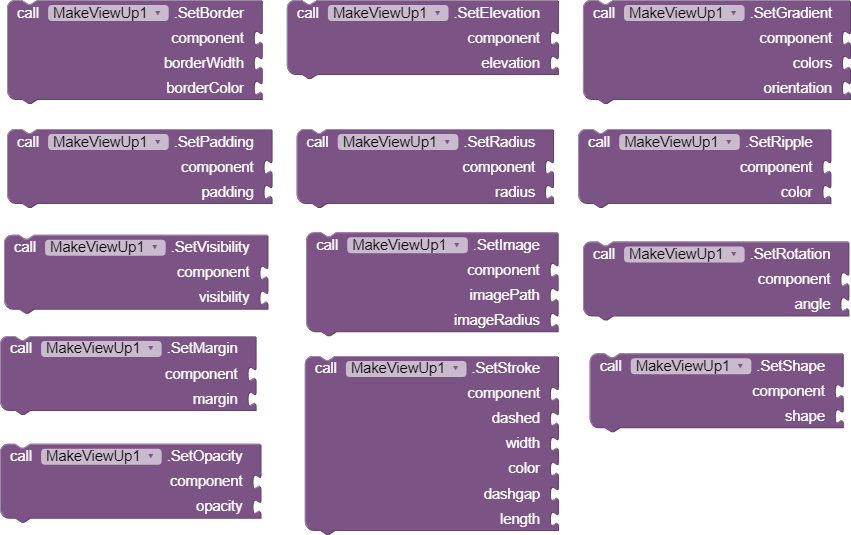
Eleven different types of methods for specific things like setting elevation, gradient, margin, padding, corner radius, the ripple effect, rotation, stroke & visibility of the android view component.

Properties:
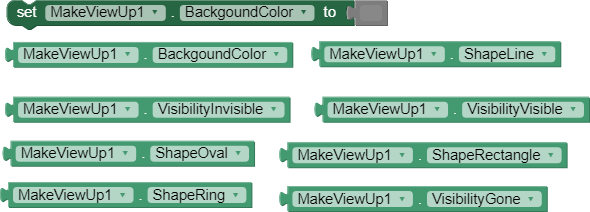
One background color setting property and eight different types of properties for specific things like getting background color, shape line, shape oval, shape rectangular, shape ring, visibility gone, visibility visible & visibility invisible.

Example:-

above is an example of this extension of how we can make a beautiful user interface in the app inventor platform.

MakeViewUp is allowed to be redistributed by MIT as part of the Appathon 2021

Direct Downloading: Makeviewup (12.1 KB)
Mirror link: Makeviewup

27 Likes

I can't see the blocks properly :sweat_smile:

2 Likes

@Kumaraswamy i have changed blocks images you can check now.

2 Likes

Wow, very useful Extension @VSATISH13 congratulations :partying_face:
I suggest you better not upload your extension on another website (Upload to MIT community)

3 Likes

Can you use this extension to stack one component on top of another, obscuring it? I can see this feature in the sample images in the first post. Which block to use? A detailed description of the blocks or a sample aia project would be nice.

1 Like

Actually that website is mine and I will add test aia with extension so I think it will be batter to upload on my hosting for future updates and less mix-up in keeping records.

1 Like

You can try that via using Margin block it should work and the example I shared there I used overlay extension (which I might release soon).

Please add Blur Effect

1 Like

maybe it can be done via opacity block.

opacity not have blurring effect)

3 Likes

I will add blurring option in next update :+1:

1 Like

Really thanks for you're extension! It helped me a lot!

Invented with app inventor :blush:

4 Likes
1 Like

This is a bad blur and slow. It takes a screenshot and blurs, not in real time.)

4 Likes

That's how it works, the extension uses the fastest blur algorithm.

5 Likes

VERY DOPE EXTENSION!!!

btw why does this look insanely big?

2 Likes

Yea @Vsatish should resize it. What I do is remove the icons URLs from all the JSON files in the AIX.

2 Likes

oh nice extension

2 Likes

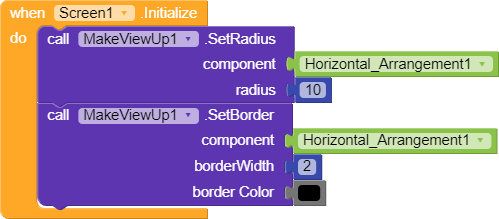
I tried changing my border and radius of component something like this,

Where in a horizontal arrangement, there is an image in the background but its not working when I put image background .

2 Likes

@VSATISH13 please resize the icon as @Kaustubh_Rakhade showed. It really looks weird.

Anyways nice extension man!

1 Like