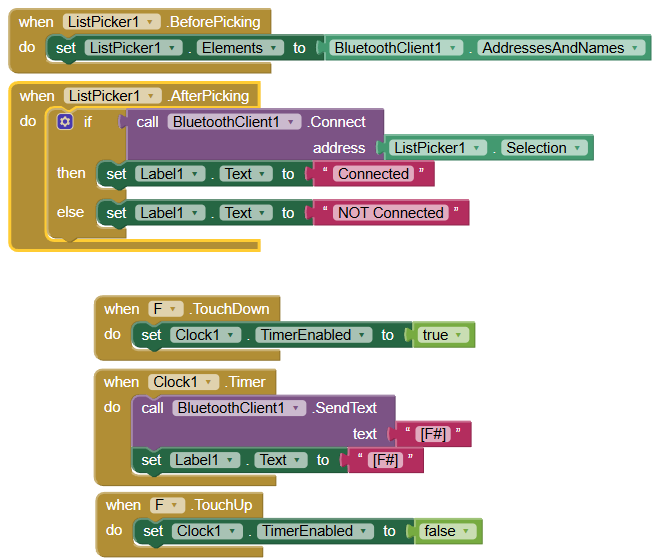
There is More code Checks for input But not shown as it has little to do with making the Bluetooth connection..
No matter what I try It will Not connect to the Arduino Bluetooth BLE 4 device. reading through the Forum it look like I need add authenticity or something.
Dear @Hargard, since you say you're a newbie on MIT AI2, let me summarize the hints that the other power users and @davidefa have already told you:
First of all you have to be sure that your Arduino board is coded correctly and is capable to exchange data on the BT line.
Since the BT featured by your board is the BLE, you have to download from the playstore the free app SerialBluetoothTerminal (SBT) by Kay Morich. With this app installed on your phone, and by selecting the BLE devices, you shall be capable to exchange messages between phone and the Arduino board.
Until you are not done with that, you will waste your time in doing any different kind of attempts.
Remember to make visible the Arduino BLE board at Android level.
All this supposes that the Arduino code is correct and capable to exchange data on BLE (if you're not sure of that, consider to post it here, so we can have a look to it).
Only after having seen that the Arduino system is capable to exchange messages with the SBT app, you can go further and focus your attention to the app. At that moment, to code your app, you will have to download the BLE extension, as @Taifun has already suggested, and load it into your app.
To get examples of that, you can take a look at his web site (https://puravidaapps.com/)) that contains a lot of code snippets, or you can search the forum with the tag "BLE" and you'll find a huge amount of examples (as the FAQ suggested and managed by @ABG).
Please be patient and do one step at a time...