I am creating a non-invasive glucometer project where the SpO2, heart rate, and glucose readings will be continuously measured and sent through bluetooth onto the app. The sharing part has been done and works fine, but I also want to create a feature where the user can press a button called “export” that saves the SpO2, heart rate, and glucose readings at that point in time onto a CSV file that can be accessed later for users to save and show health professionals any abnormal readings. After trying what I have so far, the notification shows up after pressing the button but I don’t see anything added into the CSV file on my phone. I am a beginner to this stuff and really don’t understand much. Please help!
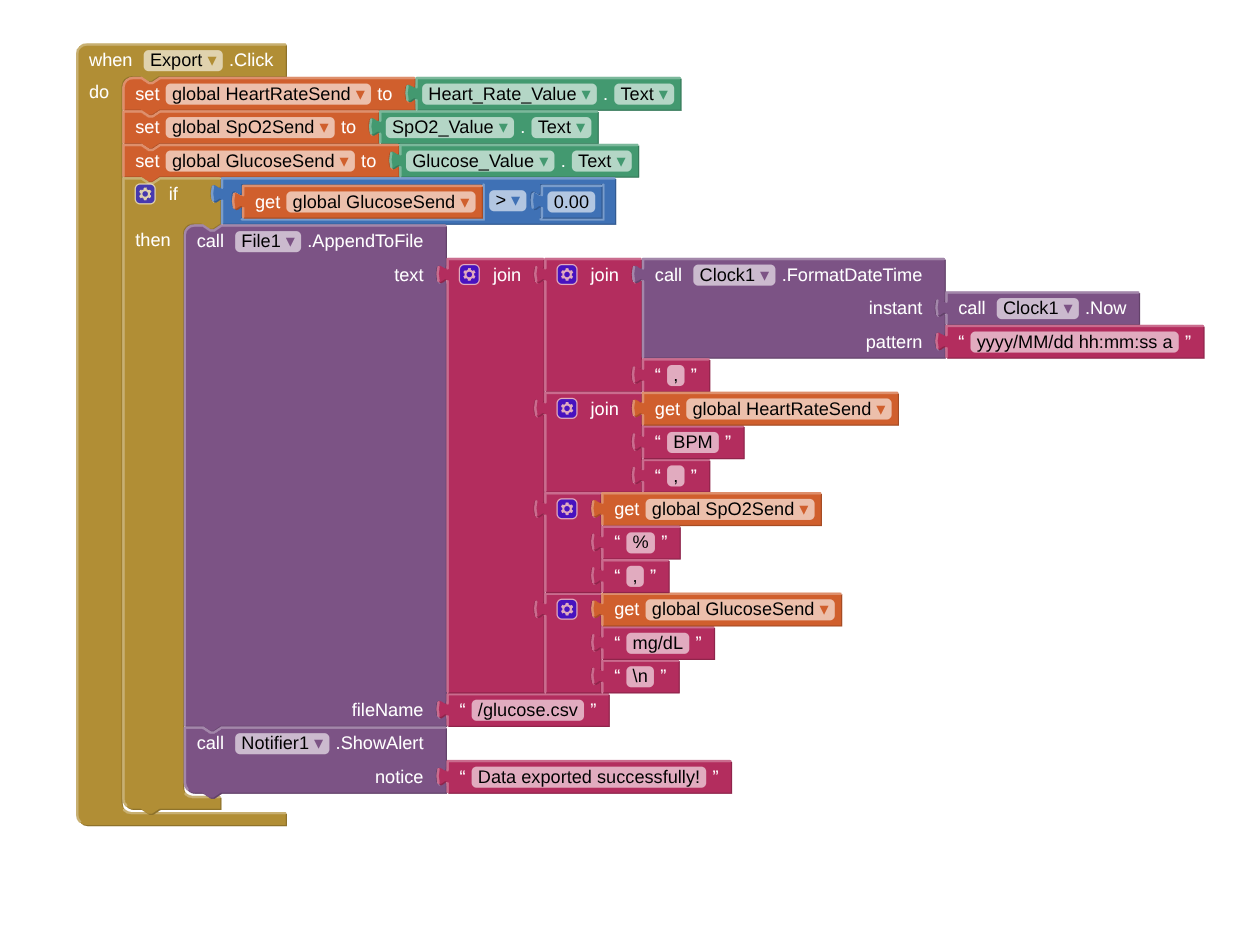
I will also be fine if the app could save the current three readings onto the phone in some other way. I would prefer it to not require an internet connection to make it more accessible for everyone. It should just be accessible offline somewhere else on the phone, or on the app even after the app is turned off (the readings shouldn’t disappear after the app is opened again).
If you're planning on graphing your data later, make it easier on yourself by keeping the data as pure numbers, without decoration or formatting.
Use the Clock's MILLISECONDS FROM 1970 for timestamps.
Storing a three column table (list of lists) in TinyDb is straightforward.
Reload from TinyDB before adding new rows, and save immediately.
There are csv conversion blocks in the Lists blocks Pallette.
There is a sharing component that can send text into other apps.
I switched the DefaultScope to Legacy instead of app and changed the the fileName to /documents/glucose.csv instead and it finally gave me an error after pressing the button. It showed Error 2104: Cannot write to file/storage/emulated/0/0documents/glucose.csv, what now?
The FAQs have other Power Users' experience.
I avoid using Files, myself.