Thank you Patel that looks like a very useful link to study. However, my App is intended for public use and the example I gave looks as if it might breach Google guidelines but it maybe the persistable permission function works by modifying the file being read? I'll keep on testing until I understand the SAF functions better.
1 Like
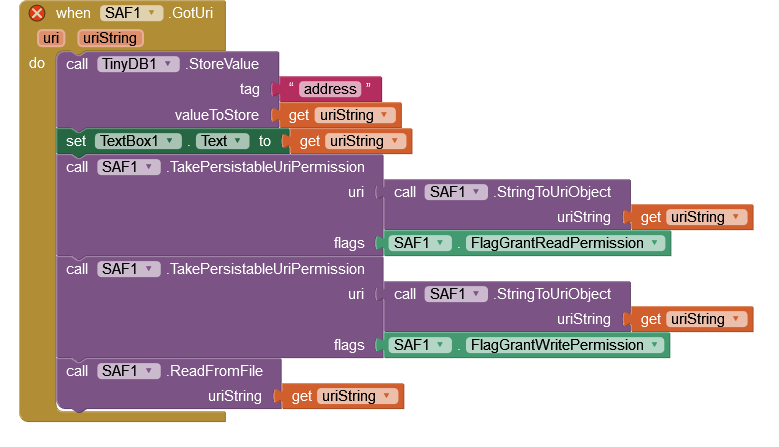
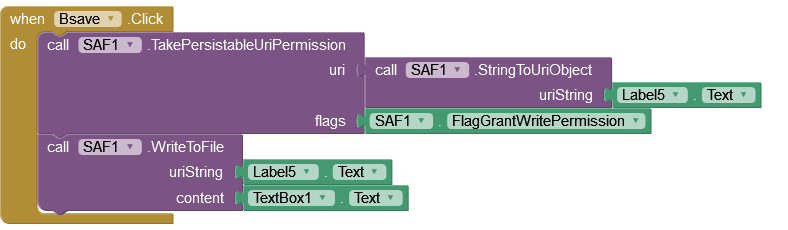
Please upload the aia so that I can take a look.
Though if it works in apk, its functionality in companion shouldn't be a concern.
2 Likes
Find attached aia, I'm using companion 2-62u, error message "media is read only"
Saf_1.aia (60.2 KB)
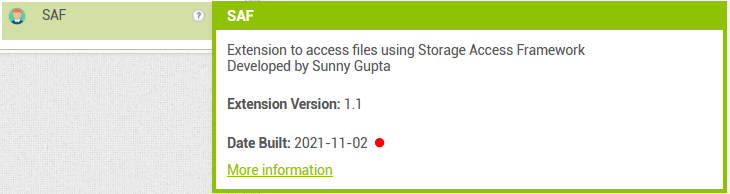
Works fine with Companion on Android 11 (even with the non-current extension version).

I am facing some problem with this SAF thing.
My end goal is to read a pdf from Documents folder and upload it to Firebase Storage. The problem I am facing is after picking the file from Documents folder and coverting its URI to path to upload it to Firebase Storage as it accepts File Paths only. I got path as /sdcard/..... which is prompted as No such file or directory while uploading to Firebase Storage.
Sorry actually I am explaining my post but unfortunately ended up posting it. Edited my issue please help me with it if you could.
can you post a link to your companion apk ?
I can see all text files with this block
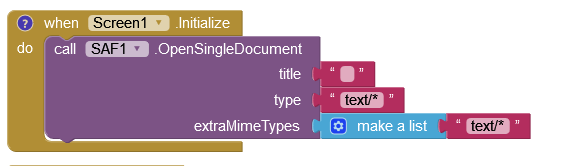
but I want see only csv
Try setting text/csv as extra mime type.
2 Likes
text/csv was my first attempt with no results
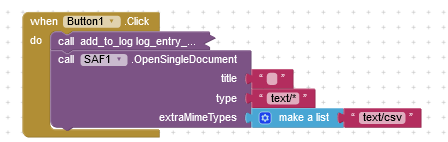
Did you solve that? I have exactly the same issue, cannot upload CSV files. I tried like this, but all csv files in my storage show greyed out:
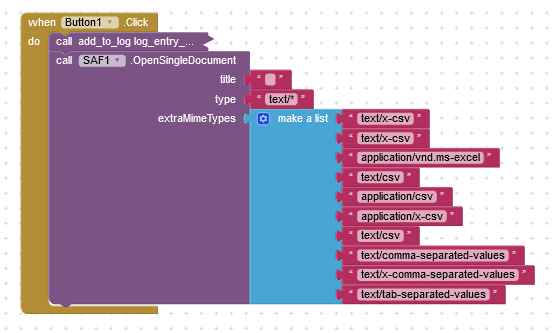
ah, it worked now for me with the following block (no clu which of the mime types in the block worked and I am too lazy to check one by one):
4 Likes
A lot of discussion here, which shows how useful SAF is.
SAF was introduced @ Android 4.4, API 19 (Thanks Johannes_Ai2)
However, An App using the SAF extension will not install on an Android 4.4 Device:
thank you, it works with text/comma-separated-values