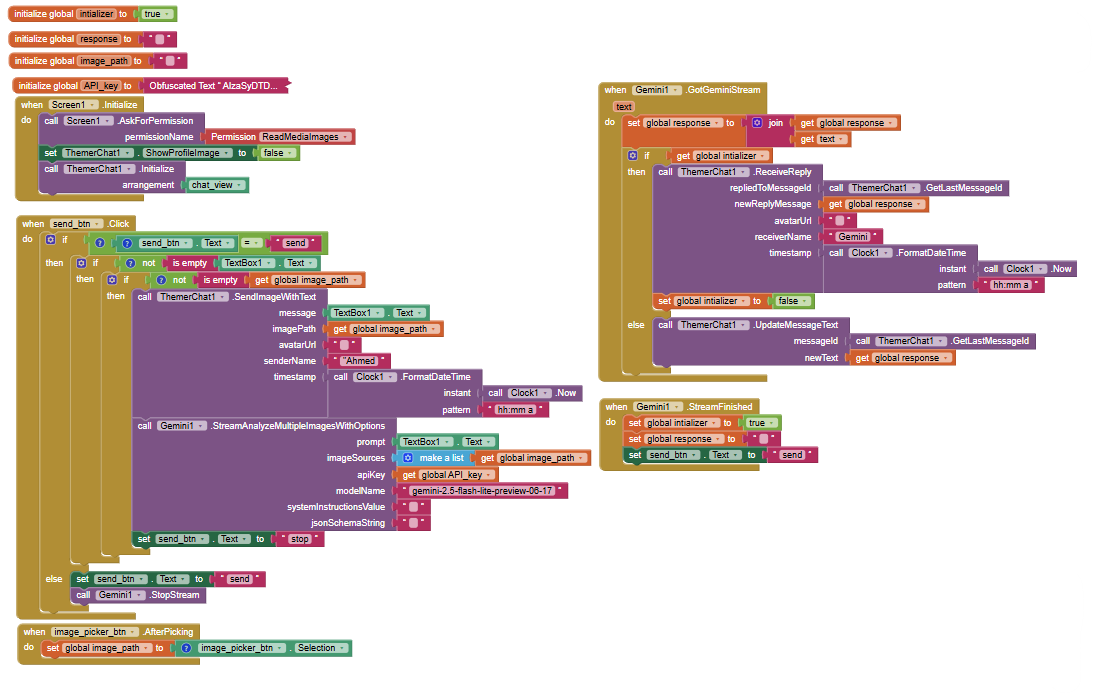
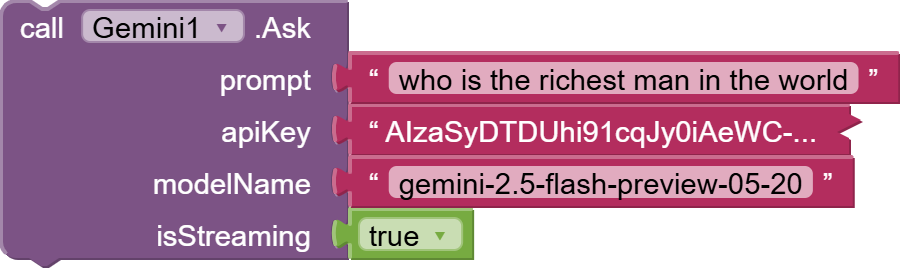
This is an example of how to use Gemini Vesion API with thermer chat extension
See the video :

The blocks :
See the video :
The blocks :
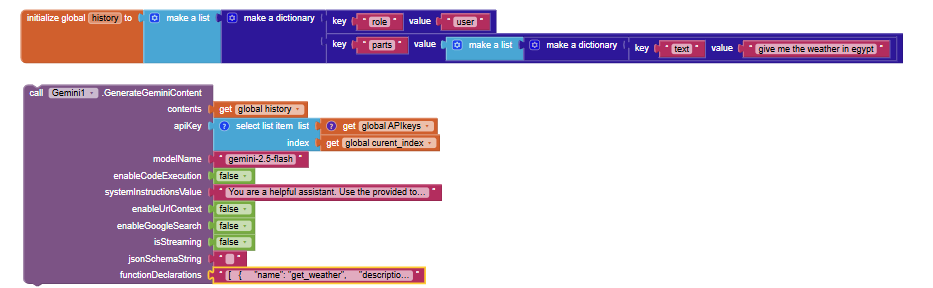
isStreaming: booleanGenerateGeminiContent block that enables you to create continuous chat :Can you please provide all features in one message
Text Generation :
Simple Chat : Provides a basic Ask function for simple text-in, text-out conversations.
Advanced Generation : A powerful GenerateGeminiContent function that supports both single-turn and multi-turn conversations, system instructions, and optional tools.
Streaming : Offers streaming versions of all major generation functions (StreamGenerateGeminiContent, StreamGenerateGroundedContent, etc.) that provide the response in real-time chunks.
Image Understanding (Vision) :
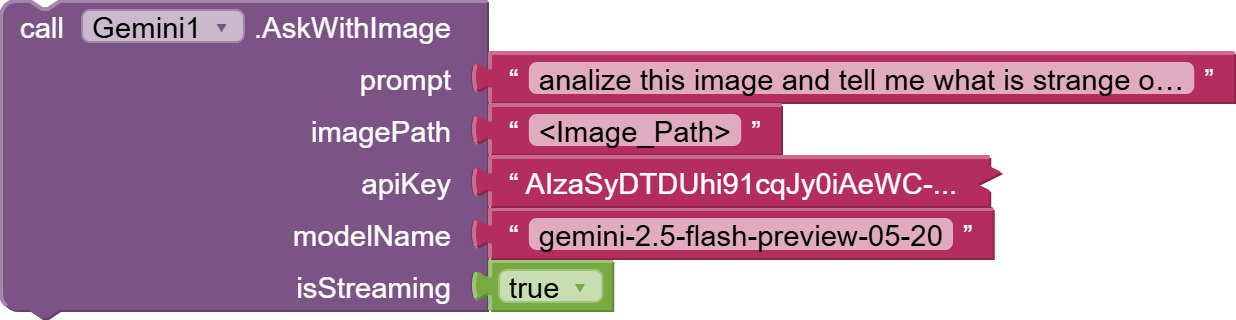
Simple Image Queries : An AskWithImage block to ask questions about a single image.
Multi-Modal Analysis : The ability to send multiple images, videos, audio files, PDFs, and text in a single prompt for comprehensive analysis.
Multiple Input Sources : Accepts files from local paths, Base64 encoded strings, content URIs, and public URLs (for PDFs and images).
YouTube Video Analysis : Can analyze content directly from a public YouTube URL (including Shorts) when provided with a prompt.
Image Generation & Editing :
Text-to-Image : GenerateImage function to create an image from a text description.
Image Editing : EditImage and EditImageFromPath functions to modify an existing image based on a text prompt.
Multi-Image Editing : EditMultipleImagesSimple function to process a prompt against a list of images from various sources (URLs, paths, Base64).
Audio Understanding :
Video Understanding :
Text-to-Speech (TTS) :
Single Speaker : GenerateSingleSpeakerSpeech function to convert text into speech using a specified prebuilt voice.
Multi-Speaker : GenerateMultiSpeakerSpeech function to create dialogue with multiple distinct voices from a structured script.
Structured Output (JSON) :
Users can provide a JSON Schema to force the model to return its answer in a structured JSON format, making it easy to parse and use data in the app. This is supported by multiple functions.
Includes a CreateJsonSchema helper block to easily build the required schema.
Google Search Grounding :
Code Execution :
File API Integration :
Efficient File Uploads : Includes robust functions to upload large files (like videos) directly to Google's servers. This is highly efficient as the file is processed on the server and referenced by a URI, avoiding the need to send the full file with every request.
File Management : Provides blocks to get detailed metadata (UploadFileAndGetMetadata) and the direct download link (GetFileContentUri) for uploaded files.
Reusability : Uploaded files can be reused in multiple API calls by referencing their URI.
The extension is event-driven, providing specific events to handle different outcomes:
General Responses : RespondedToGemini (for single responses), GotGeminiStream (for each piece of a streaming response), and StreamFinished.
Image & Audio Generation : GotImageResponse (returns Base64 image data and a saved file path) and GotSpeechAudio (returns Base64 audio and a saved file path).
File Uploads : FileUploadProgress (provides real-time progress for large uploads) and FileUploadComplete / GotFileMetadata (fires when a file is uploaded and processed, returning its URI and details).
Error Handling : A robust ErrorOccurred event that provides detailed error messages for easier debugging.
API Key Validation : APIKeyValid, APIKeyInvalid, and APIKeyCheckError events to confirm if the provided API key works.
Grounding Sources : GotGroundingInfo event that returns a list of source URLs and titles when using Google Search.
File Encoding : Multiple blocks to encode various file types (images, videos, PDFs) into Base64 format.
Path Conversion : A GetFilePathFromURI function to handle file paths provided by components like the Activity Starter or File Picker.
Permission Handling : Blocks to check for and request the necessary storage permissions on Android.
Image Display : A DisplayBase64Image helper to easily display a Base64 string in an Image component.
Model Management : A GetGeminiModelNames function to retrieve a list of all available models for the user's API key.
Favicon Fetcher : A simple utility to get the URL for a website's favicon.
Designer Properties : The extension allows setting key parameters directly in the MIT App Inventor designer, including:
API Key and default Model Name.
Generation controls: Temperature, Top P, Top K, and Max Output Tokens.
Safety settings: Category and Threshold for content moderation.
Which gemini model needs to be used to access all features
There is no model that can access all features
For General Analysis (Text, Chat, Vision, Audio, Video):
For Generating and Editing Images:
For Generating Speech (Text-to-Speech):
I'm excited to share a major update to the Gemini extension!
We've just added a powerful new feature: Image Editing . To celebrate, we are also introducing our most powerful and a-peeling model yet: the Nano Bananana AKA gemini-2.5-flash-image-preview model!
Now you can perform powerful image edits directly within your App Inventor projects. Take a look:
We are very excited to see what you can create with this new functionality.
Happy Inventing
https://x.com/Google/status/1990924447402828120?t=1Avhi2kbi6XVDg7SQNkuQA&s=19

Hello App Inventors!
We are thrilled to announce a game-changing update for the Gemini extension. This version transforms Gemini from a simple chatbot into a powerful AI Agent capable of controlling your app, while also giving you massive upgrades in file and image handling.
Demo :

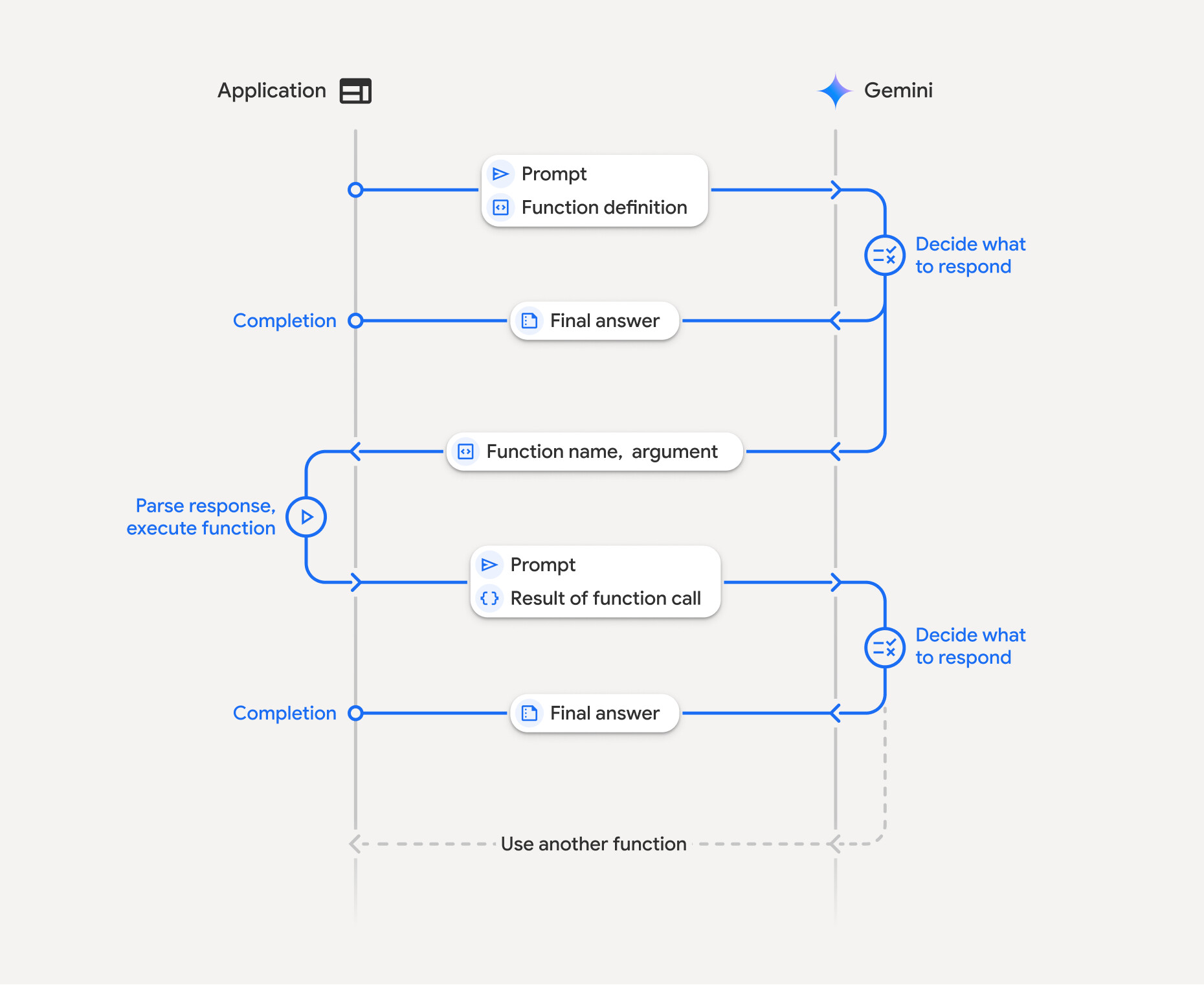
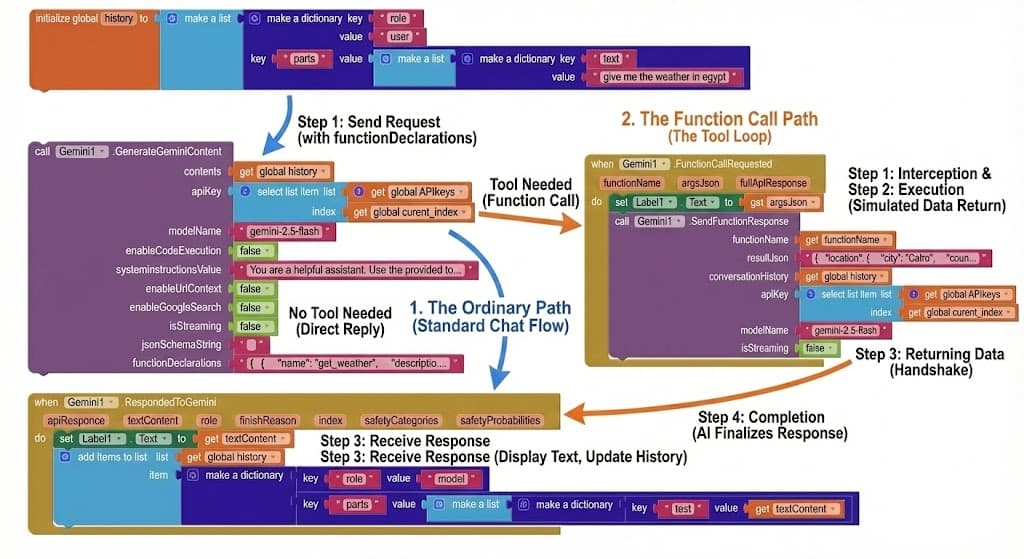
The biggest feature in this update is Function Calling. You can now teach Gemini how to use tools within your app!
Instead of just returning text, Gemini can intelligently decide to trigger events in your app based on the user's conversation.
How it Works (The Tool Loop):
get_weather tool.Example Declaration: Here is how you define a function for Gemini using the functionDeclarations parameter:
[

{

"name": "get_weather",

"description": "this function job to get weather status for specific location",

"parameters": {

"type": "object",

"properties": {

"location": {

"type": "string"

}

},

"required": [

"location"

],

"propertyOrdering": [

"location"

]

}

}

]
Key Blocks:

We've completely overhauled how files and images are handled to eliminate size limits and boost performance.
 Hybrid Image Engine
 Full Files API Control
Manage your AI's knowledge base dynamically:
(Add a screenshot here of the new file management blocks)
Price: 5.99$ not
7$for limited period
Purchase: PayPal Link or You can pay HERE using your credit card
In both cases after payment, you'll be redirected to the download URL. Contact me for any help or issues.
Happy Coding! 
Hi everyone,
I'm working on v2 of the Gemini Extension, and I want to make sure it covers your specific use cases.
Instead of just asking for features, I want to know: What kind of AI app are you trying to build right now?
Are you building a chatbot assistant?
An educational app for homework help?
A tool to generate marketing text?
If you tell me what you are building, I can add the specific blocks or parameters to make that easier for you. Let me know in the comments!