[PAID] ⏰ Alarm Manager Extension with Notification or Autostart

The alarmmanager uses the itooX framework, so all rules relevant for itoo are also relevant for the background processing of the alarmmanager. So the answer is yes, do it the same as you would use itoo

This should return false even if you started the connection in the foreground, i.e. do not mix foreground and background processing, i.e. start your connection in the background in the OnReceive event handler

To send a notification you could also use the StartNow method from the alarmmanager extension

Also for debugging use the Notifier.LogInfo method and use Logcat to check the log

Taifun

Is rhere an event available, which gets triggered if the connection was successful?

I currently do not have a link to the documentation of the mqtt extension...
You might want to register that event for itoo ... same for other relevant mqtt events...

What I forgot to ask earlier, I'm assuming, you added also the itoo extension? Without that extension obviously background processing is not possible

Taifun

How to create dynamic alarms using the alarmmanager extension

Example 1: display a random message at alarm time

start a repeating alarm and at alarm time in the OnReceive event handler pick a random text and display the notification using the StartNow method


dynamic1a

Example 2: display the current weekday at alarm time

start a repeating alarm and at alarm time in the OnReceive event handler get the current weekday and display the notification using the StartNow method


Taifun

2 Likes

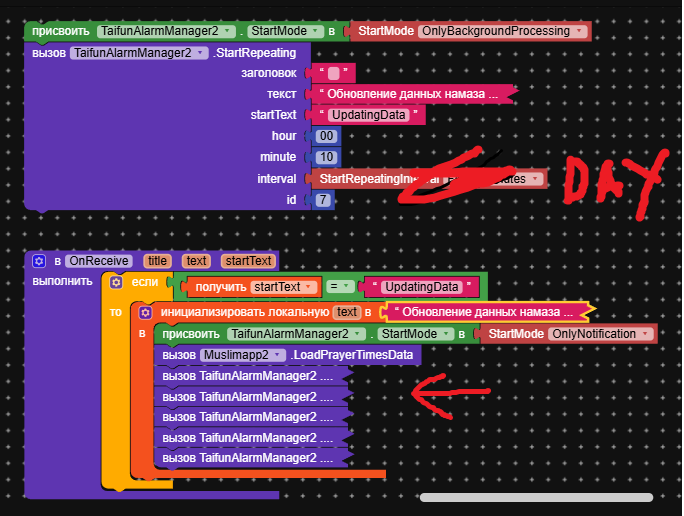
Did I do everything right? I'll only be able to check at midnight if it works or not.

@Emissary95
To call your procedure once a day you use start repeating interval Day and call only that procedure at alarm time

Also your procedure call must be inside an event... fix your red and yellow errors

You forgot to reveal, what exactly that procedure is doing (is it an asynchronous procedure?)

Also it looks like you are trying to set 5 new alarms... what about explaining a little bit more and showing us what you are trying to do?

As test you can set it to any time during the day

Next time please switch the language to English before taking a screenshot

Taifun

I wrote the extension using AI. This block

component_method (1)
takes data from a text file. If today is December 1st, it takes data from the list for December 1st; if today is December 2nd, it takes data for December 2nd, etc. I need this block to be activated at midnight to update the data in these blocks (there are 10 of them).
2025-12-01_15-49-00

These are notification blocks. They are needed because the data in them needs to be updated.


Notifications work, but I have to open the app every day. That's why I need an auto-update at midnight.

I hope I explained it correctly

Oh yeah... :disguised_face:

which only can be asynchronously and if you or AI did it correctly then there should be an event, which provides the result, as this takes a tiny bit of time

In that event handler then the 5 new alarms should be set

It looks like you do not really understand the difference and implications of synchronous and asynchronous methods

EDIT: see again my recommendation from Oct 24

Taifun

Dear Taifun, I appreciate what you do. But I don't understand what the questions you are asking have to do with my question? My question was in help running the procedure at midnight t. or 00:10 so that the procedure activates the block specified by me. The extension itself which I created with the help of AI works perfectly and gets the data for the current date from a text file (20000) characters in half a second. As I wrote earlier when activating this block updates the data in all the blocks of my extension. What blocks does my extension consist of?
Blocks:
Calculating the azimuth of the Qibla based on my location.
Fajr data
Sunrise data
Zuhr Data
Data asr data maghrib
Data isha
Data on completion of suhr
Data for 1/2 and 1/3 nights
Data about the next prayer
How much time is left until the next prayer
Data about today.
And a compass tethered to the phone’s accelerometer.

For your prayer app every day the prayer times are changing. What about writing a procedure, which gives you only the next prayer time ? Then set the alarm to that time. And after an alarm gets triggered, get the next prayer time, etc. This process will work as long as there is internet access available.

The extension does all this, but without background button activation, it's all useless. In this case, the app works perfectly. But I have to open the app to update the data.

I tried to create a background connection with AI, but nothing worked. Notifications came in the background while the app was minimized, but as soon as I closed the app, everything stopped.

// --- Удален код фоновых задач ---
// package com.muslimapp.prayertimes;

// import android.app.AlarmManager;
// import android.app.NotificationManager;
// import android.app.PendingIntent;
// import android.app.Service;
// import android.content.Context;
// import android.content.Intent;
// import android.os.Handler;
// import android.os.IBinder;
// import android.os.Looper;
// import android.util.Log;
// import androidx.core.app.NotificationCompat;
// import androidx.core.app.NotificationManagerCompat;
// import java.text.SimpleDateFormat;
// import java.util.*;

// public class PrayerBackgroundService extends Service {

//     private static final String TAG = "PrayerBackgroundService";
//     private static final long CHECK_INTERVAL_MS = 60000; // Проверять каждые 60 секунд (1 минута)
//     private static final long NOTIFICATION_THRESHOLD_MS = 5 * 60 * 1000; // Отправлять уведомление за 5 минут до намаза
//     private Handler serviceHandler;
//     private Runnable checkerRunnable;
//     private Map<String, List<String>> prayerTimesData; // Локальная копия для сервиса
//     private boolean dataLoaded = false;

//     @Override
//     public void onCreate() {
//         super.onCreate();
//         Log.d(TAG, "PrayerBackgroundService: onCreate() вызван.");

//         // Создаем уведомление для Foreground Service
//         NotificationCompat.Builder builder = buildForegroundNotification();
//         if (builder != null) {
//             startForeground(FOREGROUND_NOTIFICATION_ID, builder.build());
//             Log.d(TAG, "PrayerBackgroundService: Foreground Service запущен с уведомлением (ID: " + FOREGROUND_NOTIFICATION_ID + ").");
//         } else {
//             Log.e(TAG, "PrayerBackgroundService: Не удалось создать уведомление для Foreground Service.");
//         }

//         // Инициализируем Handler и Runnable для периодических проверок
//         serviceHandler = new Handler(Looper.getMainLooper());
//         startServiceChecker();

//         // Обновляем ссылку на сервис в главном классе
//         Muslimapp.backgroundService = this;
//         Muslimapp.isServiceRunning = true; // Устанавливаем флаг, что сервис активен
//         Log.d(TAG, "PrayerBackgroundService: onCreate() -> Muslimapp.isServiceRunning = true");
//     }

//     @Override
//     public int onStartCommand(Intent intent, int flags, int startId) {
//         Log.d(TAG, "PrayerBackgroundService: onStartCommand() вызван. Action: " + (intent != null ? intent.getAction() : "null"));

//         if (intent != null) {
//             // Обработка команды от AlarmManager
//             if ("com.muslimapp.ACTION_ALARM_TRIGGER".equals(intent.getAction())) {
//                 Log.d(TAG, "PrayerBackgroundService: Получена команда от AlarmManager.");
//                 // При срабатывании AlarmManager, мы просто перезапускаем наш планировщик проверок,
//                 // чтобы убедиться, что он работает, даже если приложение было закрыто.
//                 // Основная логика проверки времени намаза находится в checkPrayerTimesInService().
//                 if (checkerRunnable == null) {
//                     startServiceChecker(); // Запускаем, если еще не запущен
//                 }
//                 // Если данные еще не загружены, пытаемся их получить
//                 if (!Muslimapp.dataLoaded) {
//                     Log.d(TAG, "PrayerBackgroundService: Данные не загружены, пытаемся загрузить.");
//                     // Не пытаемся загрузить данные здесь, т.к. это блокирующая операция.
//                     // Загрузка происходит в Muslimapp.LoadPrayerTimesData().
//                     // Просто убеждаемся, что сервис будет работать, когда данные появятся.
//                 } else {
//                     // Обновляем локальные данные, если они изменились
//                     prayerTimesData = new HashMap<>(Muslimapp.prayerTimes);
//                     dataLoaded = true; // Устанавливаем локальный флаг
//                     Log.d(TAG, "PrayerBackgroundService: Данные обновлены из Muslimapp.");
//                 }

//             } else if ("com.muslimapp.ACTION_START_MANUALLY".equals(intent.getAction())) {
//                 Log.d(TAG, "PrayerBackgroundService: Получена команда на ручной запуск.");
//                 // При ручном запуске, также проверяем загрузку данных
//                 if (Muslimapp.dataLoaded) {
//                     prayerTimesData = new HashMap<>(Muslimapp.prayerTimes);
//                     dataLoaded = true;
//                     Log.d(TAG, "PrayerBackgroundService: Данные загружены при ручном запуске.");
//                 } else {
//                     Log.d(TAG, "PrayerBackgroundService: Данные еще не загружены, сервис будет ждать.");
//                     // Если данные не загружены, сервис будет работать, но проверки будут пропускаться
//                     // до тех пор, пока Muslimapp не загрузит данные.
//                 }
//             }
//         }

//         // Возвращаем START_STICKY, чтобы система могла перезапустить сервис, если он будет уничтожен
//         return START_STICKY;
//     }

//     @Override
//     public void onDestroy() {
//         super.onDestroy();
//         Log.d(TAG, "PrayerBackgroundService: onDestroy() вызван.");

//         // Останавливаем периодические проверки
//         stopServiceChecker();

//         // Отменяем AlarmManager, который был установлен в Muslimapp
//         Intent serviceIntent = new Intent(this, PrayerBackgroundService.class);
//         serviceIntent.setAction("com.muslimapp.ACTION_ALARM_TRIGGER"); // Тот же action, что и при установке
//         int requestCode = 100; // Тот же requestCode, что и при установке
//         int pendingIntentFlags = PendingIntent.FLAG_UPDATE_CURRENT;
//         if (Build.VERSION.SDK_INT >= Build.VERSION_CODES.M) {
//             pendingIntentFlags |= PendingIntent.FLAG_IMMUTABLE;
//         }
//         PendingIntent pendingIntent = PendingIntent.getService(this, requestCode, serviceIntent, pendingIntentFlags);
//         AlarmManager alarmManager = (AlarmManager) getSystemService(Context.ALARM_SERVICE);
//         if (alarmManager != null && pendingIntent != null) {
//             alarmManager.cancel(pendingIntent);
//             Log.d(TAG, "PrayerBackgroundService: AlarmManager отменен.");
//         } else {
//             Log.w(TAG, "PrayerBackgroundService: AlarmManager или PendingIntent null при отмене.");
//         }

//         Muslimapp.backgroundService = null; // Очищаем ссылку на сервис
//         Muslimapp.isServiceRunning = false; // Устанавливаем флаг, что сервис остановлен
//         Log.d(TAG, "PrayerBackgroundService: onDestroy() -> Muslimapp.isServiceRunning = false");
//         Log.d(TAG, "PrayerBackgroundService: onDestroy() -> Завершено.");
//     }

//     @Override
//     public IBinder onBind(Intent intent) {
//         Log.d(TAG, "PrayerBackgroundService: onBind() вызван. Возвращаем null.");
//         return null; // Сервис не предназначен для биндинга
//     }

//     private void startServiceChecker() {
//         Log.d(TAG, "PrayerBackgroundService: Запуск внутреннего планировщика проверок.");
//         if (checkerRunnable == null) {
//             checkerRunnable = new Runnable() {
//                 @Override
//                 public void run() {
//                     Log.d(TAG, "PrayerBackgroundService: Выполнение проверки времени намаза...");
//                     checkPrayerTimesInService();
//                     // Планируем следующую проверку
//                     if (checkerRunnable != null) { // Проверяем, не был ли уже остановлен
//                         serviceHandler.postDelayed(checkerRunnable, CHECK_INTERVAL_MS);
//                     }
//                 }
//             };
//         }
//         // Запускаем первую проверку немедленно, если еще не запускались
//         serviceHandler.post(checkerRunnable);
//     }

//     private void stopServiceChecker() {
//         Log.d(TAG, "PrayerBackgroundService: Остановка внутреннего планировщика проверок.");
//         if (checkerRunnable != null) {
//             serviceHandler.removeCallbacks(checkerRunnable); // Удаляем все отложенные вызовы
//             checkerRunnable = null;
//             Log.d(TAG, "PrayerBackgroundService: Внутренний планировщик проверок остановлен.");
//         }
//     }

//     private void checkPrayerTimesInService() {
//         if (!dataLoaded || prayerTimesData == null || prayerTimesData.isEmpty() || !Muslimapp.AreNotificationsEnabled()) {
//             Log.d(TAG, "PrayerBackgroundService: Проверка пропущена (данные не загружены, уведомления отключены, или prayerTimesData null/empty).");
//             return;
//         }

//         String currentDate = Muslimapp.getCurrentDate();
//         String currentTime = Muslimapp.getCurrentTime();
//         List<String> times = prayerTimesData.get(currentDate);

//         if (times == null) {
//             Log.d(TAG, "PrayerBackgroundService: Нет данных о времени намаза для текущей даты: " + currentDate);
//             return;
//         }

//         // Индексы для основных намазов (Фаджр, Зухр, Аср, Магриб, Иша)
//         // Индексы в файле: [1] Сухур End, [2] Фаджр, [3] Восход, [4] Зухр, [5] Аср, [6] Магриб, [7] Иша
//         int[] prayerIndices = {2, 4, 5, 6, 7};
//         String[] prayerNames = {"Фаджр", "Зухр", "Аср", "Магриб", "Иша"};
//         Set<String> sentNotifications = Muslimapp.sentNotifications; // Используем общее поле для отслеживания отправленных уведомлений

//         SimpleDateFormat parser = new SimpleDateFormat("dd.MM HH:mm", Locale.getDefault());
//         try {
//             Date now = parser.parse(currentDate + " " + currentTime); // Текущее время

//             for (int i = 0; i < prayerIndices.length; i++) {
//                 int prayerIndex = prayerIndices[i];
//                 String currentPrayerName = prayerNames[i]; // Имя намаза
//                 String notificationKey = currentDate + "_" + currentPrayerName; // Уникальный ключ для этого намаза сегодня

//                 // Проверяем, есть ли данные для этого намаза и не отправлялось ли уже уведомление
//                 if (prayerIndex < times.size()) {
//                     String prayerTimeStr = times.get(prayerIndex);
//                     if (prayerTimeStr != null && !sentNotifications.contains(notificationKey)) {
//                         Date prayerTimeDate = parser.parse(currentDate + " " + prayerTimeStr); // Время намаза
//                         long timeDiff = prayerTimeDate.getTime() - now.getTime(); // Разница во времени в миллисекундах

//                         // Отправляем уведомление, если до намаза осталось <= NOTIFICATION_THRESHOLD_MS
//                         // timeDiff > 0 означает, что намаз еще не наступил.
//                         if (timeDiff > 0 && timeDiff <= NOTIFICATION_THRESHOLD_MS) {
//                             sentNotifications.add(notificationKey); // Отмечаем, что уведомление отправлено
//                             sendNotificationDirectlyFromService(currentPrayerName, prayerTimeStr);
//                             Log.d(TAG, "PrayerBackgroundService: Уведомление для " + currentPrayerName + " в " + prayerTimeStr);
//                         }
//                     }
//                 } else {
//                     Log.w(TAG, "PrayerBackgroundService: Индекс намаза " + currentPrayerName + " (" + prayerIndex + ") выходит за границы списка данных.");
//                 }
//             }
//         } catch (Exception e) {
//             Log.e(TAG, "PrayerBackgroundService: Ошибка при проверке времени намаза в сервисе.", e);
//         }
//     }

//     // Строит уведомление для Foreground Service
//     private NotificationCompat.Builder buildForegroundNotification() {
//         Log.d(TAG, "PrayerBackgroundService: buildForegroundNotification() -> Создание уведомления...");
//         Intent notificationIntent = new Intent(this, getMainActivityClass());
//         if (notificationIntent.resolveActivity(getPackageManager()) != null) {
//             notificationIntent.setFlags(Intent.FLAG_ACTIVITY_NEW_TASK | Intent.FLAG_ACTIVITY_CLEAR_TASK);
//             Log.d(TAG, "PrayerBackgroundService: Notification Intent для MainActivity создан.");
//         } else {
//             notificationIntent = null; // Если MainActivity не найдена, Intent будет null
//             Log.w(TAG, "PrayerBackgroundService: MainActivity не найдена. Notification Intent будет null.");
//         }

//         int pendingIntentFlags = PendingIntent.FLAG_UPDATE_CURRENT;
//         if (Build.VERSION.SDK_INT >= Build.VERSION_CODES.M) {
//             pendingIntentFlags |= PendingIntent.FLAG_IMMUTABLE;
//         }
//         PendingIntent pendingIntent = null;
//         if (notificationIntent != null) {
//             pendingIntent = PendingIntent.getActivity(this, 0, notificationIntent, pendingIntentFlags);
//             Log.d(TAG, "PrayerBackgroundService: PendingIntent для MainActivity создан.");
//         } else {
//              Log.w(TAG, "PrayerBackgroundService: PendingIntent не будет создан, так как Notification Intent null.");
//         }

//         int appIcon = getApplicationInfo().icon; // Иконка приложения
//         Log.d(TAG, "PrayerBackgroundService: appIcon = " + appIcon);

//         return new NotificationCompat.Builder(this, CHANNEL_ID)
//                 .setContentTitle("MuslimApp активно")
//                 .setContentText("Проверка времени намаза...")
//                 .setSmallIcon(appIcon)
//                 .setContentIntent(pendingIntent)
//                 .setOngoing(true); // Уведомление нельзя удалить вручную, пока сервис активен
//     }

//     // Публичный метод для отправки уведомления напрямую из сервиса
//     public void sendNotificationDirectlyFromService(String prayerName, String prayerTime) {
//         // Снова проверяем, разрешены ли уведомления
//         if (!Muslimapp.AreNotificationsEnabled()) {
//             Log.w(TAG, "sendNotificationDirectlyFromService: Уведомления отключены. Уведомление не будет отправлено.");
//             return;
//         }

//         // Intent для открытия MainActivity при нажатии на уведомление о намазе
//         Intent notificationIntent = new Intent(this, getMainActivityClass());
//         if (notificationIntent.resolveActivity(getPackageManager()) != null) {
//             notificationIntent.setFlags(Intent.FLAG_ACTIVITY_NEW_TASK | Intent.FLAG_ACTIVITY_CLEAR_TASK);
//         } else {
//             notificationIntent = null; // Если MainActivity не найдена, Intent будет null
//         }

//         int pendingIntentFlags = PendingIntent.FLAG_UPDATE_CURRENT;
//         if (Build.VERSION.SDK_INT >= Build.VERSION_CODES.M) {
//             pendingIntentFlags |= PendingIntent.FLAG_IMMUTABLE;
//         }
//         PendingIntent pendingIntent = (notificationIntent == null) ? null : PendingIntent.getActivity(this, 0, notificationIntent, pendingIntentFlags);

//         int appIcon = getApplicationInfo().icon;

//         NotificationCompat.Builder builder = new NotificationCompat.Builder(this, CHANNEL_ID)
//                 .setContentTitle("Время намаза")
//                 .setContentText(prayerName + ": " + prayerTime)
//                 .setSmallIcon(appIcon)
//                 .setContentIntent(pendingIntent) // Прикрепляем Intent, если он есть
//                 .setPriority(NotificationCompat.PRIORITY_HIGH) // Высокий приоритет для уведомлений
//                 .setAutoCancel(true); // Уведомление исчезнет после нажатия

//         // Отправляем уведомление с уникальным ID для уведомлений о намазе
//         try {
//             NotificationManagerCompat.from(this).notify(PRAYER_NOTIFICATION_ID, builder.build());
//             Log.d(TAG, "PrayerBackgroundService: Уведомление отправлено (ID: " + PRAYER_NOTIFICATION_ID + ").");
//         } catch (SecurityException e) {
//             Log.e(TAG, "PrayerBackgroundService: SecurityException при отправке уведомления. Требуется разрешение POST_NOTIFICATIONS (API 33+)?", e);
//         } catch (Exception e) {
//             Log.e(TAG, "PrayerBackgroundService: Неизвестная ошибка при отправке уведомления.", e);
//         }
//     }

//     private Class<?> getMainActivityClass() {
//         // Используем полный путь, как указано в вашем манифесте
//         String fullMainActivityPath = "io.kodular.chechnya360.ghghg.Screen1";

//         try {
//             Log.d(TAG, "Пытаемся загрузить класс MainActivity: " + fullMainActivityPath);
//             return Class.forName(fullMainActivityPath);
//         } catch (ClassNotFoundException e) {
//             Log.e(TAG, "PrayerBackgroundService: Класс MainActivity '" + fullMainActivityPath + "' не найден.", e);
//             return null; // Возвращаем null, если класс не найден
//         }
//     }
// }


// --- ИСПРАВЛЕНО: Добавлен BroadcastReceiver для обработки перезагрузки устройства ---
// class BootReceiver extends BroadcastReceiver {
//     private static final String TAG = "BootReceiver";

//     @Override
//     public void onReceive(Context context, Intent intent) {
//         Log.d(TAG, "onReceive() вызван. Action: " + intent.getAction());
//         if (Intent.ACTION_BOOT_COMPLETED.equals(intent.getAction())) {
//             Log.d(TAG, "Received BOOT_COMPLETED. Rescheduling AlarmManager.");

//             Context appContext = context.getApplicationContext();
//             if (appContext != null) {
//                 Intent serviceIntent = new Intent(appContext, PrayerBackgroundService.class);
//                 serviceIntent.setAction("com.muslimapp.ACTION_ALARM_TRIGGER"); // Действие, совпадающее с Muslimapp

//                 int pendingIntentFlags = PendingIntent.FLAG_UPDATE_CURRENT;
//                 if (Build.VERSION.SDK_INT >= Build.VERSION_CODES.M) {
//                     pendingIntentFlags |= PendingIntent.FLAG_IMMUTABLE;
//                 }
//                 PendingIntent pendingIntent = PendingIntent.getService(appContext, 100, serviceIntent, pendingIntentFlags); // Тот же requestCode, что и в Muslimapp

//                 AlarmManager alarmManager = (AlarmManager) appContext.getSystemService(Context.ALARM_SERVICE);
//                 if (alarmManager != null) {
//                     // Устанавливаем будильник примерно через 1 минуту после загрузки
//                     alarmManager.setInexactRepeating(
//                             AlarmManager.RTC_WAKEUP,
//                             System.currentTimeMillis() + 60000, // 1 минута задержки
//                             AlarmManager.INTERVAL_DAY,
//                             pendingIntent
//                     );
//                     Log.d(TAG, "AlarmManager установлен после BOOT_COMPLETED.");
//                 } else {
//                     Log.e(TAG, "AlarmManager is null after BOOT_COMPLETED.");
//                 }
//             } else {
//                 Log.e(TAG, "AppContext is null, cannot reschedule AlarmManager after BOOT_COMPLETED.");
//             }
//         } else {
//             Log.d(TAG, "Received unknown action: " + intent.getAction());
//         }
//     }
// }

Yes, as you can see yourself it takes a little bit of time. Usually you do this asynchronously, see for example the file component and the ReadFile method. The result will get provided in the GotText event and there you continue with your logic. Your extension should do the same.

After calling LoadPrayerTimesData, the prayer times you are looking for are not immediately available in the following methods GerFajrHour, GetFajrMinute, etc

However you are calling those methods immediately after LoadPrayerTimesData and there your logic fails. Blocks do not wait until the data is available.

Taifun

Even with a one-hour delay, it's still more than enough since the first Fajr isn't until 5 a.m. This doesn't affect the work at all. And that's not the main issue; all of this can be fixed with a timer. The main task is to start the procedure at 00:10 a.m.

When you click LoadPrayerTimesData, the data in these blocks is immediately updated.
2025-12-01_15-49-00

earlier you confirmed

No
What about revealing the source code of your AI written extension?

Taifun

You're just nitpicking my words right now)) I'll send you the code in a private message, but as I said, that's not the point of my question.

only those who understand the difference between "immediately" and "a tiny bit of time" can understand it

I now checked your source code and I will comment only on what is required to answer your question

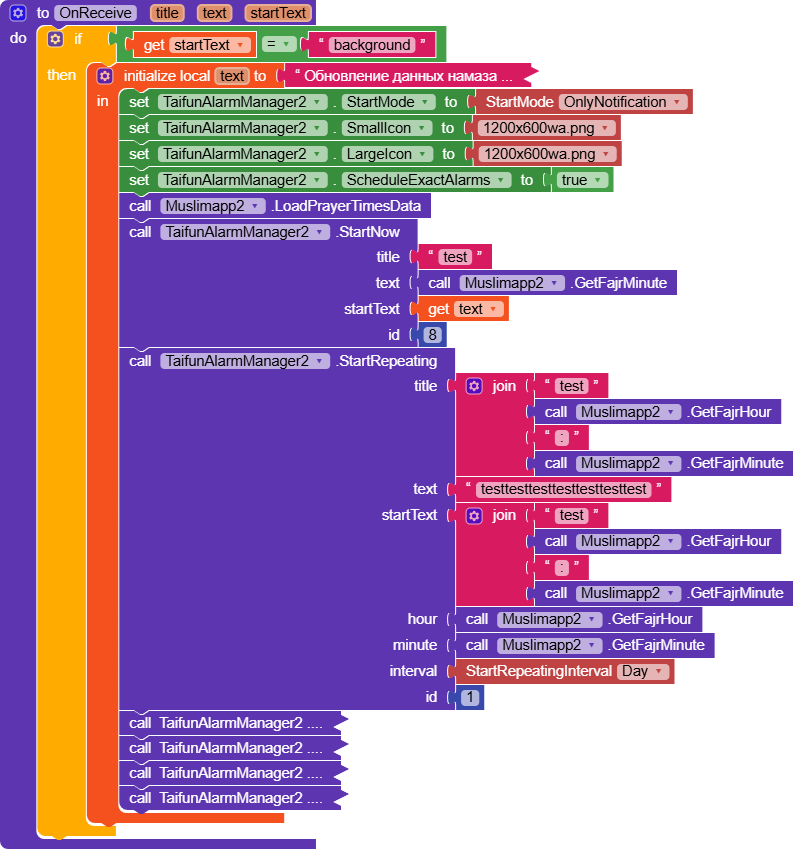
your code offers an event called OnDataLoaded. Remember what I mentioned earlier

Register that event using itoo and use the corresponding event handler to set the 5 alarm times

    @SimpleEvent(description = "Событие после загрузки данных.")
    public void OnDataLoaded(int recordsCount) {
        EventDispatcher.dispatchEvent(this, "OnDataLoaded", recordsCount);
    }

Taifun

I honestly don't understand how this will help, since the notifications are coming and it's not the problem with them, but with the OnReceive call at 00:10 startnow. The notification that I set for testing doesn't come, which means that the procedure isn't being called for some reason.

How did you set the alarm for 00:10? Remember to do it in an event, for example a button click event

Also use the alarmmanager extension only once, do not drag it twice to the working area

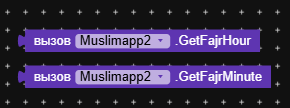
I see you updated your screenshot... the blocks to register the event look better now. Take your time to test. However as GetFarjMinute does not exist before the data has been loaded, you should call it in the event handler after the data has been loaded

Taifun

Usually you would use the same argument name, which is recordsCount

Taifun

If you’re unsure whether the alarm was set correctly, use the Started event to verify it. You can then close the application when the user presses a button.

Again

Taifun

The startnow notification block triggered with a delay of 7 minutes at 00:17, which is strange... in principle, it doesn't matter to me, the main thing is that it worked, albeit with a delay.