Earlier i built a mqtt app, which was stooping after sometime. Because of that I am sending notification message every 30 minutes with timestamp to see after how long the app stops.
Yes, unrestricted battery background usage is enabled
This should help a bit. It is a Motorola device-specific behaviour.
Keep the application open in recent menu and check if you have an option to "Lock app".
[How can we run a task at a specified time? The yellow block is not supported. I need the procedure to run at a specified time of 00:05.
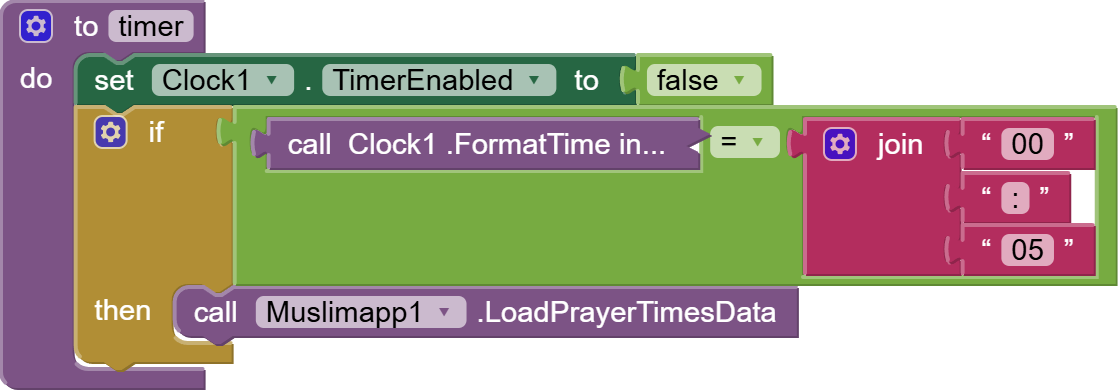
Hello, here are your options:
a free solution
a paid solution
I bought this extension a long time ago, but it doesn't solve my problem. That's why it needs a background data refresh at 12:05 AM.
The following example shows the current weekday at alarm time. [PAID] ⏰ Alarm Manager Extension with Notification or Autostart - #222 by Taifun
Just call your method instead
Taifun
1 Like
2 posts were merged into an existing topic: [PAID]  Alarm Manager Extension with Notification or Autostart
Please tell me if this block works in the background? For some reason, it doesn't work for me.

Yes, your extension is not that complex to fail in the background. Also ask it in the Kodular Community...
Thanks for the reply. But for some reason, this block wasn't being called in the background. I've already rewritten the extension code. Now the code automatically determines next Friday, and the problem has been solved. Reconciliation is no longer necessary.
Hi,
Is it possible to download files in the backround using the Web component or are there any permission issues?
My app has the 'App' DefaultFileScope and can successfully download files to its apps directory. However when i register a background download event, i can see it is being successfully triggered and connects to the download web server, yet no file is being saved locally.
Thanks !
Show your relevant blocks
Yes
No
Taifun
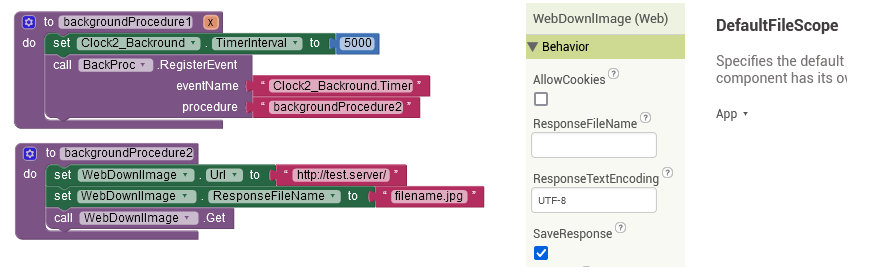
This is the most basic form.
I can see it connecting to the server in the background each 5 seconds but no file is being downloaded.
The Web component downloads the file successfully when used from within the app.
you forgot to register the WebDownImage GotFile event...
Also show us your GotFile event handler
Taifun
1 Like
As far as i understand the GotFile event is irrelevant to the download process itself. It enabled us to show the user if the download was successful or not but removing it from the application will not fail the download itself (tested)..
Ok, i now understand that unlike the previous scenario,i have to register the GotFile event even if i don't actually do anything with as it is still required for the download process in the background.
help 01-14 12:12:57.582 E/ActivityThread( 7457): Service xyz.kumaraswamy.itoo.ItooService has leaked IntentReceiver xyz.kumaraswamy.itoo.ItooService$EndActionReceiver@ef3ab11 that was originally registered here. Are you missing a call to unregisterReceiver()?
how to hide process is running , i only want notification in every change in content of label (label content from api)
Your answer already is here
Taifun