Hello @miracle_Ho, sorry for the late reply. You must first set the properties of the Location Sensor before using it.
E.g. working blocks:

ItooLocation.aia (83.7 KB)
Hello @miracle_Ho, sorry for the late reply. You must first set the properties of the Location Sensor before using it.
E.g. working blocks:
ItooLocation.aia (83.7 KB)
Hello @Atomgep, your blocks are almost right!
The reason you see nothing appear on the Label1 is because when the procedure event BluetoothClient1_ClientError tries to call the debug procedure, the debug procedure fails because it touches the Label1 component which belongs to the UI. (UI cannot be touched from the background).
To fix the problem, simple rename procedure debug --> ui_debug. This would indicate to the extension that the procedure must be processed on the UI thread.
To keep the Bluetooth Client connection working in the itoo background, you must move your whole bluetooth functionality to Itoo styled blocks.
Hello Kumaraswamy,
I think I got it: I even can’t read the BluetootClient1.Connected() function in my “foreground” part, because it’s simply not the same instance. Probably that’s why my code fail to follow the BT status. Other than that, I renamed my debug to ui_dbug but still did not get any errors; maybe the connection succeeded, but I can’t check it right now. I’ll re-design my code and test.
Thank you very much!
Dear @Atomgep, you might also give a look to this example of mine:
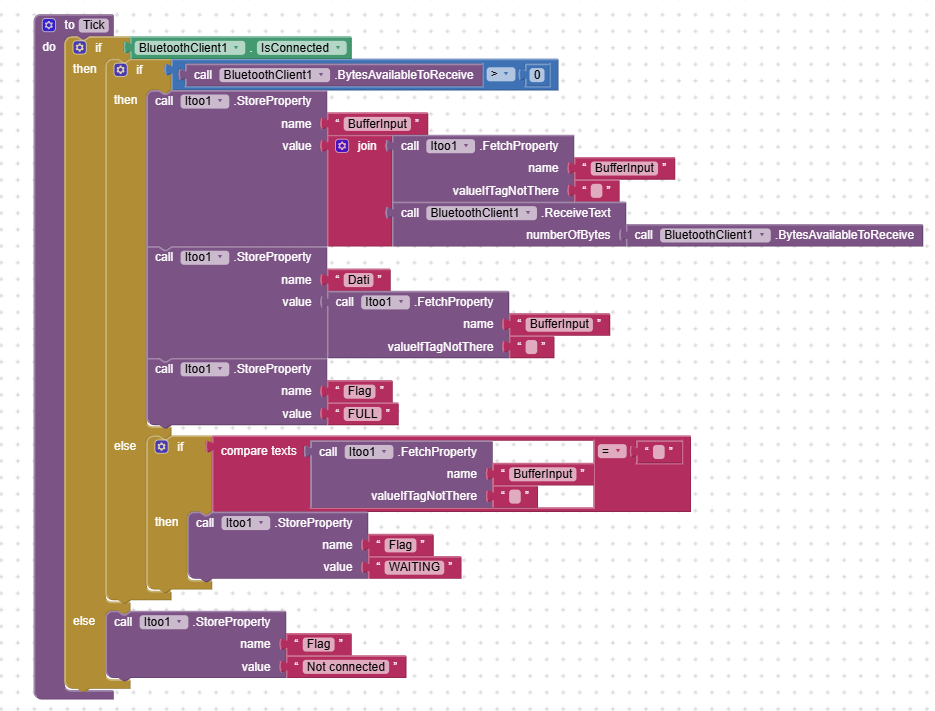
Here the BT is handled by itoo (i.e. in background).
Moreover in this example I wanted to see iwhether the classic BT and the BLE were capable to live together, but you can extract only the part you need.
Cheers.
Thank you so much for your reply, Kumaraswamy! I will follow your example to set the Location Sensor properties first and test it on my device. Appreciate your great work on Itoo!
Hello uskiara,
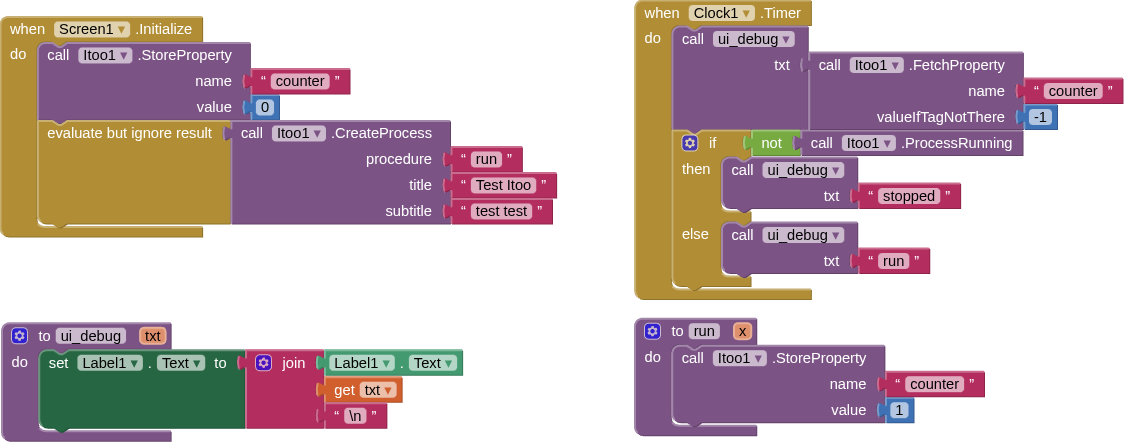
thank you indeed, I read the page, excellent work! Unfortunately, in the meantime I’m having a strange issue, I use Android 14 and I tried v4.5.0 and v4.4.2 version of Itoo, with a dead simple example that still does not work. No BT this time. These are all my blocks, I don’t think I can’t simplify it more… I left the Itoo settings on default in both versions.
Shouldn’t the run(x) functions run at least once? The counter always shows zero. As long as I don’t understand what’s happening, I can’t go for more complex code. 
Hello @Atomgep, are you testing it in the companion or the compiled APK? Itoo does not support the companion, so it is likely the run never got executed.
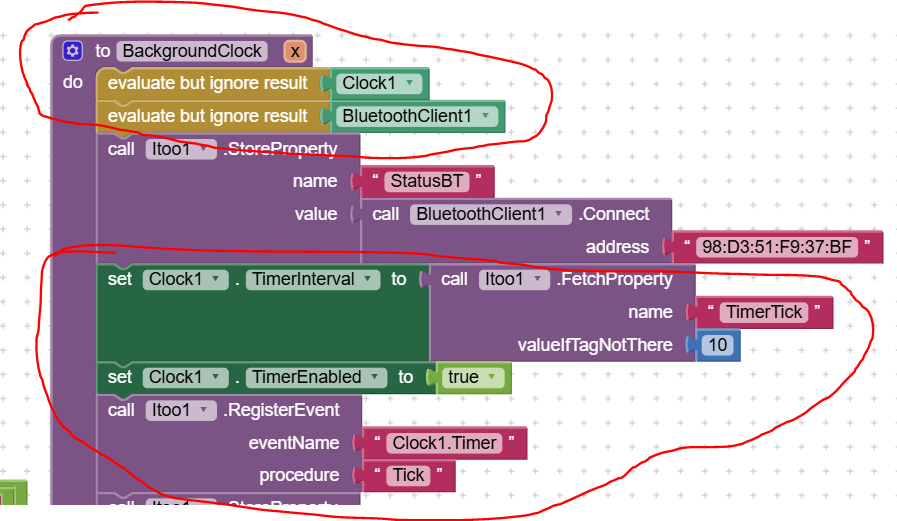
Dear @Atomgep, if I compare my example with what you've done, I see many differences.
The most evident one is that you never activate the clock. And do not forget to "register" the clock event.
Please take a look to my Background(x) function here below (don't consider the BT activation, but only the red circled parts):
EDIT after a recap with @Kumaraswamy, please check the extension version you 're using: probably the Registter for event is deprecated. But the timer activation hint, remains 
Hi @Kumaraswamy,
I am working on a background project using Itoo v4.5 (Sky). I want my background task to survive and automatically continue running after the device reboots.
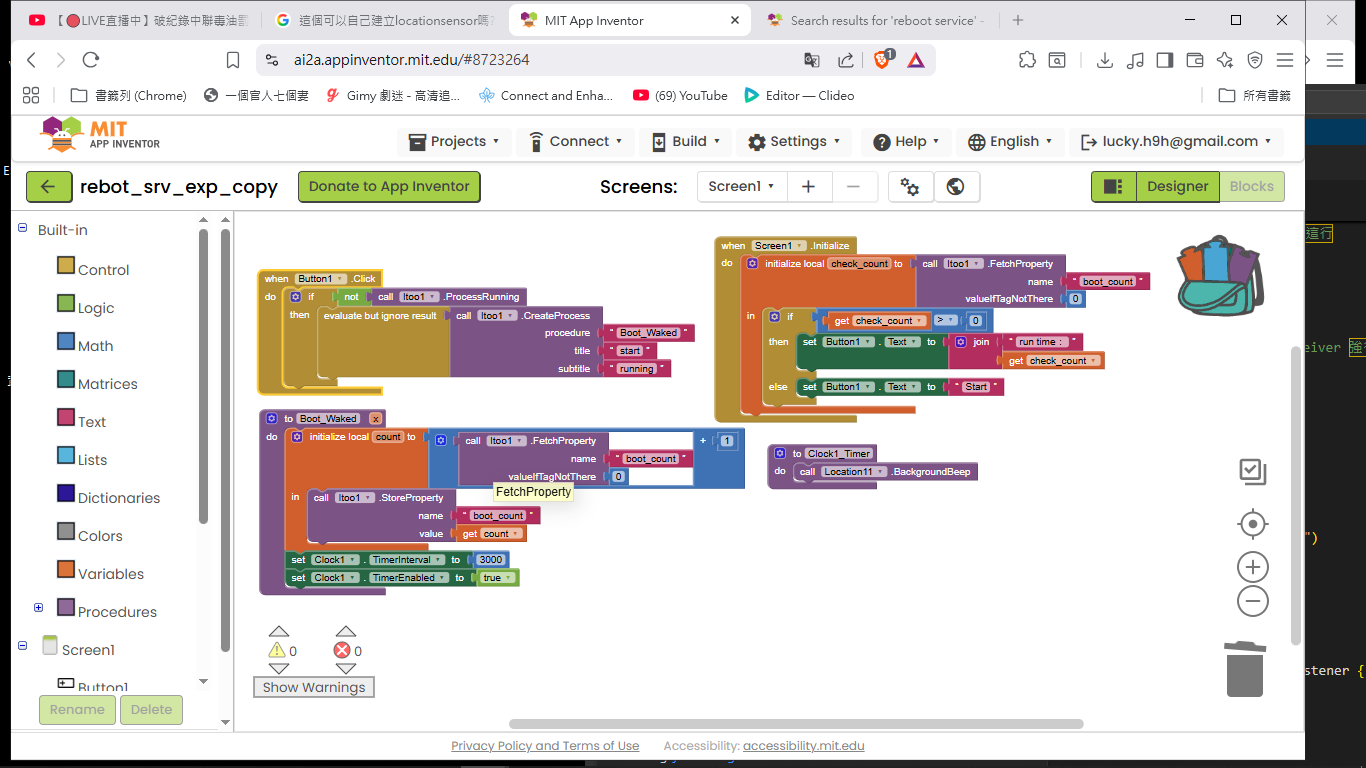
I have attached my current block setup below. As you can see, I am using a simple counter with StoreProperty and FetchProperty to keep track of the run times, and a Clock in the background to handle the loop.
Currently, Itoo1.CreateProcess successfully ignites the Boot_Waked procedure in the foreground, but nothing happens after the phone restarts.
Since Itoo v4.5 has deprecated RegisterEvent, could you please guide me on how to achieve auto-start on boot with this setup?
Do I need to call a specific block in the foreground to register the "Boot_Waked" procedure for boot autostart?
Or should the background process automatically resume by itself under the v4.5 architecture?
Any advice or code snippets would be greatly appreciated. Thank you for this amazing extension!
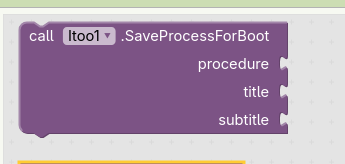
Formerly you would use the SaveProcessForBoot method for this. Does it still exist in itoo 4 5?
See also here for an example
ESIT: it does not exist anymore, see also ny next answer below
Taifun
Hi Taifun,
The itoo sky 4.5 I downloaded doesn't seem to have SaveProcessForBoot, which is why I'm a bit confused. Thanks for your example suggestion.
Hi @Kumaraswamy,
I have returned to using itoo sky 4.4 first, and it is running normally using SaveProcessForBoot. I hope that itoo sky 4.5 can also use SaveProcessForBoot again. Thank you.
Which Android version ate you using for your tests?
It has been removed, because it will not work anymore for any foreground seevice type, see also these tests
https://community.appinventor.mit.edu/t/itoo-revamp-testing-needed/164110/5?u=taifun
What Google actually allows now
From
BOOT_COMPLETED, apps are only allowed to do lightweight scheduling, not long-running work.
Allowed:
- Schedule WorkManager
- Schedule JobScheduler
- Register receivers / alarms
- Read small amounts of state
Not allowed:
- Starting any foreground service (including
dataSync)- Long-running syncs
- Network calls
- Location, media, etc.
Even Google’s own sample apps no longer start FGS from boot.
TL;DR (plain English)
You can no longer start any foreground service from
BOOT_COMPLETED— evendataSync.Android wants:
- Schedule work
- Wait
- Run later when allowed
Taifun
Hi @Kumaraswamy,
I hadn't seen it before, but it miraculously appeared after I repeatedly installed it.
Hello,
I am trying to fix this aplication because to send messages in background I can’t. This aplication is about detect drops and send a message if you can see what is going on.
Thanks so match for answer the last time I post!!!
Hello @Oriol_Munoz_Lorenzo
In the Segundo_Plano, add an accelerometer property block, Enabled = true.
Next time, make your post publicly where more people can help you!
Which Android version are you using for your tests? Did you allow sms in the settings of your app? See also SendMessageDirect / MessageReceived - Setting SMS Permissions on Android 16
Why is your procedure called ui_EnviarAlerta? Do you want the message to be sent only while the app is in the foreground? Remove the ui_
Taifun
Yes I put permissions to the SMS. My version of Android of my mobile is 15 and in the app is 5+. And I remove the ui_. Also I put the accelerator to true. But It doesn’t work, only apears a notification but when I throw the mobile it doesn’t send a message. Also a thing that I see is that when I do it like in foreground it works like only two times and doesn’t work anymore. If you find the solution you are god. Thanks for all the support. I send you here the new code change it.
You forgot to set the phone number in the background
To do it in the foreground in the button click event is not sufficient
EDIT also to find out if something is working in the background or not, you can use the Notifier.LogInfo method and use Logcat to check the log
Taifun