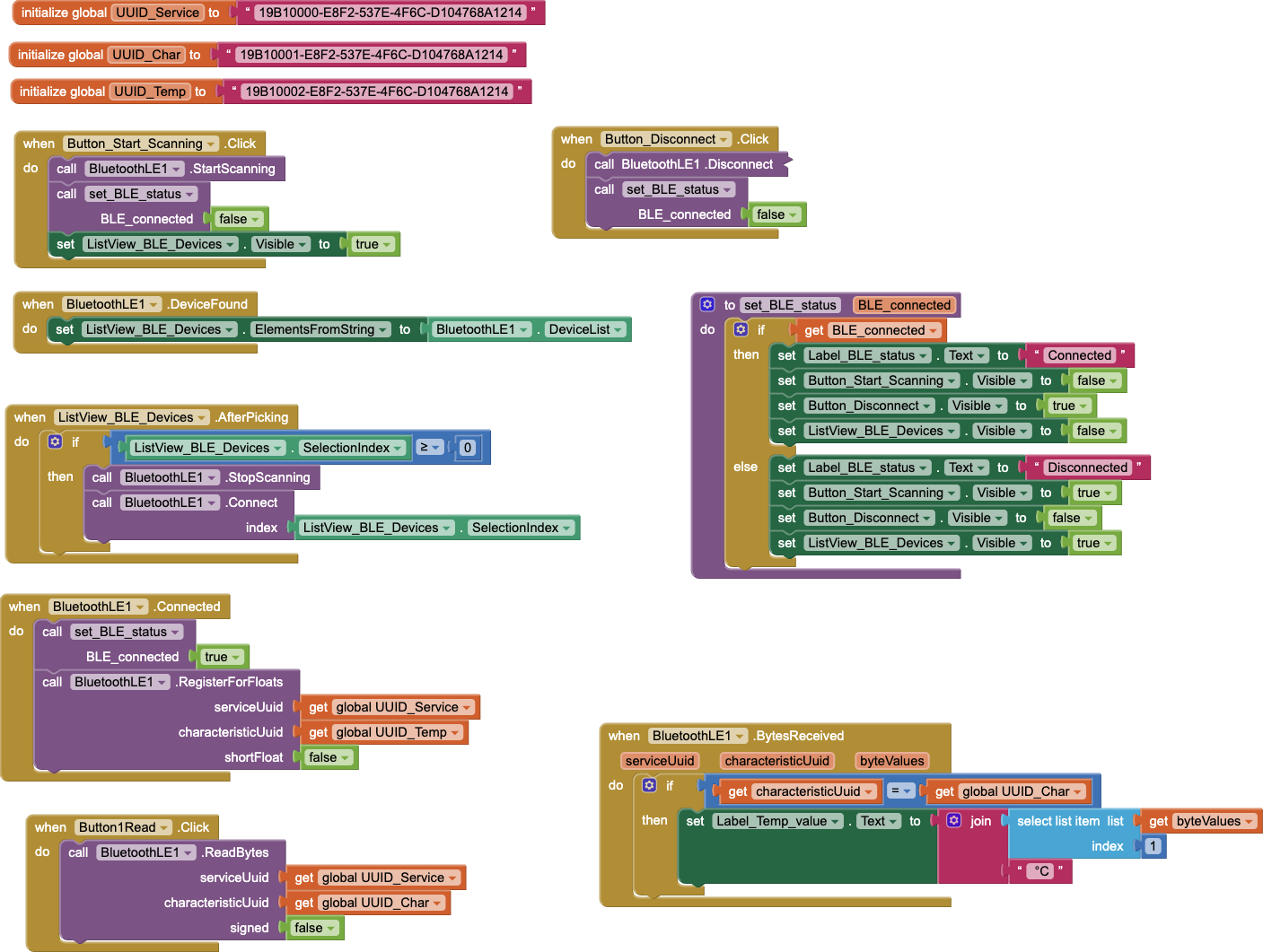
Hello everyone, I am quite new to the MIT app inventor and Arduino in general, can I ask you for some help? I am using an Arduino UNO R4 together with a MAX6675 thermocouple and though the thermocouple is able to read the temperature in Arduino, I cannot see anything in the app. I am using the BLE of the Arduino board together with the BluetoothLE Extension in the MIT app inventor. The Arduino board connects correctly to the app, but my problem is that there is no temperature reading in the app. Can you help me? I will upload my code and blocks image.
#include <ArduinoBLE.h>
#include <max6675.h>

BLEService ledService("19B10000-E8F2-537E-4F6C-D104768A1214"); // create service

// create switch characteristic and allow remote device to read and write
BLEByteCharacteristic switchCharacteristic("19B10001-E8F2-537E-4F6C-D104768A1214", BLERead | BLEWrite);
BLEFloatCharacteristic tempCharacteristic("19B10002-E8F2-537E-4F6C-D104768A1214", BLERead | BLENotify);

const int ledPin = LED_BUILTIN; // pin to use for the LED
int thermoSO=A5;
int thermoCS=A3;
int thermoSCK=A2;

MAX6675 thermocouple(thermoSCK, thermoCS, thermoSO);

void setup() {
  Serial.begin(9600);
  while (!Serial);
  pinMode(ledPin, OUTPUT); // use the LED pin as an output
  // begin initialization
  if (!BLE.begin()) {
    Serial.println("starting Bluetooth® Low Energy module failed!");
    while (1);
  }
  // set the local name peripheral advertises
  BLE.setLocalName("R4-Thermo");

  // set the UUID for the service this peripheral advertises
  BLE.setAdvertisedService(ledService);

  // add the characteristic to the service
  ledService.addCharacteristic(switchCharacteristic);
  ledService.addCharacteristic(tempCharacteristic);

  // add service
  BLE.addService(ledService);

  // assign event handlers for connected, disconnected to peripheral
  BLE.setEventHandler(BLEConnected, blePeripheralConnectHandler);
  BLE.setEventHandler(BLEDisconnected, blePeripheralDisconnectHandler);

  // assign event handlers for characteristic
  switchCharacteristic.setEventHandler(BLEWritten, switchCharacteristicWritten);

  // set an initial value for the characteristic
  switchCharacteristic.setValue(0);
  tempCharacteristic.setValue(0.0);

  // start advertising
  BLE.setAdvertisedServiceUuid(ledService.uuid());
  BLE.advertise();

  Serial.println(("Bluetooth® device active, waiting for connections..."));

}

void loop() {
  // poll for Bluetooth® Low Energy events
  BLE.poll();
  float temp = thermocouple.readCelsius();
  tempCharacteristic.setValue(temp);
  Serial.println(temp);
  delay(1000);
}

void blePeripheralConnectHandler(BLEDevice central) {
  // central connected event handler
  Serial.print("Connected event, central: ");
  Serial.println(central.address());
}

void blePeripheralDisconnectHandler(BLEDevice central) {
  // central disconnected event handler
  Serial.print("Disconnected event, central: ");
  Serial.println(central.address());
}

void switchCharacteristicWritten(BLEDevice central, BLECharacteristic characteristic) {
  // central wrote new value to characteristic, update LED
  Serial.print("Characteristic event, written: ");
  if (switchCharacteristic.value()) {
    Serial.println("LED on");
    digitalWrite(ledPin, HIGH);
  } else {
    Serial.println("LED off");
    digitalWrite(ledPin, LOW);
  }
  Serial.println(switchCharacteristic.value());
}