Then why not use that?
Im building an app which only sends image or video to the tv
Because some device doesent support screen cast miracast
It’s similar to dlna
I strongly know its complicated, i just want the solution, that’s it
I'm going to see the ChatGPT again and i will get results once I'm finished.
Please post here the answer ( from chatgpt )
Alright here’s the result
Me : Make me an app which is similar to dlna (which sends the tv image or video and plays it) in mit app inventor,
Say the blocks only
Chatgpt :
Alright here it is :
Components:
Button_Select
Button_Send
ListPicker1
Web1
ActivityStarter1
FilePicker1
Notifier1
Blocks:
When Button_Select.Click
→ call FilePicker1.Open
When FilePicker1.AfterPicking
→ set global filePath to FilePicker1.Selection
When Button_Send.Click
→ set global link to join "http://000.000.00.000/" + get file name from global filePath
→ set ActivityStarter1.Action to "android.intent.action.VIEW"
→ set ActivityStarter1.DataUri to global link
→ set ActivityStarter1.DataType to "*/*"
→ call ActivityStarter1.StartActivity
(Optional)
When Screen1.Initialize
→ set ListPicker1.Elements to make a list ("TV Browser", "DLNA App")
When ListPicker1.AfterPicking
→ call Notifier1.ShowAlert "Open the link on your TV to play the media"
Shall I add this to
?
1 Like
As long as you want
If somebody knows how to send picture video or audio to the tv, just please tell me, ive been searching alot for it.
Thank you
Not sure if possible in MIT directly. for that to work you need to have admin accessibility to your network and MIT will need to read and transfer the data of connected devices to your device while encoding and decoding the data.
what did you say
I cant open that image
but you could do it though a web browser in a app. 
webviewer
not sure at this moment let me mess around for a min and figure out
You can use @Juan_Antonio 's Terminal extension to run ping requests on your local subnet. This can take up to 6 minutes to complete the entire range from 1 - 254. Here are the blocks I used on my local subnet of 192.168.1.* Returns only those IP addresses that responded.
Assumes that your phone/device has an IP address on your local subnet!
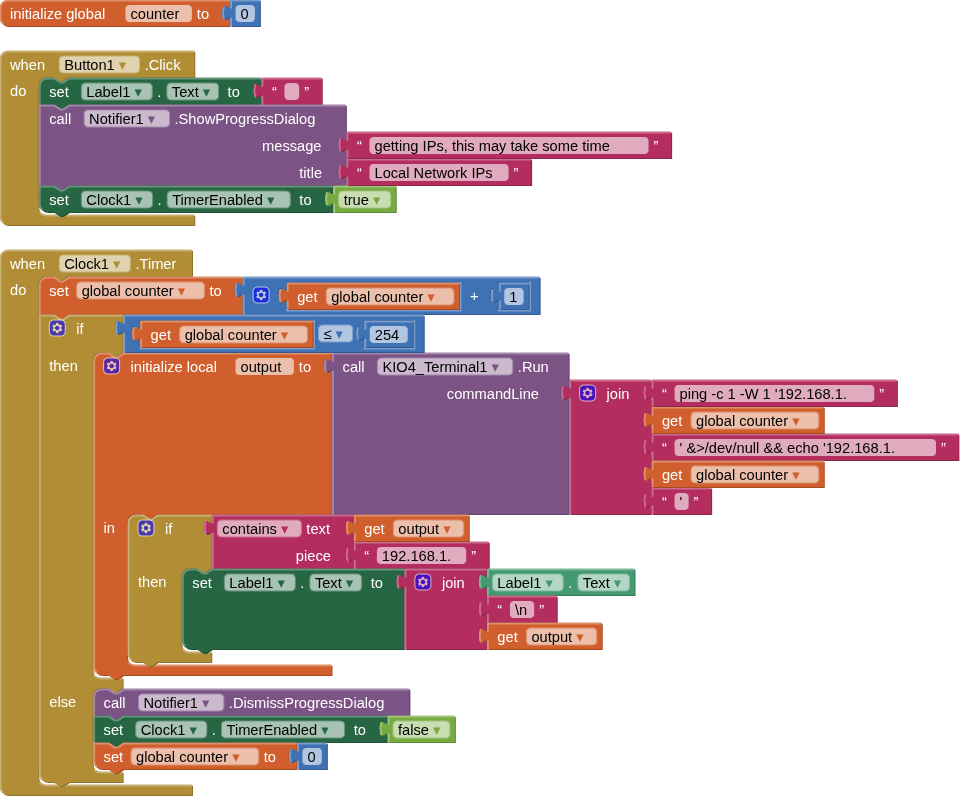
The terminal command is:
ping -c 1 -W 1 '192.168.1.*' &>/dev/null && echo '192.168.1.*'
(I got 12 back, and that was with most of my devices turned off! Best do some tracking down!)
Always worth a look: 3 phones, 1 computer, 3 NAS, 2 Smart TVs, 1 Router, 1 Wifi Extender, 1 Google Nest, A Photo Frame, A Fridge, A Shower !!
Where do i know the web1 and activity starter things?
Hello
Where do you guys know web1 https, post file etc.
And also activity starter ?
Thank you.
Thank you
What do you mean ?
Im saying how do I get the web1 http and activity starter intent.