Account email: (anthonyzenitam@gmail.com)
Project name: (activity5)
It worked yesterday. Today, opening it shows "An internal error occurred. Report a bug?"
Other projects open fine.
Already tried: other browsers, incognito, logout/login, checkpoints (no window), export/copy are grayed out.
Could you please restore this project from a server backup/checkpoint?
Dear @anthony_zenitam ,I had some trouble in understanding your text “It worked yesterday. Today, opening it shows "An internal error occurred. Report a bug?", could it be because you changed your code blocks, or it could be because of a bug. I suggest you to add more debugs to your code blocks, or report a bug (as it came in your error message). Also, try looking out to the community for more of these problems which have already been solve and go through them.
@Akshaj_Rarhi Thanks for the reply! Just to clarify — this error is not happening while running the app. It happens the moment I try to open the project in the App Inventor editor:
Clicking the project in my project list immediately shows "An internal error has occurred. Report a bug?" and the editor never loads.
So I cannot see, edit, or debug any blocks — the project simply won't open.
All my other projects open normally with the same account.
For this project only, Export, Copy and Checkpoints are disabled / do nothing.
Already tried: different browsers, incognito, logout/login — same result.
This looks like the project file is corrupted or locked server-side. Could a staff member please check the server logs for this project and restore it from a backup/checkpoint? I'd be very grateful. 
Do you have a backup aia project on your computer? If so you could try it on the code2 or ai2-test servers?
Also
Use this to get to the Project List
@TIMAI2 yes i managed to download the aia of the project and tried to import in both code2 and ai2 but im still receiving the same pop up message saying “An internal error has occurred. Report a bug?“ I did tried to delete all my files inside the assets and still the same, so im gonna attach my project with no asset. since i the maximum i can attach in here is 8MB, and my orginal project is 37MB
src.aia (24.2 KB)
Hello Anthony
Large Project. Have you used any extensions?
You can reduce the file size without reducing quality by converting all your images to webp format (except the app icon).
Though you only use one Screen, you have failed to give your components unique and meaningful names - that makes it difficult for us to unravel the files that make up the aia.
I'm not sure why it is that your aia weighs in at 37MB, how many images are there in the assets?
It is possible that, because the file is cumbersome, the loading gets timed out (removing the assets but still calling them in the code does not help, it causes a new error). The project name "src" may not be a great idea as that is associated with code. Also, do not rename the project outside of App Inventor as the name is stored inside the aia.
Hi Anthony
I get the same error when trying to load on the code2 server.
I had a look at the aia project internals, I couldn't see anything obvious, the only component that might be a bit buggy is the Absolute Arrangement.
We probably need @Boban the "Project Fixer" for this one 
2 Likes
No, didn't use any extension…
Okay, so is there any thing I can do while we wait for @boba
Do you have a backup aia project on your computer? Try this?
What are the 37mb of assets, images/audio/video/other ? You could resize and optimise these for your intended device usage.
Tim is right, unfortunately the Absolute Arrangement component has been a project killer in the past.....
you could try this ( had to remove an arrangment with a canvas and a sprite, inside absolutearrangment3 ):
src4a.aia (23.1 KB)
1 Like
Well, that loads OK - 15 warnings in the Blocks? Not very good, though likely caused by removing the Assets  . It is always best to fix warnings as soon as they appear - same as your car really, get a warning about the brakes, don't ignore it!
You don't need an Absolute Arrangement yet you have a number of them. The Table Arrangement is even more scary, at least you haven't used one of those.
So, optimise your images, reload them into the project. Give your components meaningful names - you will be glad you did when you want to modify the Project in 6 months time.
Though we don't know if the Absolute Arrangement code is failing behind the scenes, you could replace them with appropriate Vertical and Horizontal Arrangements - tried and tested for donkeys years. Also, use FireFox, currently the best for App Inventor.
okay the aia file that @davidefa gave works on mine, altho some table is deleted i just gonna re arrange everything and reupload the assest i do still have a copy and also renaming them, ty for all your help @ChrisWard @TIMAI2 @Akshaj_Rarhi @Adem_MAYOUF @ABG
1 Like
I'm looking into this as well. Getting an error on project load is almost certainly a bug on our part!
Working one without deleting anything src1.aia (24.1 KB)
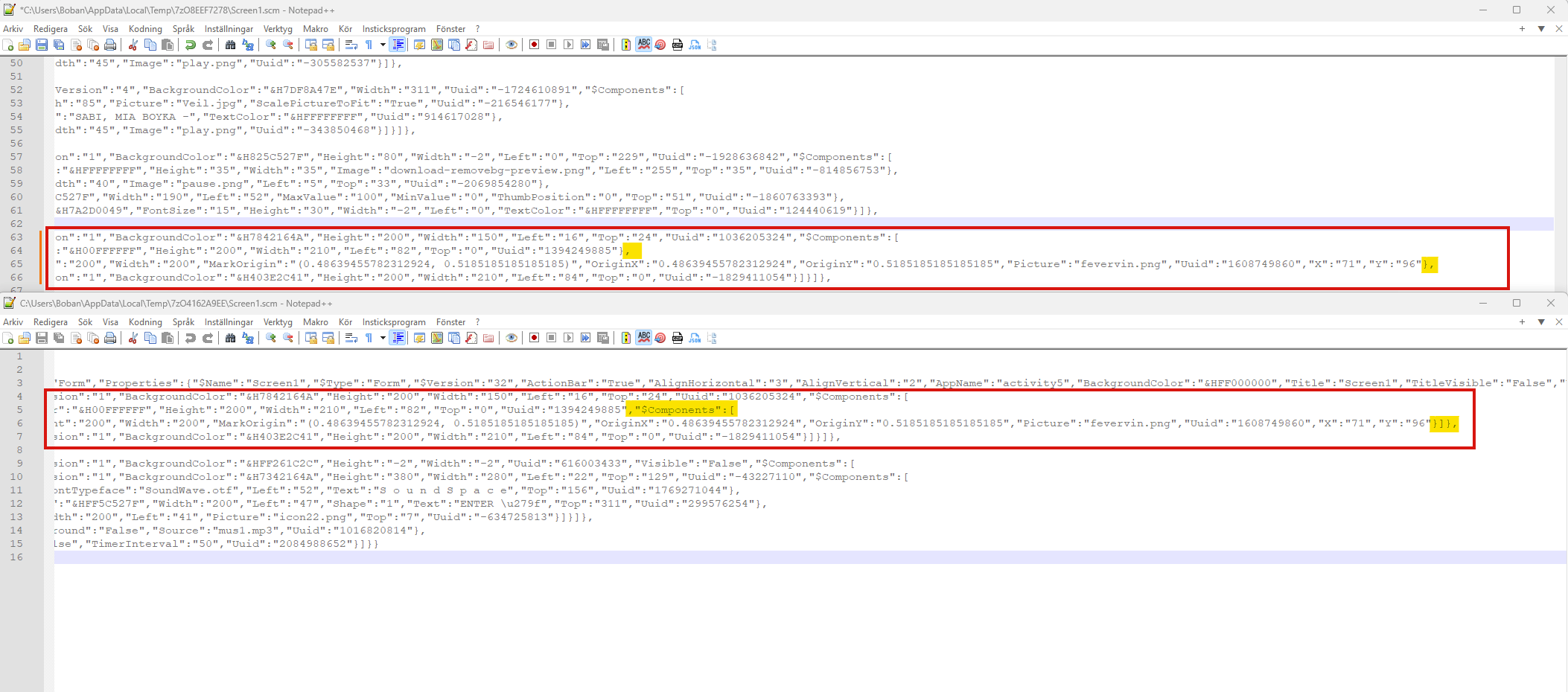
Somehow ImageSprite1 was in the wrong position..
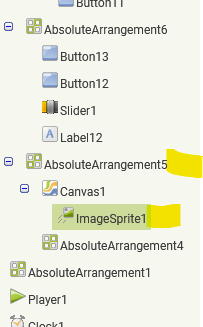
some manual edit in the xml, from this
{"$Name":"AbsoluteArrangement5","$Type":"AbsoluteArrangement","$Version":"1","BackgroundColor":"&H7842164A","Height":"200","Width":"150","Left":"16","Top":"24","Uuid":"1036205324","$Components":[
{"$Name":"Canvas1","$Type":"Canvas","$Version":"15","BackgroundColor":"&H00FFFFFF","Height":"200","Width":"210","Left":"82","Top":"0","Uuid":"1394249885"},
{"$Name":"ImageSprite1","$Type":"ImageSprite","$Version":"11","Height":"200","Width":"200","MarkOrigin":"(0.48639455782312924, 0.5185185185185185)","OriginX":"0.48639455782312924","OriginY":"0.5185185185185185","Picture":"fevervin.png","Uuid":"1608749860","X":"71","Y":"96"},
{"$Name":"AbsoluteArrangement4","$Type":"AbsoluteArrangement","$Version":"1","BackgroundColor":"&H403E2C41","Height":"200","Width":"210","Left":"84","Top":"0","Uuid":"-1829411054"}]}]},
to this
{"$Name":"AbsoluteArrangement5","$Type":"AbsoluteArrangement","$Version":"1","BackgroundColor":"&H7842164A","Height":"200","Width":"150","Left":"16","Top":"24","Uuid":"1036205324","$Components":[
{"$Name":"Canvas1","$Type":"Canvas","$Version":"15","BackgroundColor":"&H00FFFFFF","Height":"200","Width":"210","Left":"82","Top":"0","Uuid":"1394249885","$Components":[
{"$Name":"ImageSprite1","$Type":"ImageSprite","$Version":"11","Height":"200","Width":"200","MarkOrigin":"(0.48639455782312924, 0.5185185185185185)","OriginX":"0.48639455782312924","OriginY":"0.5185185185185185","Picture":"fevervin.png","Uuid":"1608749860","X":"71","Y":"96"}]},
{"$Name":"AbsoluteArrangement4","$Type":"AbsoluteArrangement","$Version":"1","BackgroundColor":"&H403E2C41","Height":"200","Width":"210","Left":"84","Top":"0","Uuid":"-1829411054"}]}]},
or
5 Likes
Very well spotted Boban - laser eyes!
1 Like