From APK to AAB

I am unable to provide any answers, but hopefully someone with more knowledge of Google Play can help ?

Thank you.

It doesn't look anyone can.

I tried using Android Studio and it didn't work. I'm trying this line:
java pepk.jar --keystore=C:\android\repository --alias=keay --output=key.zip --output=key.zip --include-cert --rsa-aes-encription --encryption-key-path=C:\android\repository\encription_public_key.pem and got Error: Unable to access jarfile pepk.jar. Perhaps there are minor transcription errors.

There has to be an easier way.

I got sent a link to this: How to request a new upload key - Google Play Developer Community. I'm going to try it out in a week or two (I can't do it in time for my next release on Sunday).

"...it has to be an *.aab"

No.

freind when post your apk on google developer it will generate an uniqe .aab file for every user that downloads it from google play and cannot be downloaded from anewhere else (this was proposed mainly for coy selling games but is going to apply for all apps including free) so its user lockin

No.

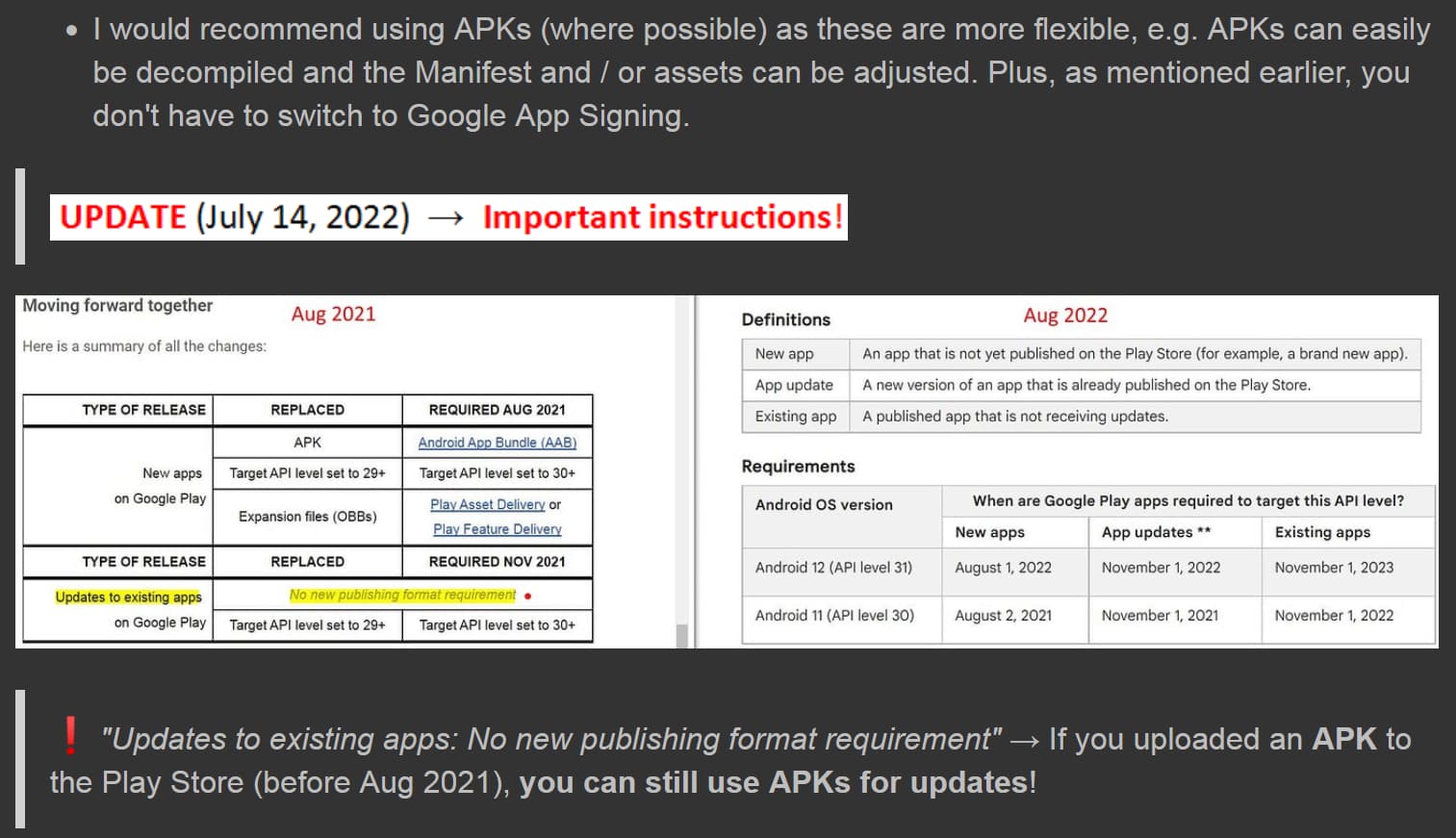
Furthermore, since August 2021, only AABs can be uploaded for new apps, from which device-specific APKs are then generated.

ooh sorry i forgot to mention that usually ide itself now adays converts to aab such as in mit app inventof and android studio

Steps 4 and 5 do not seem to be options and if they are, I haven't found them yet.

The problem is that I have to upload a key and the instructions for that always come to a point of asking me to do something that I can't. I need instructions that don't involve Android Studio, that don't assume I already have a key and if I have to run a command line, I need very explicit instruction about what to replace with what.

Could it be that all I have to do is Export my key from App Inventor?

image

Now, to be fair, I've tried this, but I keep getting told that the key is out of date. How would I update my key without messing anything else up?

First, make a backup of your key from App Inventor before doing anything because nobody can recover your keystore if you make a mistake.

Second, what specifically is telling you that the keystore is out of date? Do you have a screenshot of the message?

Usually when you switch to using AABs from APKs, you have to use the following process:

  1. Back up your existing keystore by selecting Export Keystore. SAVE THIS SOMEWHERE SAFE! You will have to upload this keystore to Google since they need it to sign the APKs generated from the AAB for existing user upgrades.
  2. In App Inventor, select Delete Keystore to remove the keystore from your account.
  3. Now, rebuild your app using the AAB option. This will generate a new keystore file. (You should also back up this keystore by exporting it... make sure to keep track of which keystore is which).
  4. Upload this AAB to your Google Play entry for the app. Google should recognize that it has a new keystore that doesn't conflict with the old keystore.

Why is this?

Android uses the signing key to determine authenticity of an application update (APK), in a technique where the holder of the private key (the keystore) can generate signatures, but forging a signature is mathematically difficult. Newer versions of an app must be signed with the same key as the currently installed version. When publishing APKs, you are the keyholder and the APK contents cannot be modified without breaking the signature. AABs, on the other hand, work by sending all of the relevant resources to Google, and then for a given user Google reconstructs an APK with only the relevant pieces for a particular user (e.g., I am an English speaker so don't need the Chinese or Arabic translations of the app) and so can make a smaller app specific to your configuration. However, if I've installed your app, Android expects the next version to be signed by you. Exporting your keystore and then uploading it to Google gives Google the ability to sign these app combinations on your behalf. To ensure you don't continue using that key to sign builds, Google disallows you from using it to sign future updates published through the Play Store. Step 3 above creates a new keystore and Google will expect uploads to use this keystore going forward. They will use this to verify that you are the holder of the keystore, and then generate a set of APKs and sign those with your old keystore.

1 Like

O.K., so, here's the screenshot you asked for:

It would have been nice to know this a few years ago when I first wanted to migrate to .aab. It would have also been helpful to know that last spring when I wanted to put a new app on Google Play. I may finally be able to do that.

It might take me a day to get to this, I've got an other issue to fix. But than k you so much! It's increadibly helpful.

One question,

Will this inhibit current users from updating to the newest version of my app?

Thank you, but that doesn't answer the question which is, will that hinder people up[dating from the current version of my app? it doesn't sound like it would, but I've been burned before.

Ok that screenshot is helpful.

The way to provide your key to Google is that they provide a separate public key that is used to encrypt your keystore prior to uploading it to Google. This is done to reduce the chances of a man-in-the-middle attack intercepting your private key. The public key they provide you is set to expire after only a few minutes. The expiration message pertains to that Google-generated key, not your App Inventor key.

You will have to follow the Google instructions again to get a temporary private key to encrypt your keystore. Once you've got that, use the code they link to in step 2 to encrypt your android.keystore downloaded from App Inventor. You will upload that encrypted file in step 3. After success, the Google servers will decrypt your key and install it in your Google Play account.

You're welcome. I keep foundering on the instructions to encode the key. I have something to test. This is interesting.

O.K., when I tried it, this happened:

Your question concerned a new app, and I answered it by saying that only a new keystore is needed. Regarding your old (former APK) app, I said that you can still use APKs for updates (so you don't have to switch to AABs) and that it's best not to switch to Google App Signing and/or possibly revert to the standard signing method.

It's possible that the method from https://helpdesk.appypie.com no longer seems to work today. I haven't checked. It worked back then, but we all know that Google is constantly tightening the (thumb) screws.

  1. Backup your old keystore

  2. Delete the current keystore
    This forces App Inventor to generate a completely new keystore for your project.

  3. Build a new AAB (upload it to Google Play later)
    App Inventor will now automatically create a new keystore and sign the AAB with it.

  4. In Google Play Console: go to App Signing
    Google Play Console → Your App → Setup → App Integrity → App Signing
    Here you will see two keys:

  • App signing key (stored by Google)
  • Upload key (the one you must use for uploads)
    Because you deleted your old keystore, you now need to register the new upload key.
  1. Request Google to reset your upload key
    On the App Signing page, click:
    Request upload key reset (or reset upload key)
    Then Google will ask you to provide:
    The certificate (public key) generated from your new keystore

  2. Generate the certificate from your new keystore
    Open a terminal/command prompt in the folder where the new keystore is located, then run:

keytool -export -rfc -alias androidkey -file upload_certificate.pem -keystore android.keystore

Enter the password (default App Inventor keystore password = "android").
This will produce the file: upload_certificate.pem. This is the file Google needs.

  1. Upload the certificate to Google Play
    Return to Google Play → App Integrity → App Signing → Upload your certificate
    Upload the file: upload_certificate.pem

Google will then process your upload key reset (usually takes a few hours/days).


Subject: Request to reset upload key

Hello Google Play team,

I am enrolled in Play App Signing and accidentally signed my recent build with the app signing key. Because of this, I can’t upload a new release.

Please reset my upload key.

Attached is the certificate (upload_certificate.pem ) for my new upload key, which was automatically generated by App Inventor.

App package name:
appinventor.ai_<email>.appName

Thank you!