This error also happened to me. I found it happens if we uninstall the app then reinstall it.
or if we delete the db then install again.
and it will return to normal if the DB name in the asset is changed then rebuilt then installed again
I first like to thank TIMAI2 for this extension SimpleSQLite., very crucial for Database related access, moreover it has been given free to everyone.
Now the problem:
There is SimpleSQLite in Screen1, when SimpleSQLite is added to Screen2 or Screen3, then The app freezes, while trying to open Screen2 or Screen3 .
I suppose SimpleSQLite is unique to every Screen. I don't know why it happens?
Thanks and regards
Stephen
Don't remember this being an issue previously, not heard of this before. I have tested a 3 screen project in companion, with SimpleSqlite loaded in each screen (not doing anything) and I see no crashing.
Are you closing/unloading databases before switching screens ?
Do you need multiple real screens, you could probably use virtual screens for your app
I have attached the .aia file with modification adding Screen4 .
When the Search button in Screen1 is clicked, Screen4 opens but takes time and the app freezes.
Please, Let me know why it is so?
Thanks and regards
St
Bible (1).aia (515.2 KB)
ephen
I am looking
Why are you using V2 of SimpleSQLite? Use the latest version V4 which includes the listFixer method along with other improvements.
You appear to have got yourself into a muddle. You only have one bible database, so why does the user have to pick a file from Shared Directories ? Just import it to the main database from assets and work from there, or as I did in my previous example, download it to your ASD and set the filepath there.
Different real screens should be considered as different apps, you need to ensure you close the database on one screen before loading and opening the database on another. This I why I suggested virtual screens.
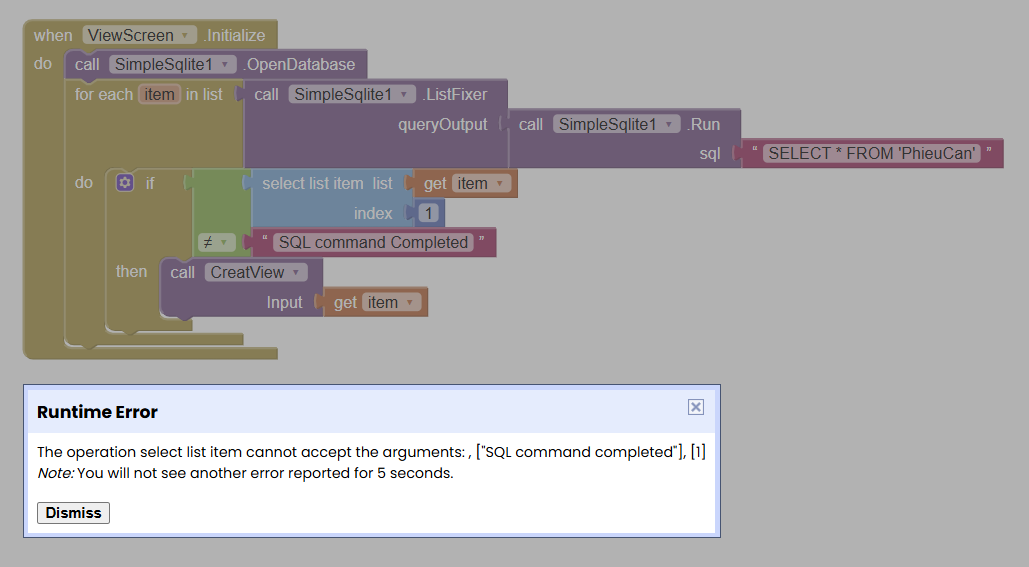
Hello TIMAI2,
I'm encountering a problem with the return values from what appears to be the sql.run function. It seems that if the query finds matching records, the function correctly returns the data. But if no records are found, it returns the string "SQL command completed" instead of an empty list.
This makes the data handling logic more complicated, as I have to check the result type before processing it.
What is the recommended way to handle this scenario? I was expecting an empty list for a query with no results.
Thanks for your help.
confirmed.
I will take a look, see what can be done.
Try this:
uk.co.metricrat.simplesqliteV4.12.aix (22.5 KB)
(needs testing "in the wild")
I have replaced:
    if (task.rows.size() == 0) {
      return YailList.makeList(Arrays.asList("SQL command completed"));
    } else {
      return YailList.makeList(task.rows);
    }
with
   if (sql.toLowerCase().contains("select") && task.rows.size() > -1) {
      return YailList.makeList(task.rows);
    }
    else if (task.rows.size() > 0) {
      return YailList.makeList(task.rows);
    }
    else {
      return YailList.makeList(Arrays.asList("SQL command completed"));
    }
1 Like
I will try, thanks for your help
Hello everyone,
I wanted to download the “simplesqlite” extension, but the link on the website for uk.co.metricrat.simplesqliteV4.12.aix doesn't seem to be working.
I tried on my smartphone, on a PC... same result.
Are other people having this problem? If the error persists, are there any alternative sites from which I can download this extension?
Please excuse my language errors as I don't speak English and am using an automatic translator.
Thank you in advance for your replies.
Translated with DeepL.com (free version)
Just open the site and Press Ctrl+S to download the .aix file.
Nothing wrong with the download link, tested on two different browsers and mobile here.
You can try right clicking on the Download button and selecting Save Link As .
Should be working now in Firefox / other browsers ?
Utilizando la extensión SimpleSQLite no me funciona correctamente la .exportación (ExportDatabase ) / importación (ImportDatabase) hacia/ desde /storage/emulated/0/Download/alumbron.db
A veces exporta pero a continuación no importa.
Si pudiera ver un ejemplo funcional. Pienso que pudiera ser algo de permisos tal vez.
El asunto es que necesito implementar una salva y restaura de la BD.
Gracias anticipadas
Which Android version are you testing with ?
Are you testing with companion app or compiled app?
Are you exporting the db from the default database first, then trying to import it ?
Show your relevant blocks.
Have you read the guide ?
Excuse me, I'm having problems to reply now, tomorrow I hope.
Thanks you very much !!!
. Utilizo Android 13
. Estoy probando con Companion via Wifi
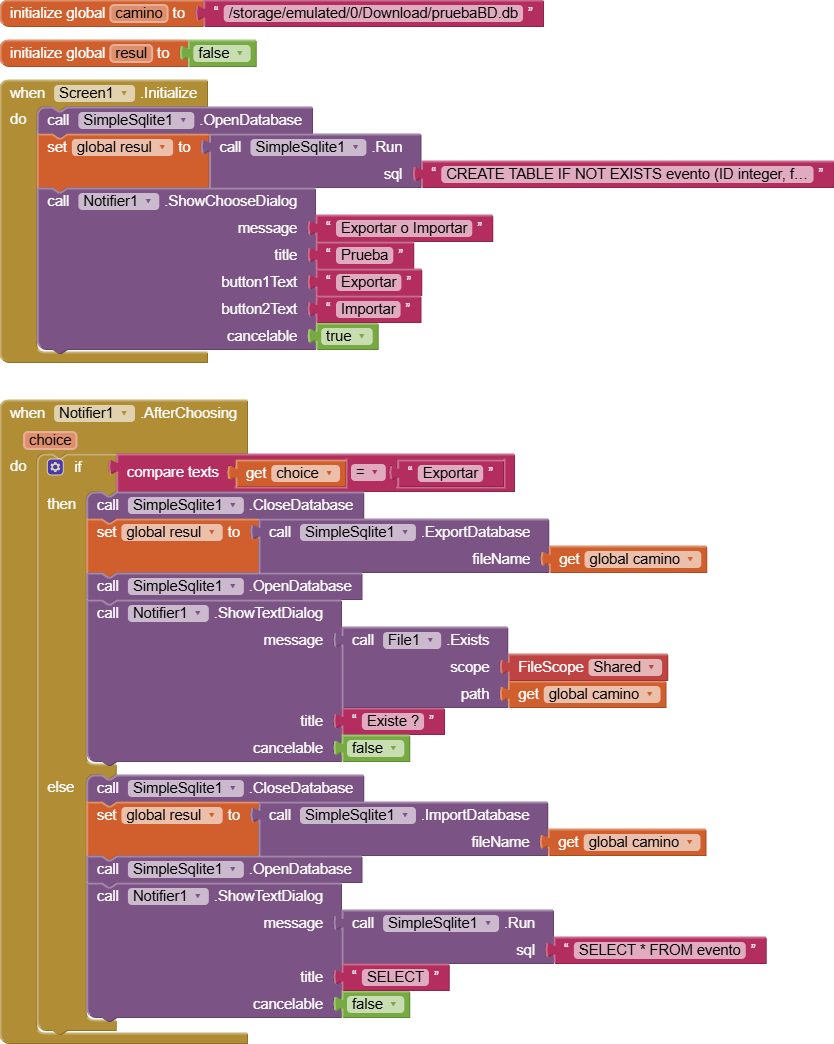
. Adjunto los bloques de un programita de prueba.
-
Cuando le doy Exportar pone dos mensajes de error sobre permisos denegados para imágenes y videos ( cosa que no requiero en esta aplicación ) y no saca el dialogo con el File Exists. Sin embargo SÍ CREA EL FICHERO pruebaBD.bd en la ubicación solicitada.
-
Cuando le doy Importar el resultado del SELECT se corresponde con una base de datos asociada anteriormente a esta misma aplicación antes de modificarla como se muestra ahora.
Es decir, a pesar de que creó el fichero con la presunta salva de la BD, no importa nada en la importación donde debería haber sobrescrito la base de datos anterior.
En resumen, lo que necesito es cómo salvar mi base de datos actual en una carpeta accesible para poder copiarla a otro medio o abrirla con un browser de SQLite y cómo restaurar mi base de datos desde una salva en esa misma carpeta, por ejemplo.
Gracias
No issues here in the same environment.
Suggest you use the DBName block after EXPORTing, then you can work directly with the database in the Download directory, instead of IMPORTing into the default database every time.

You should also capture the location of the default database so that you can also set this as the DBName if you need to get back to it:

Not sure why your notifier is not working.
See the Guide: