๐Ÿ“Š [Free] ChartMakerPlus - an extension to make google charts

hello, thank you very much for that work
i am asking if i can make timeline chart with this extension the same like google time line charts
example from google docs..

==============================================================
google.charts.load('current', {'packages':['timeline']});
google.charts.setOnLoadCallback(drawChart);

function drawChart() {
  var data = google.visualization.arrayToDataTable([
    ['Activity', 'Start Time', 'End Time'],
    ['Sleep',
     new Date(2014, 10, 15, 0, 30),
     new Date(2014, 10, 15, 6, 30)],
    ['Eat Breakfast',
     new Date(2014, 10, 15, 6, 45),
     new Date(2014, 10, 15, 7)],
    ['Get Ready',
     new Date(2014, 10, 15, 7, 4),
     new Date(2014, 10, 15, 7, 30)],
    ['Commute To Work',
     new Date(2014, 10, 15, 7, 30),
     new Date(2014, 10, 15, 8, 30)],
    ['Work',
     new Date(2014, 10, 15, 8, 30),
     new Date(2014, 10, 15, 17)],
    ['Commute Home',
     new Date(2014, 10,  15, 17),
     new Date(2014, 10,  15, 18)],
    ['Gym',
     new Date(2014, 10, 15, 18),
     new Date(2014, 10,  15, 18, 45)],
    ['Eat Dinner',
     new Date(2014, 10,  15, 19),
     new Date(2014, 10,  15, 20)],
    ['Get Ready For Bed',
     new Date(2014, 10,  15, 21),
     new Date(2014, 10,  15, 22)]
  ]);

  var options = {
    height: 450,
  };

  var chart = new google.visualization.Timeline(document.getElementById('chart_div'));

  chart.draw(data, options);
}

====================================================================

here the array of times is made like that ['Get Ready For Bed',
new Date(2014, 10, 15, 21),
new Date(2014, 10, 15, 22)]

is that mean to make the data line table should contain the word new Date ?
what will be the extra option i need to put

accully my data will be datetime for sensor that measures ph every 4 hours this data is saved in firebase database so it easy to get it formated as keys and values where the keys will be the time but should it be in
new Date(2014, 10, 15, 21)
this formate ?
You will have to use Google Charts directly for that, in a webviewer.

1 Like

Please do you have any examples for this ?

hi!
thank you a lot for made it! im using well.

i have a question,
how can i change font size of axis?

for example,

5
4
3
2
1
...1 2 3 4 5 6 7
these axis text font size (+title size). i cannot understand even if i read google chart tutorial..
can i insert into options or css part?

ps/ and zoom options is not working with "true"

+add
i found! e.g : fontSize:30

but still cannot zoom..

You do not say which chart you are making? (line/pie/bar etc. ?)

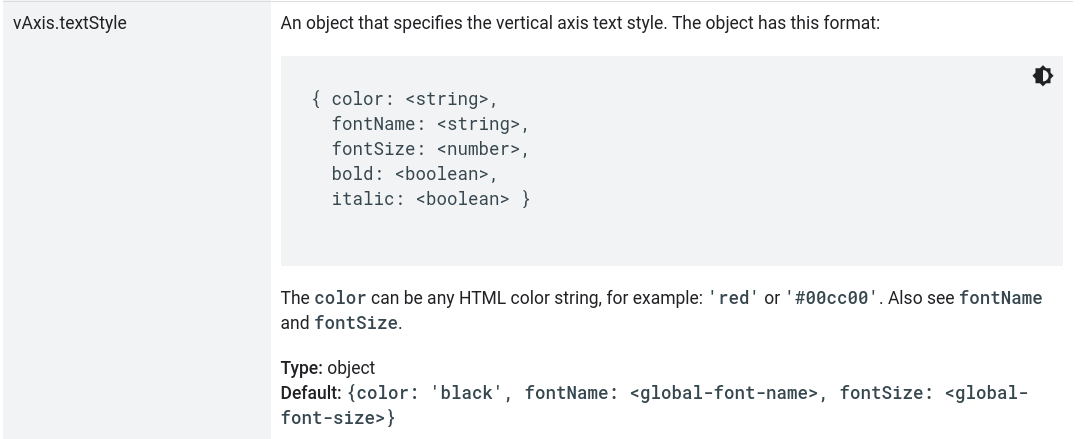
That said, for a bar chart, which includes vaxis options:

You would set this in options, not css

Hi
Good extension
Is there a way to keep for instance One Hour of data ? Or let's say 150 dots

thx

What do you mean by "keep" ?

Do you mean to store a specific set of data?

Trim the incoming data list, regardless of choice of graph package:

do while length of list (L) > 150
remove item 1 from list L
end do while
reload graph

Hi! i'm using your extension and it looks very useful, i have a little problem with my container and zoom and i can't get rid of this.
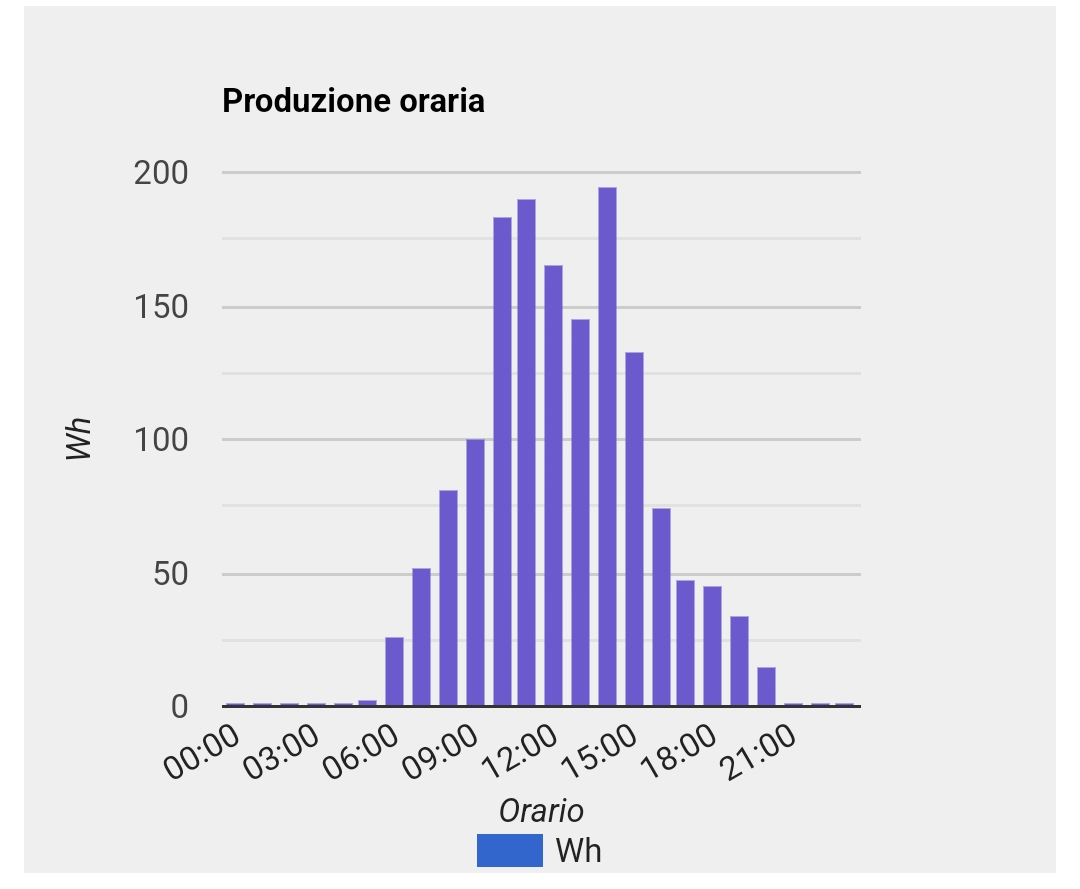
If there is no zoom the chart looks like this

but when an user want to zoom in, the webviewer don't allow that and the result is a truncate image

i've tried with overflow: scroll in the css menรน but i'm pretty sure i miss the class of css item, can you give me some tips?
Thank You
Luca

Looks like it is zooming OK to me The zoom feature zooms the entire html page.

Show your blocks for the chart....

Sorry i exposed the problem in a confused way.
It does the zoom but the container doesen't allow me to scroll in the zoommed page, the result is that the content i want to zoom result truncated.
this is the block

I would have to build up an example chart to test this out.

You could try adjusting the chart size using css. The chart is in a div with id = col_chart set in the extension width = 100% and height = 100%. Change these to pixels instead of percentages...

<body>
<div id="col_chart"  style="width:100%; height:100%;"></div>
</body>
1 Like

Sorry but i didn't understand were and how i have to change the pixels instead of percentage :cry:
I tried to build an app with the graph only, the WebViewer show data and i can move in the zoomed window normally.
In my application there is a big vertical scroll arrangement (width and height set to "fill parent") , inside of it there is a block with some data and, below that, my graph, but in this case the window is blocked.
if i set automatic size in a blank project, it work fine, but if set that in my project, graph don't even show, i have to set a fixed height to make it visible.

I have just tested the demo aia project from the first post in this topic, on the column chart with zoom set to true. Using companion app, the graph zooms with a two finger gesture, and scrolls around with a one finger gesture. Therefore unsure as to where your issue lies?

I found the issue, if you have the webviewer in a container, and the sum of the container height is over 100% (in my case the first box have height 70% and graph 50%, scrollable), the movement inside the zoommed graph is blocked.
i hope this video describes well the error

OK, scrolling within a scrolling arrangement. Yep, doesn't always work.

You could try this extension:

to split up your big scrolling arrangement into pages.....

Thank you so much :heart:, i'll try it out!

Best regards
Luca

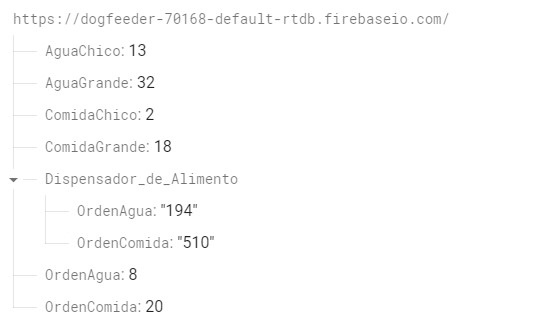
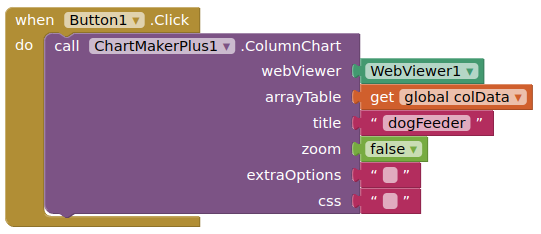
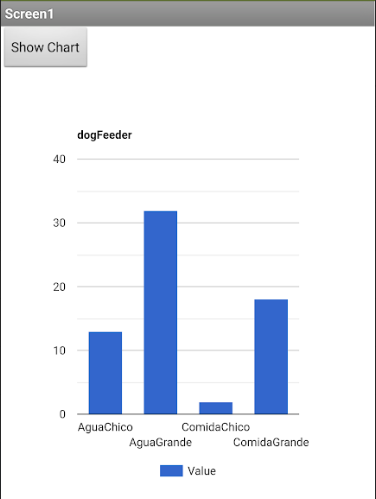
Hi! first of all i speak spanish, so i apologize if my english is not good enough. I tried to make a column chart with data from firebase, but it doesn't seems to work, i swear i read all the documentation and try by myself but honestly i can't. i know my database is setted correctly. My problems are only the blocks. i just need to do a column chart with 4 columns that updates when i touch a button, and it should display the 4 int values into the columns, i know my problem is in the "list" part but i tried so many ways, so i return to the begining for this question, what should i do from this cap to do what i want? sorry if i am asking you something stupid. i need to siplay in the columns the first 4 tags from firebase, and keep it updated when i touched a button.


firebase

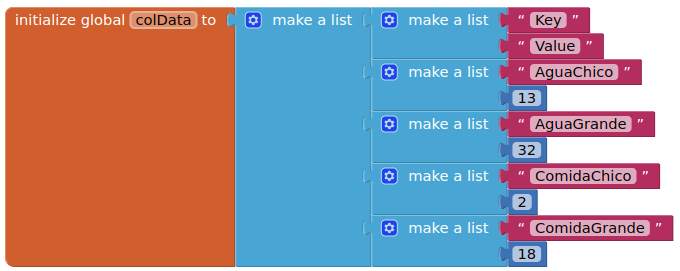
Let us simplify to start off with. Based upon your displayed firebase data, your columnData should look like this:

image

image

If you apply this, do you get your column chart ?

image

If so you need to show how you are returning the firebase data to the app, and in what format.