It is a good point.
The extension is expecting numbers AS numbers, therefore you have to convert the textbox item (which is a string) to a number. You do this like this:

or

AppInventor doesn't mind if a number is presented as a text(string), it handles the conversion, java/javascript is less forgiving. You can see the difference in these two lists:
Numbers as numbers:
[
["Cars", "Number"],
["MG", 7],
["Jaguar", 4],
["Triumph", 3]
]
Numbers as texts (strings):
[
["Cars", "Number"],
["MG", "7"],
["Jaguar", "4"],
["Triumph", "3"]
]
to make the pie chart:
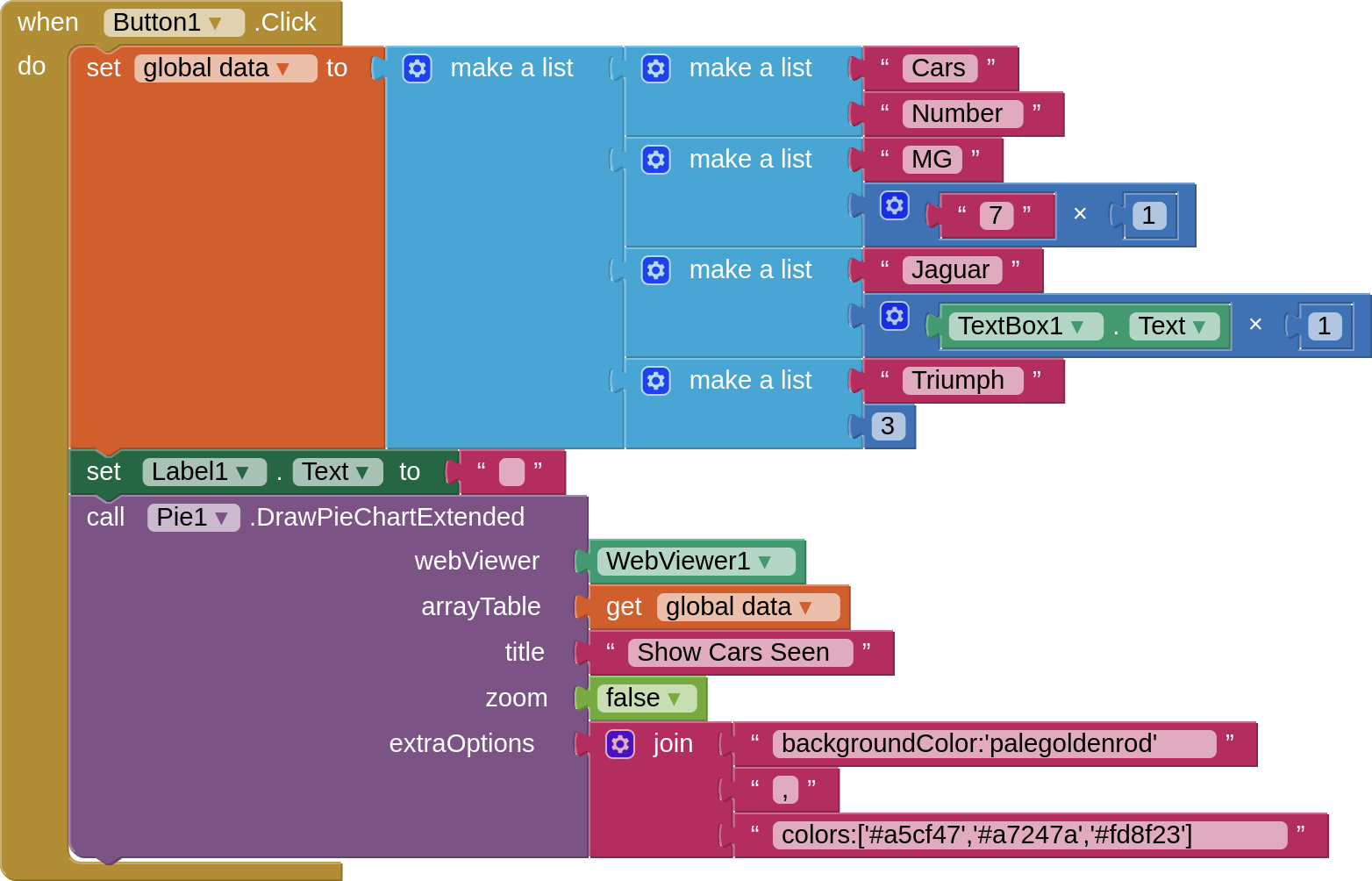
Also, in the first list of lists in your blocks you have "string" and "number". In this extension the first list does not define the type, it defines the headers as you can see in the two above examples ["Cars","Number"]. The type (string or number) is defined by what is presented in the rows. A pie chart expects the first item in the row to be a string, and the second to be a number.
I hope that helps to explain how it works.