11.- ESP32 Soft Access Point. Web Server. Buttons on/off LED12 and LED14. Check status.
In
4.- ESP32 Soft Access Point. Web Server. Web page on/off LED2. Check status LED2.
we saw how to create an Access Point and turn on/off an LED from a web page.
In
5.- App sends on/off LED12 and LED14. WiFi. WebServer. Static IP.
we saw how to create a Router client and turn on/off LEDs from the App buttons.
Now we are going to use that two example. We are going to create an Access Point and turn on/off two LEDs using the application buttons.
// Juan A. Villalpando.
// KIO4.COM
// Enciende y apaga LED. Botones. SoftAP.

#include <WiFi.h>
#include <WiFiClient.h>
#include <WiFiAP.h>

const char* ssid     = "Juan";
const char* password = "123456789";

WiFiServer server(80); // Port 80

#define LED12  12    // LED12
#define LED14  14    // LED14
String estado = "";
int wait30 = 30000; // time to reconnect when connection is lost.

void setup() {
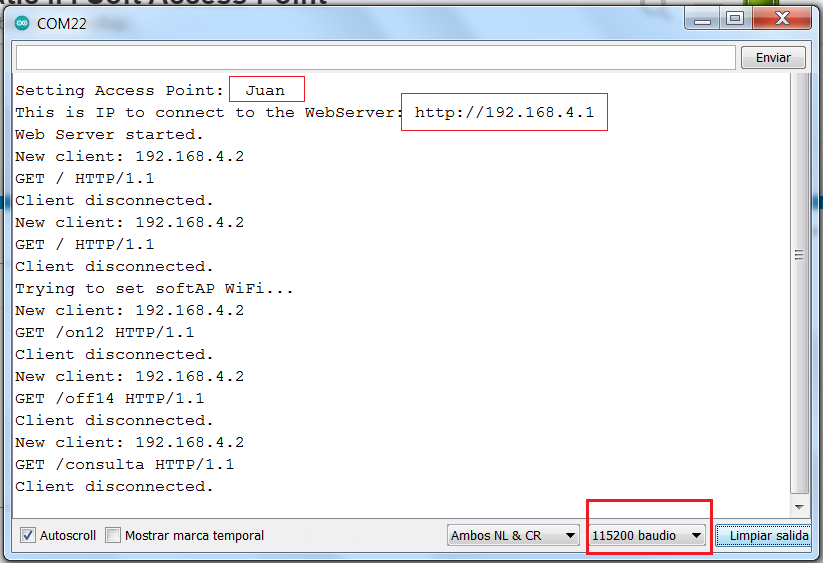
  Serial.begin(115200);

// Conecta a la red wifi.
  Serial.println();
  Serial.print("Setting Access Point:  ");
  Serial.println(ssid);

  WiFi.softAP(ssid, password);
  IPAddress myIP = WiFi.softAPIP();

  // Esta es la IP
  Serial.print("This is IP to connect to the WebServer: ");
  Serial.print("http://");
  Serial.println(myIP);

  // Start Web Server.
  server.begin();
  Serial.println("Web Server started.");
}

void loop() {
// If disconnected, try to reconnect every 30 seconds.
  if ((WiFi.status() != WL_CONNECTED) && (millis() > wait30)) {
    Serial.println("Trying to set softAP again...");
    WiFi.softAP(ssid, password);
    wait30 = millis() + 30000;
  }
  // Check if a client has connected..
  WiFiClient client = server.available();
  if (!client) {
    return;
  }

  Serial.print("New client: ");
  Serial.println(client.remoteIP());

  // Espera hasta que el cliente envíe datos.
  // while(!client.available()){ delay(1); }

  /////////////////////////////////////////////////////
  // Read the information sent by the client.
  String req = client.readStringUntil('\r');
  Serial.println(req);

  // Make the client's request.
       if (req.indexOf("on12") != -1) {digitalWrite(LED12, HIGH); estado = "LED12 ON";}
       if (req.indexOf("off12") != -1){digitalWrite(LED12, LOW); estado = "LED12 OFF";}
       if (req.indexOf("on14") != -1) {digitalWrite(LED14, HIGH); estado = "LED14 ON";}
       if (req.indexOf("off14") != -1){digitalWrite(LED14, LOW); estado = "LED14 OFF";}
       if (req.indexOf("consulta") != -1){
           estado ="";
           if (digitalRead(LED12) == HIGH) {estado = "LED12 ON,";} else {estado = "LED12 OFF,";}
           if (digitalRead(LED14) == HIGH) {estado = estado + "LED14 ON";} else {estado = estado + "LED14 OFF";}
           }

//////////////////////////////////////////////
  // Página WEB. ////////////////////////////
  client.println("HTTP/1.1 200 OK");
  client.println("Content-Type: text/html");
  client.println(""); //  Comillas importantes.
  client.println(estado); //  Return status.

  client.flush();
  client.stop();
  Serial.println("Client disconnected.");
}
p125_wemos_led2_SoftAP.aia (2.4 KB)
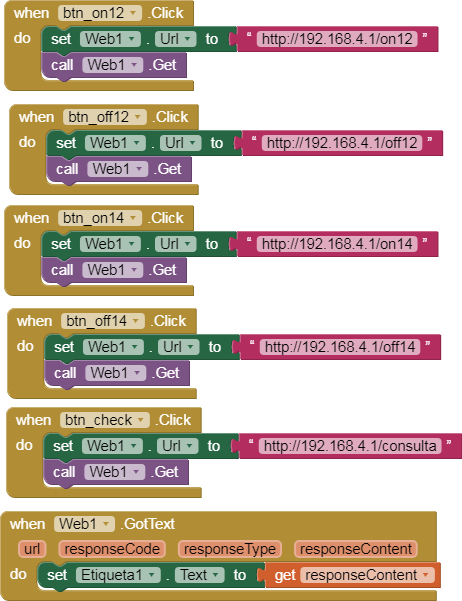
- Build and install the application (Do not use MIT Companion).
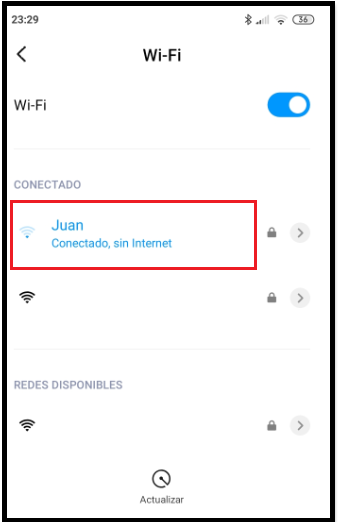
- Configure your device for the WiFi network "Juan" (123456789)