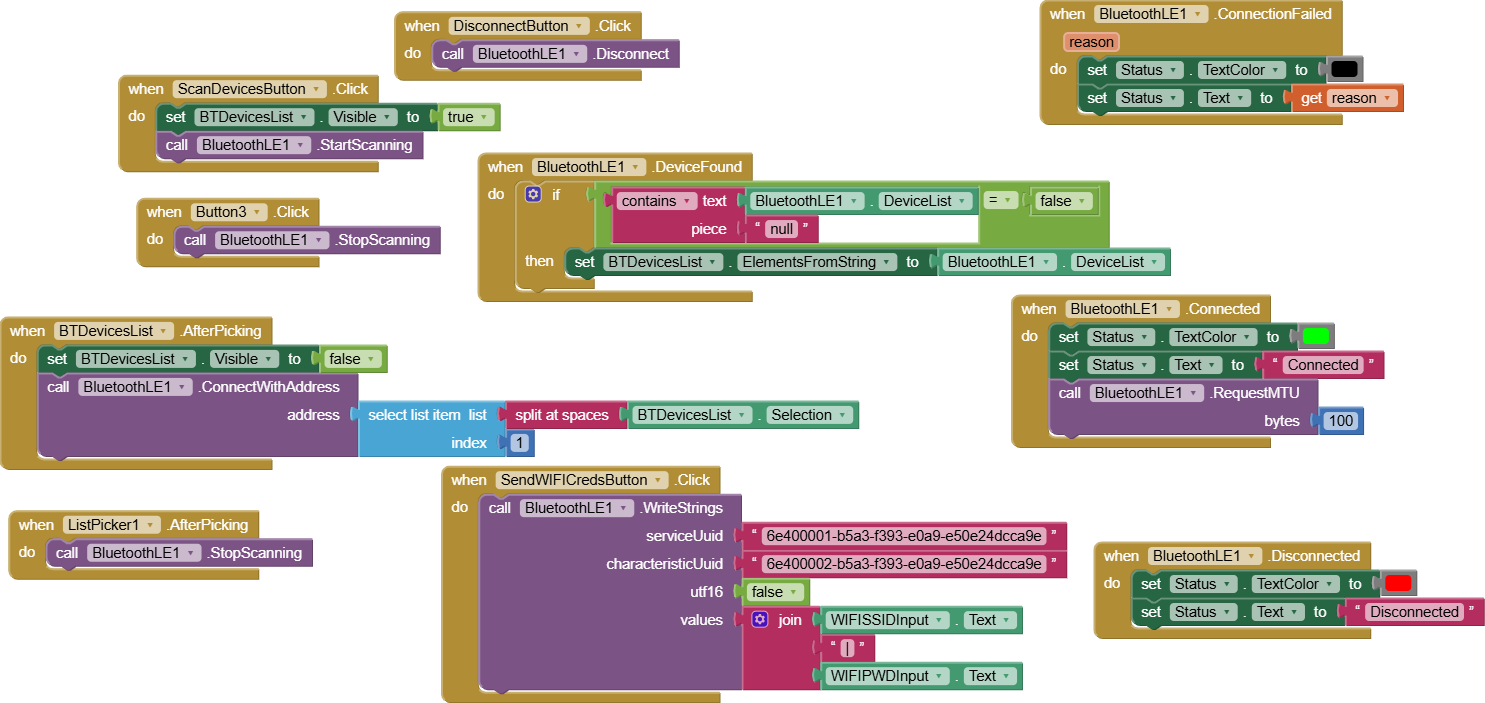
Alright here's the solution, for me at least. (For real this time)
It was absolutely nothing wrong with AppInventor, but actually my ESP32-C3 code. I've come across many other people online with the exact same issue trying to interface AppInventor and ESP32-C3, so I better go around and share my answer quick.
With some help of ChatGPT, here's my explaination and solution:
Let's start off with behavior recorded:
- First connection → works
- Disconnect → phone thinks it disconnected
- ESP32-C3 → still thinks the connection is active
- Reconnect → OS 133 / timeout
- Reset ESP32-C3 → works instantly
Why the ESP32-C3 can’t reconnect until reset
The ESP32-C3 uses the NimBLE BLE stack (not Bluedroid like ESP32).
When an Android device disconnects, Android sends:
LL_TERMINATE_IND
…but sometimes NimBLE never receives the termination packet.
This leaves the ESP32 stuck in “ghost connection” state:
Phone: disconnected.
ESP32-C3: still connected.
So when I try to connect again:
- Android thinks the device is available
- ESP32 still thinks someone is connected
- The GATT server won’t accept a new connection
- Android returns timeout / OS133
The fix: Must implement onDisconnect and restart advertising properly in the ESP32-C3 code.
My code didn't have ServerCallbacks, so the ESP32 never realized the client left unless it received the BLE-level termination packet (which Android sometimes drops).
Add this:
class ServerCallbacks : public BLEServerCallbacks {
  void onConnect(BLEServer* pServer) override {
    Serial.println("Client connected");
  }

  void onDisconnect(BLEServer* pServer) override {
    Serial.println("Client disconnected");
    delay(100); // NimBLE needs a small pause
    BLEDevice::startAdvertising();  // critical!
  }
};
And in setup:
server->setCallbacks(new ServerCallbacks());
This single change forces NimBLE to:
 Mark the connection as closed
Clean up GATT state
Re-enable advertising
Allow a new connection
Example code showcasing my main point of using ServerCallbacks:
#include <WiFi.h>
#include "BLEDevice.h"

#define RX_UUID       "6e400002-b5a3-f393-e0a9-e50e24dcca9e"
#define SERVICE_UUID  "6e400001-b5a3-f393-e0a9-e50e24dcca9e"

BLECharacteristic *rxChar;
BLEServer *server;

// --------------------------------------------------
//      BLE Write Callback — Just prints data
// --------------------------------------------------
class RXCallback : public BLECharacteristicCallbacks {
  void onWrite(BLECharacteristic *characteristic) override {
    String incoming = String(characteristic->getValue().c_str());
    Serial.print("BLE Received: ");
    Serial.println(incoming);
  }
};

// --------------------------------------------------
//      ServerCallbacks — CRITICAL for proper BLE
//      reconnection, especially on Android
// --------------------------------------------------
class ServerCallbacks : public BLEServerCallbacks {
  void onConnect(BLEServer* pServer) override {
    Serial.println("Client connected");
  }

  void onDisconnect(BLEServer* pServer) override {
    Serial.println("Client disconnected");

    // Without this delay + restart,
    // Android often fails to reconnect.
    delay(200);

    BLEAdvertising *adv = pServer->getAdvertising();
    adv->start();

    Serial.println("Advertising restarted");
  }
};

// --------------------------------------------------
//      Setup
// --------------------------------------------------
void setup() {
  Serial.begin(115200);
  delay(200);

  // Reset BLE state (fixes C3/Android stale handles)
  BLEDevice::deinit(true);
  delay(200);

  BLEDevice::init("ESP32C3-DEMO");
  server = BLEDevice::createServer();
  server->setCallbacks(new ServerCallbacks());

  BLEService *service = server->createService(SERVICE_UUID);

  rxChar = service->createCharacteristic(
      RX_UUID,
      BLECharacteristic::PROPERTY_WRITE
  );
  rxChar->setCallbacks(new RXCallback());
  service->start();

  BLEAdvertising *adv = server->getAdvertising();
  adv->addServiceUUID(SERVICE_UUID);
  adv->setScanResponse(true);

  // Recommended values for NimBLE on C3
  adv->setMinPreferred(0x06);
  adv->setMinPreferred(0x12);

  adv->start();

  Serial.println("BLE Ready — Send text to RX characteristic.");
}

void loop() {}
EDIT: Here's my AppInventor code by the way,