So how can you find out, if that value changed without calling that API?
Do you like to reveal, which API you are talking about?
Taifun
So how can you find out, if that value changed without calling that API?
Do you like to reveal, which API you are talking about?
Taifun
the api i am talking about is private to my school --- is there any method to check the changes in the label locally in background and if it changed send notifaction and after sending that notification the newset value sent with notifa=cation became old and stored in local storage---
is there any way to make that?
consider that u have alabel and its values changed with api and in every change send notification
in another words is there any way to check to the label locally in tiny db and if the valu changed send notification to the app ?--- checks for the changes (in tiny db) every 2 hours
If your app is in the background, there exists no user unterface and also no labels
TinyDB is a local database. There can't be any changes in TinyDB while the app is in the background
What you can do is
Taifun
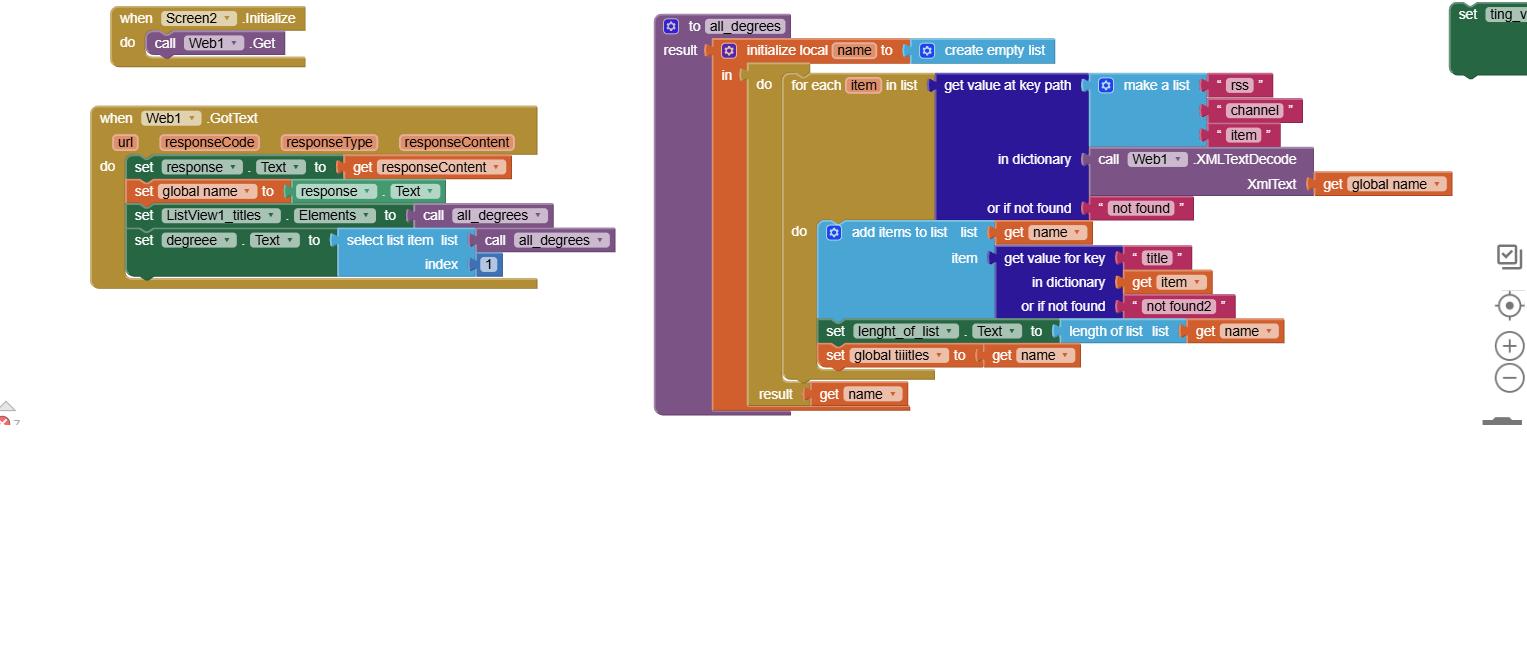
I have a label that retrieves data from an API and stores it. I want to send a notification when the content of this label changes, because the label's content comes from the API. So, I'd like to have the API constantly fetch the data in the background, and as soon as there's a change in the API's content, the label's content would change, and a notification would be sent to the application. Is it possible to do this by storing an old label and a new label, and then sending a notification when the new label's content doesn't match the old one? Or how should it be done so that a notification is sent when the content coming from the API changes?
A label can't retrieve data. You most probably are talking about the web component
What about providing a screenshot of your relevant blocks?
Before thinking about doing something in the background, first get it running in the foreground
Taifun
In the foreground:
Store the last degree in TinyDB
Then compare the new degree and the stored degree and in case they are different use the Melon Notification extension to send a notification
Taifun
so i need to get the web data content peridically .. in anither words i need to get the data from web in background how can i do that and also which blocks will i need from all of these?
You have 2 options,
a solution using only the itoo extension, which works, biut drains the battery and requires a persistent notification, but is free, or
the professional solution, which uses the advanced alarmmanager extension without persistent notification, which is able to execute some logic in rhe background periodically as you need it, but is paid and is available for only 15 USD
Taifun
with solution 1 how can i made that fetch data from web in background and if data changed send notification ???? (and i read the docs there are block that shows process is running all the time how can hide that ??? ) ( and is this block in your solution 2 ?? ) can you help me wz blocks in solution 1 plz ???in every change in web data send notification
and what is the difference between solutions you said and melon notification?
i dont have afirebase and i dont want that .. all i want is from my web1 when its gots text it runs in background and notification sent to the app if there are any changes in data of web1 which is in my example in label 1 as shown in my blocks
Yes, here is a roadmap for you:
We cant help you if you are unwilling to try.
theere is ablock called create process how can i hide that or how can i instread of that calling web data every hour and shoow create process every hour ???can that happened
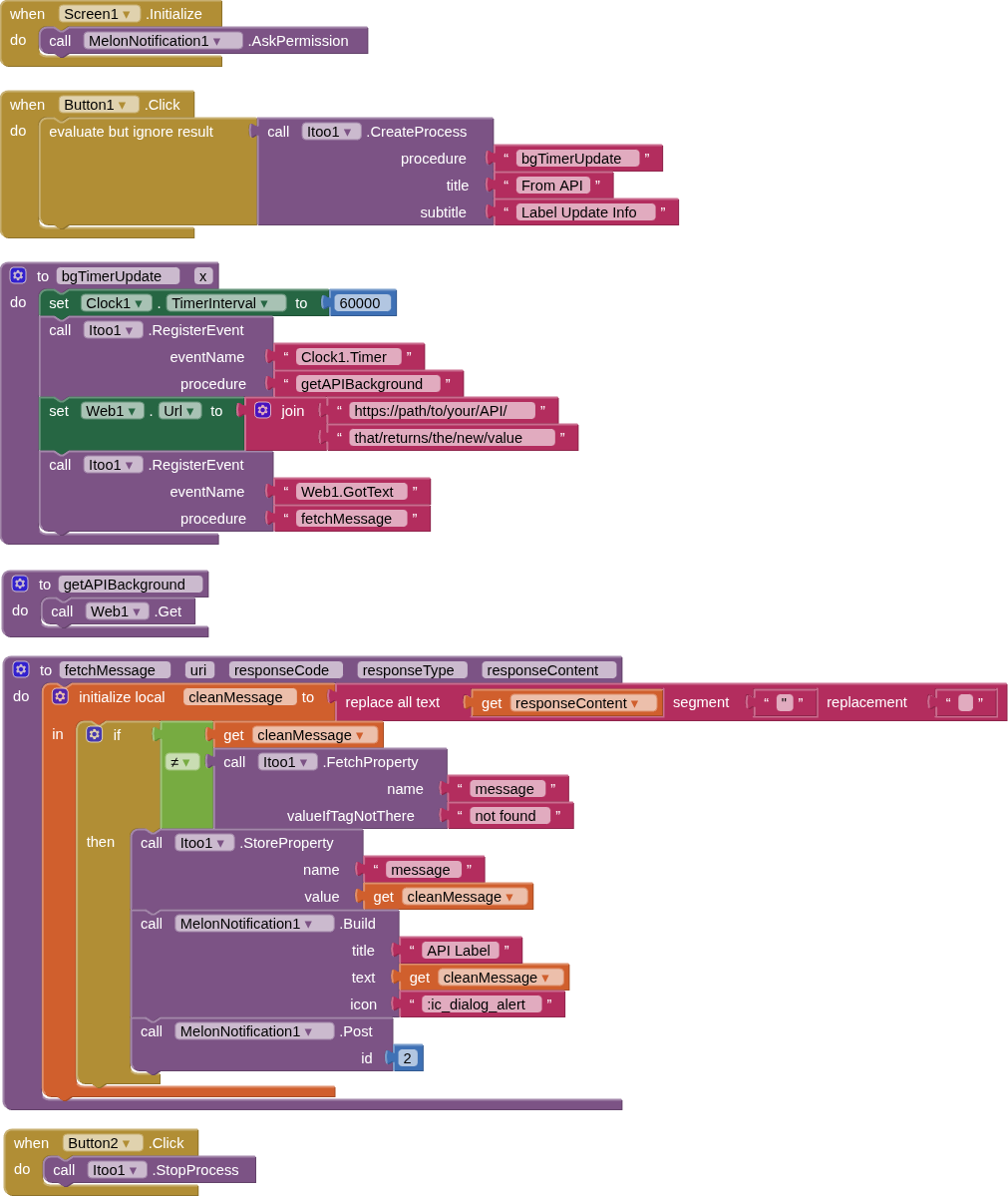
Should be something like this, using iToo and MelonNotification
(you may need to adjust "clean message" or possibly not need it at all, depending on what is cominig back from your API)
Remember this will only work with a compiled app.
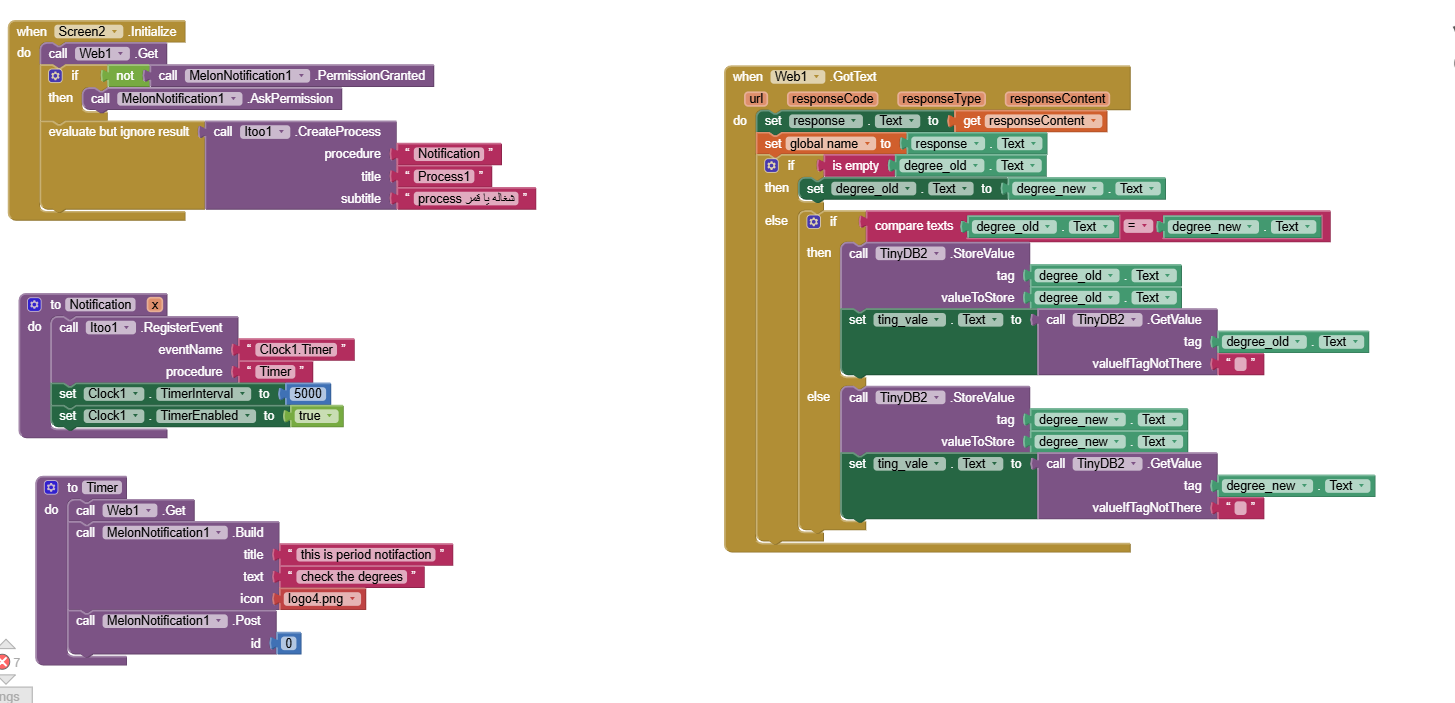
it doesnt work for me :(c --- it first when opening app shows my app keeps stopping app info or close app and when click in info and make notifications on it doesn`t show again ,,, but no notification sent 
No, you have to set the Web1.Url property in blocks in the Notification procedure...
i am already put in url property in the design url for web1 component ,, must i put it again in notification procedure ? and is this the only error ?