I am having a problem with my app. Can someone plz look into it.
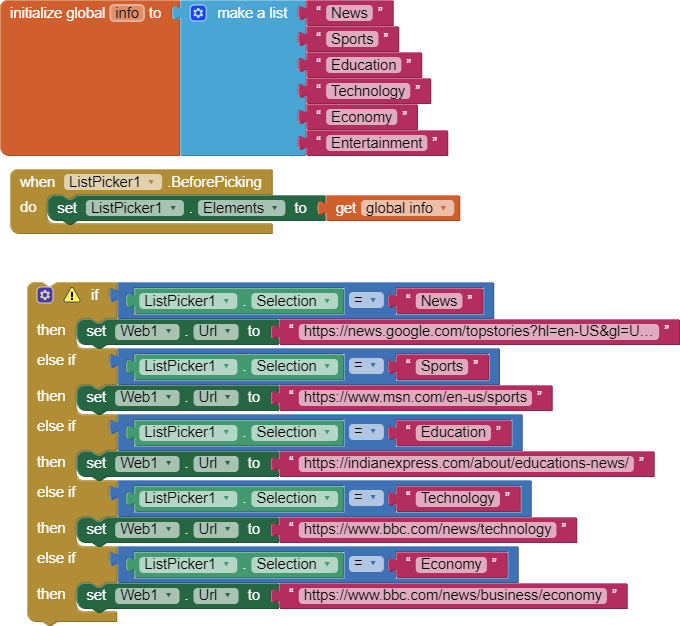
Hello Hadi. No one can open the link you posted except YOU. It is a private link to your Project.
Try the information here> How to ask a question (open new topic) . The link explains how to provide your aia and/or image files to post.
Regards,
Steve
ok
give me 5 min
what does the 4th point mean ???
Exactly what it says: "debug your blocks" to discover and fix bugs and issues yourself.
1 Like
you might want to move your if statement into the Listpicker.AfterPicking event
and probably you like to user a webviewer to open one of these pages rather than the web component?
Taifun
Trying to push the limits! Snippets, Tutorials and Extensions from Pura Vida Apps by
Taifun.
ooh i thought that item was there
i dont know how to use a webviewer
A very good way to learn App Inventor is to read the free Inventor's Manual here in the AI2 free online eBook App Inventor 2 Book: Create Your Own Android Apps ... the links are at the bottom of the Web page. The book 'teaches' users how to program with AI2 blocks.
There is a free programming course here Course In A Box and the aia files for the projects in the book are here: App Inventor 2 Book: Create Your Own Android Apps
How to do a lot of basic things with App Inventor are described here: How do you...? .
Also do the tutorials Our Tutorials! to learn the basics of App Inventor, then try something and follow the Top 5 Tips: How to learn App Inventor
Taifun
Trying to push the limits! Snippets, Tutorials and Extensions from Pura Vida Apps by
Taifun.
1 Like
1 Question
what,s the difference between web and webviewer
please see the documentation
http://ai2.appinventor.mit.edu/reference/components/userinterface.html#WebViewer
Component for viewing Web pages.
http://ai2.appinventor.mit.edu/reference/components/connectivity.html#Web
Non-visible component that provides functions for HTTP GET, POST, PUT, and DELETE requests.
what about doing some tutorials to learn the basics?
Taifun