Uploading APPS directly to Appstore not working

Hi,

today i tried to upload a project directly fro AppInventor to Apple App Store Connect and got the following Error message:

Although delivery was successful, you may want to correct the following issues in your next delivery. Once you've corrected the issues, upload a new binary to App Store Connect.

ITMS-90725: SDK version issue - This app was built with the iOS 18.5 SDK. Starting April 28, 2026, all iOS and iPadOS apps must be built with the iOS 26 SDK or later, included in Xcode 26 or later, in order to be uploaded to App Store Connect or submitted for distribution.

Apple Developer Relations

Best Regards

Sascha

It is not an error message, but a warning that iOS 26 SDK will be required from April 28, 2026. @ewpatton

I just built an IPA and got this (Info.plist):

<key>DTSDKName</key>
<string>iphoneos18.5</string>

and

<key>MinimumOSVersion</key>
<string>12.0</string>

Therefore, please adapt the iOS SDK to the required version and provide an option to set the MinimumOSVersion as you have already done on the iOS test server. @ewpatton

Hmm, so we won't be able to publish apps anymore starting April 28th. Or am I wrong, and/or am I overlooking something?

I'm in the process of updating the servers.

2 Likes

https://iosbuildservertest.appinventor.mit.edu/ should be up-to-date and report SDK 26 in builds. If everything checks out I'll move it over to the production server.

App Inventor is unable to compile this project.
The compiler error output was
[ReadBuildInfo] Starting Task
[ReadBuildInfo] Task succeeded in 0.004 seconds
[LoadComponentInfo] Starting Task
[LoadComponentInfo] INFO: Generating assets...
[LoadComponentInfo] Component assets needed, n = 0
[LoadComponentInfo] INFO: Generating activities...
[LoadComponentInfo] Component activities needed, n = 0
[LoadComponentInfo] Component activity metadata needed, n = 0
[LoadComponentInfo] INFO: Generating broadcast receivers...
[LoadComponentInfo] INFO: Generating libraries...
[LoadComponentInfo] Libraries needed, n = 1
[LoadComponentInfo] Component metadata needed, n = 0
[LoadComponentInfo] INFO: Generating Android minimum SDK...
[LoadComponentInfo] INFO: Generating native libraries...
[LoadComponentInfo] Native Libraries needed, n = 0
[LoadComponentInfo] INFO: Generating permissions...
[LoadComponentInfo] usesLocation = False
[LoadComponentInfo] Permissions needed, n = 5
[LoadComponentInfo] Component xmls needed, n = 0
[LoadComponentInfo] Component features needed, n = 0
[LoadComponentInfo] INFO: Generating component broadcast receivers...
[LoadComponentInfo] Task succeeded in 0.014 seconds
[ExtractPlayerApp] Starting Task
[ExtractPlayerApp] Task succeeded in 0.665 seconds
[ExtractProvisioningPlist] Starting Task
[ExtractProvisioningPlist] Task succeeded in 0.005 seconds
[PrepareAppIcon] Starting Task
[PrepareAppIcon] INFO: Creating app asset dirs...
[PrepareAppIcon] INFO: Generating icons...
[PrepareAppIcon] INFO: Compiling icon asset set...
/* com.apple.actool.document.notices */
/var/folders/cj/y0pj22fd5p1g7wk4vrn9gc_80000gp/T/1777579964688_3048513815570364416-0/assets/Assets.xcassets:./AppIcon.appiconset/[][ipad][76x76][][][1x][][][][]: notice: 76x76@1x app icons only apply to iPad apps targeting releases of iOS prior to 10.0.
/* com.apple.actool.compilation-results */
/var/folders/cj/y0pj22fd5p1g7wk4vrn9gc_80000gp/T/1777579964688_3048513815570364416-0/build/Payload/PlayerApp.app/AppIcon60x60@2x.png
/var/folders/cj/y0pj22fd5p1g7wk4vrn9gc_80000gp/T/1777579964688_3048513815570364416-0/build/Payload/PlayerApp.app/AppIcon76x76@2x~ipad.png
/var/folders/cj/y0pj22fd5p1g7wk4vrn9gc_80000gp/T/1777579964688_3048513815570364416-0/build/Payload/PlayerApp.app/Assets.car
/var/folders/cj/y0pj22fd5p1g7wk4vrn9gc_80000gp/T/1777579964688_3048513815570364416-0/build/tmp/assetcatalog_generated_info.plist

[PrepareAppIcon] Task succeeded in 3.575 seconds
[CreateEntitlements] Starting Task
[CreateEntitlements] Task succeeded in 0.001 seconds
[CreateInfoPlist] Starting Task
[CreateInfoPlist] Task succeeded in 0.002 seconds
[CompileLaunchScreen] Starting Task
[CompileLaunchScreen] Task succeeded in 0.0 seconds
[BuildAia] Starting Task
[BuildAia] Task succeeded in 0.028 seconds
[LinkLibraries] Starting Task
[LinkLibraries] Task succeeded in 0.0 seconds
[SignPackage] Starting Task
[SignPackage] ERROR: Failed to sign framework /var/folders/cj/y0pj22fd5p1g7wk4vrn9gc_80000gp/T/1777579964688_3048513815570364416-0/youngandroidproject/../build/Payload/PlayerApp.app/Frameworks/PSSRedisClient.framework
[SignPackage] Task errored in 0.282 seconds
.

Is your keystore the same on the test server as the main server? If not, it may be a mismatch in the private key to what is in the provisioning profile.

I built the same app 5 hours ago with no issue.
EDIT: But there was unfortunately an outdated provisioning profile. :upside_down_face:

On the test server? Please send me a copy of the provisioning profile so I can take a look at it.

1 Like

I just imported the keystore from the code2 server (again). Same result, compiling fails. And I'm quite sure, that all keystores are the same (main server = code2 server = test server).

(But I don't understand, why this is relevant.)

Sorry!!! :flushed_face: I had created several versions of "switchScreen" because I tested it on all the servers. Unfortunately, the test server still had a version containing an outdated provisioning file (with the same name). My apologies again! :sob:

This is now the result on the test server:

<key>DTSDKName</key>
<string>iphoneos26.4</string>

<key>MinimumOSVersion</key>
<string>17</string>

Here is the version with the correct (valid) provisioning profile, which also allows for testing the issue with switching screens. And this is the case—remarkably enough—even though it is an extremely simple app with very few components.
switchScreens2.aia (23.3 KB)

Hey,

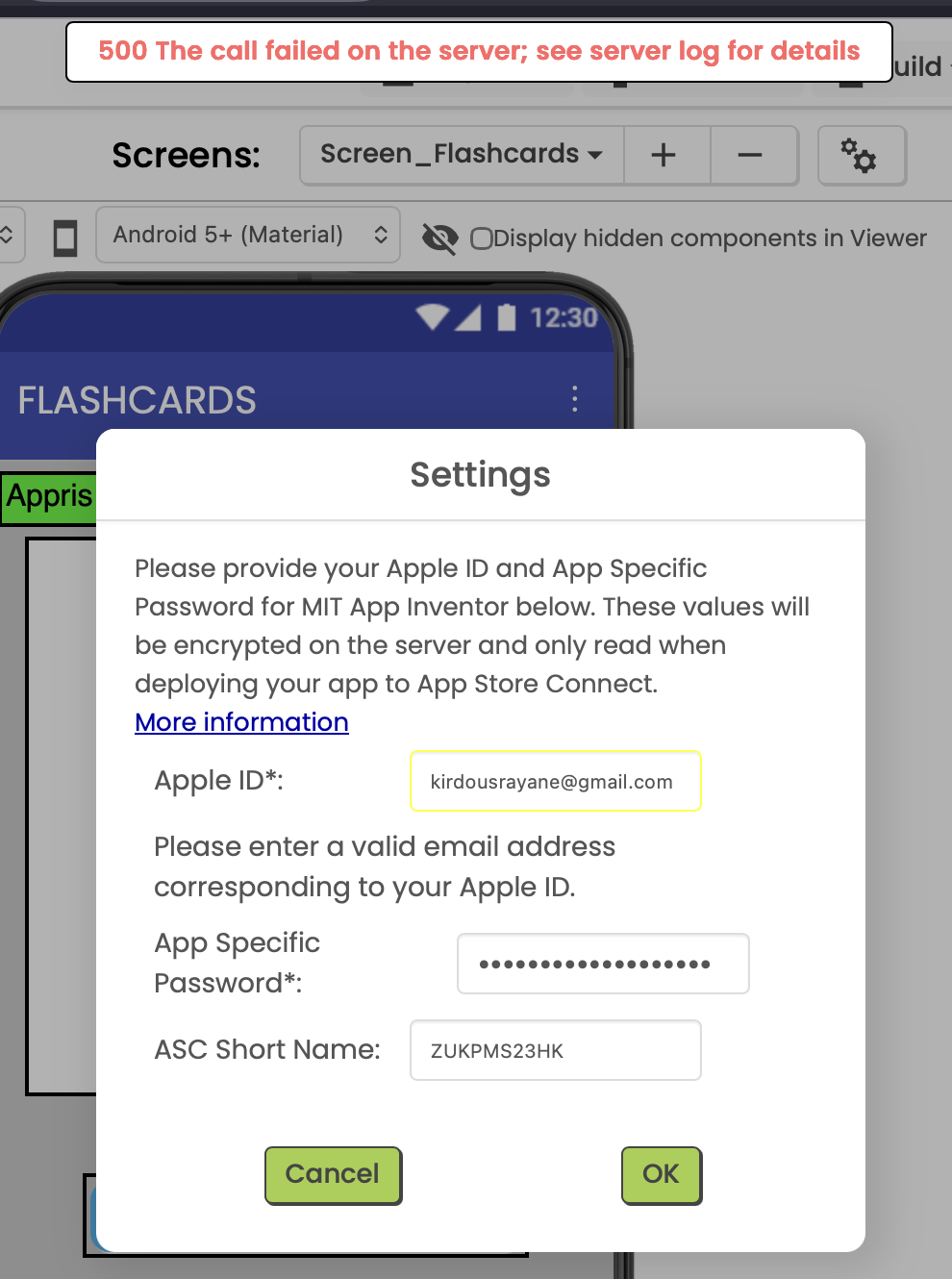
I have the same issue where I cannot build my app on the regular App Inventor servers, so I tried exporting my .aia project and importing it on the test version, but when I try to enter my Apple ID in the Apple Store Settings I get this error message :

Please enter a valid email address corresponding to your Apple ID.

and at the top of the screen I get this error :

**500 The call failed on the server; see server log for details
**
I’m supposed to have the app published to the Apple Store by tuesday. Does anyone have a clue on how to fix my problem?

Thank you!

I hope you understand that app stores can take a long time before accepting an app. That could be up to 10 days on some stores.

Post a screenshot.


There you go

Yes I get this, I’m just trying to have it sent for approval by tuesday so it can get published in the upcoming days/weeks.

Clear cache and/or try another browser (Firefox/Chrome).

I just tried this on Chrome and I get the same error message :confused: