Yes, since you never look for anything in TinyDB.
That clear TinyDB block will just make trouble for you later if you store something else in TinyDB and wonder why it disappeared.
Yes, since you never look for anything in TinyDB.
That clear TinyDB block will just make trouble for you later if you store something else in TinyDB and wonder why it disappeared.
Third time's the charm.
It's always the corner cases that get you.
I started the stack index at 0, and should have started at 1, to match the first image on the stack taken at app startup.

Here's the sample, with a test run.
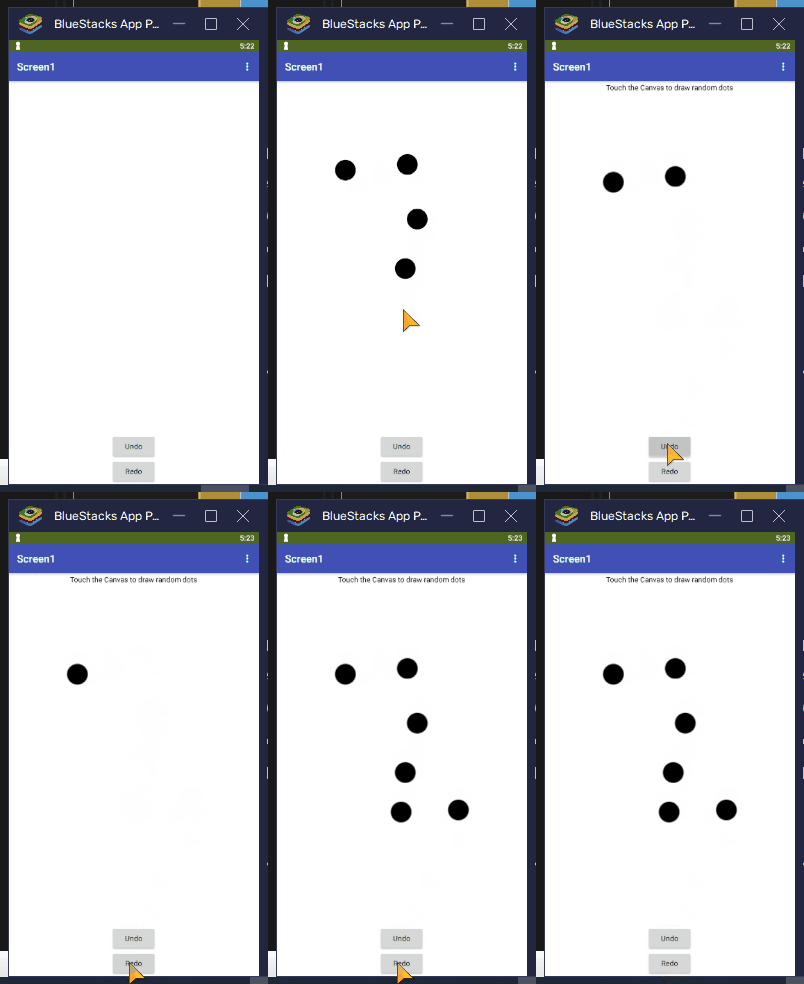
I don't bother with TinyDB in my sample, because I am ony doing a single session.
If I were doing multiple sessions that I wanted to keep, I would need separate TinyDB tags for them, and I would need to keep their Undo stacks under those tags.
By the way, I made no provision for erasing those image files, because storage is cheap and life is short.
I do use the TinyDB on my later pages, for when I show the Quilt Block again, and when I TempSave and TempLoad. I took it off and tried the Undo, and the last 2 Fills got deleted again, like before. So, I refreshed the computer screen, and all was fine. So, now the only thing left is to figure out the Redo issue.
Ok, so I changed the UndoIndex to 1, and the Undo's are still working, but the Redo is now deleting everything on the 4rth Click. I wonder if it's because I am using that Extension??
For the Image Deletions.... I do have a Button that says "Delete All Temp Memory". It deletes the TinyDB memory. Do you think I can add a Canvas.Clear to that Button to clear the Images in Storage? ....NO, not Canvas.Clear... that just clears the Canvas.
That means nothing to me without seeing its Click event blocks.
Download the blocks for the Redo Event.
A Project Export aia file would help.
Look for the online book in
You are confusing various concepts
Use the Companion and Do It to show the contents of the image stack.
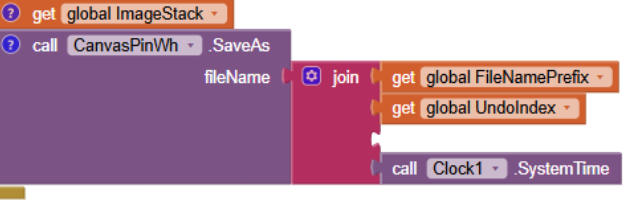
Look at the illegal file names you are generating for your saved image files.
Where is the .jpg file name suffix?
Also, where is the Screen.Initialize event where you capture the first image in the stack?
Lack of that would throw off the index (1 for an empty stack.)
Yes, I put that back. Not sure how it got deleted.
You need to capture one image before your first touch event, otherwise the bottom of your image stack won't have a total Undo image.
When you say “capture one image”, I am not sure what you mean. The Pinwheel Block Image is set as a Background Image on the Canvas (this was set on the Designer Tab).
But, that same Pinwheel image is also set as the background image in the Screen.Initialize event. Could this double setting of an image cause issues with the Stack?
Canvas SaveAs in combination with adding the resulting file name to the stack.
The Undo Click event does not change the contents of the stack.
My only guess is that the extension's flood fill is not reflected in the image files saved in the stack.
For debugging, try adding a List Picker whose Elements are loaded from the stack, and when selected, they are loaded into the Canvas Background for display.
I don't support extensions.
The sample app I supplied works okay without extensions,
Ty, I don’t know how to use a List Picker yet. I am going to sleep now, so I will check back here tomorrow. Ty again for all your help.
I just realized that if I click Undo, and then try to refill the area, the color does not fill completely, and the Outlines get distorted, just as they did when I used the Undo that came with the Extended Canvas extension. So, you may be right about that extension not supporting the image files saved in the stack. If this is true, is there any other way to do Flood Fill on these Quilt Blocks using the built-in tools? (I will check back tomorrow.)
Switch to a list of polygons and use the canvas polygons blocks.
Select the polygon using a slider ranging over the list indexes of the polygons.
Highlight the current polygon the same way the AI2 blocks editor highlights a block, with a yellow border.
Knowing which polygon to fill makes it a trivial redraw.
Ty. That does seem a bit too advanced for me. I did change the .jpg to .png, hoping that would make my redraws cleaner. It helped slightly. I also put in several “emptying” blocks for the global UndoIndex and ImageStack. I put these in places like my Reset Buttons, or changing Screens. It seems that things are working ok except for that last Redo. But, I can accept that, given my novice level with this software.
When you Undo and Redo, you are reloading the background image of the Canvas from a list of file names traversed by the Undo and Redo buttons.
There is no actual flood fill action happening during Undo and Redo.
So the question is: Is the stack of image files truly reflecting the actions that filled it?
That can be confirmed independently, using a List Picker whose Elements are loaded from the Undo stack, and whose selection action is to display the selected image file.
From your description, it sounds like either the Canvas SaveAs operation is missing results of flood fills, or is not adding images to the Undo stack..
Diagnosing this requires going through the Undo stack and examining the images, one after another.
Hi. There is a Video Link in my last comment, showing how it is behaving. Here is that Link again: https://youtu.be/PD2N-htjEbA
I don’t know how to set up the List Picker to see my Image files from the Stack. However, when I clicked “Do it” on the Image Stack, I could see that the correct number of Images were in the Stack.