Undo - Redo 3
No extensions required!
Here is a third iteration which overcomes most, if not all, artifacts that could be generating by drawing, undoing and redoing.
It uses two lists, the first is a list of all the pointlists for each polygon that can be drawn. The second is a list of undrawn "touch" circles that fit inside each of the polygon. These two lists have the same number of items, therefore their indexes match. The touch circles list could be generated by formula.
The user touches a polygon area on the canvas, if they touch anywhere inside the undrawn circle for that polygon, the polygon is drawn, filled and outlined with the set colour.
There is a formula in a procedure that checks if the "touch" is inside any of the undrawn circles. If true, then the respective polygon is selected.
The background quilt pattern image is displayed in the vertical arrangement which holds the canvas, so remains untouched by any drawing, undoing or redoing. The canvas has an empty background. The VA and the canvas have the same dimensions. These are set to 340 x 340 pixels. LineWidth is set to 1.0. An outline for each polygon is also drawn, to maintain the pattern layout.
AIA
floodUndo3.aia (18.3 KB)
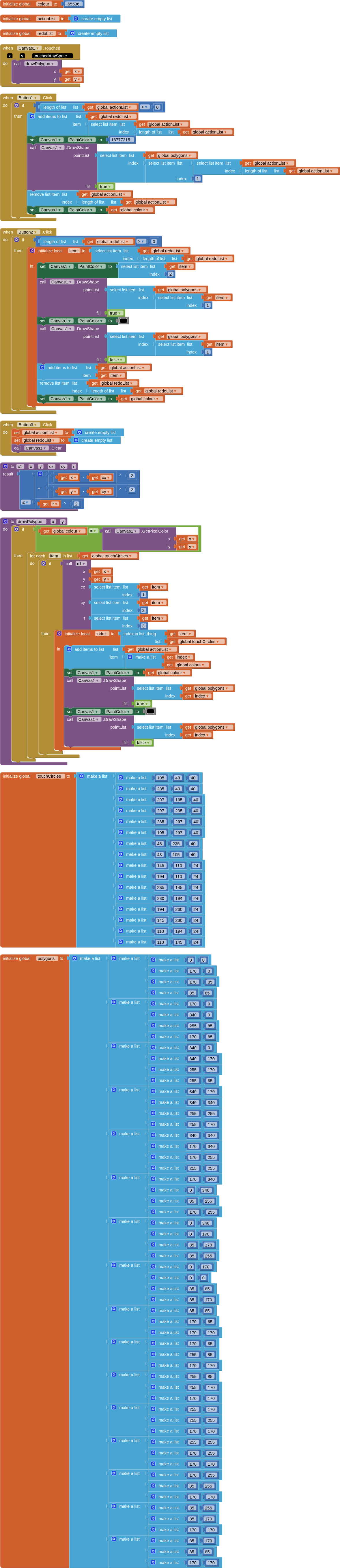
The downside of this approach, whilst good for drawing, undoing and redoing, is the need to generate the two lists for each quilt pattern, matching the canvas sizing.