Mikei
January 24, 2022, 9:34pm
1
I'm using the text messaging solution posted by How to Send SMS Messages with Google Sheets and Android Phone (note Youtube video blocks are different than website pix) and I'm running into the following problems:
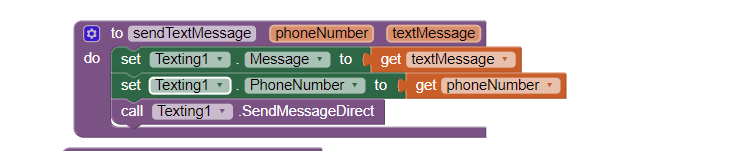
If I use sendmessagesdirect, the text messages ARE sent, but I have no record of them in my google messages app (Pixel 6, A12)
If I use sendmessage the text messages never get sent, never get populated in my google messages app.
Does anyone have a solution to either?
1 Like
TIMAI2
January 24, 2022, 10:45pm
2
This is correct. The messages app doesn't send the message.
If I remember correctly, there is a bug here. The default messaging app should be called by the sendmessage block, but it isn't....
I created an app send message by pressing a key from a text field but it doesn't work I don't understand where the error is by pressing the key I have no answer
[1]
1 Like
Mikei
January 25, 2022, 3:36am
3
So, is there a way to force calling the messages app to handle the send function?
Also, I believe there is an issue with sending direct with RCS turned on.
I have the exact same issue. Using sendmessagedirect seems to work for me.
Mikei
January 25, 2022, 1:22pm
5
Interestingly enough if I use the companion vs compiling an APK, the messages DO show up if I use sendmessagesdirect call. I just realized this fact this morning. Has anyone else recognized this?
1 Like
TIMAI2
January 25, 2022, 2:11pm
6
Ah well, maybe it does....
Mikei
January 25, 2022, 4:01pm
7
Confirmed that is the case with A/B testing this morning. Not sure if it's a bug that should be reported or something to do the differences in u companion vs APK ready for Google Play