I looked closely at the project in the Designer, and remembered a flash of a red error message when it first loaded.
The Table Arrangement looks fishy.
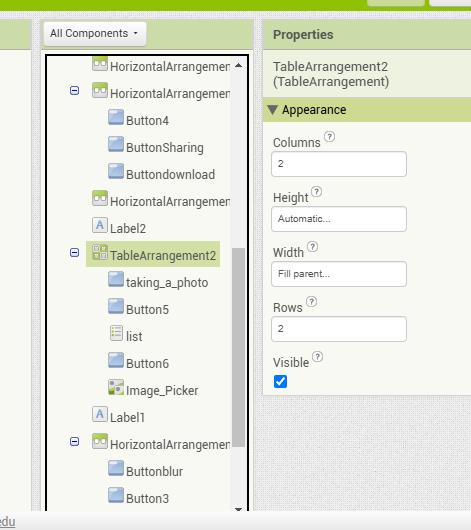
It's got 2 rows and 2 columns, but has 5 components hanging under it in the Components Tree pane. (2*2= 4, right, so how is that possible?)
I recommend nesting Horizontal and Vertical Arrangements as an alternative to using Table Arrangements, because they are internally complex and bug-prone.
Take backups (.aia exports) of this project before trying to replace that Table Arrangement. They get internally tangled under cut and paste operations.
Also, don't mix pixel counts with proportions with automatic sizes. The AI2 component sizing algorithm is a free for all fight for space on the Screen at run time. Pixel counts are unpredictable if the screen is set responsive, because you won't know how many pixels fit on the screen.
Canvas sizes take a moment to calculate, and are unreliable in Screen1.Initialize.