🚀 Google Play In-app Billing Extension
An extension for MIT App Inventor, Kodular, Niotron & All AI2 Based No-code App Builders.Now It's Mandatory To Use Play Billing Library v.8+ Starting Sept.2026, Presenting World-class Google Play In-app Billing Extension for Monetizing Apps (To Receive Payments Globally For In-app Digital Products & Subscriptions).
Developed By
Bharat Technologies.
 Specifications
 Package:
 com.googleplayinappbilling.ext
 SDK Version: v9.1.0 (Latest SDK Released On June 18, 2026)
 Size: 515.00 KB
 Minimum API Level: 23
 Updated On: 13th Aug 2026
 Built using: AIXER
 Features:
Core Billing
- Initialize/Connect - connect to Google Play billing (auto-reconnect enabled, pending one-time purchases supported)
- Query products -
QueryProducts(multiple) andQueryProduct(single) for INAPP & SUBS; events returnproductId, title, price, description, type, offerToken, basePlanIds - Query subscription offers -
GetSubscriptionOfferDetails→ fires once per offer withprice, tags, billingPeriod, basePlanId, offerId - Purchase -
Purchase, plusPurchaseWithObfuscatedAccountId/PurchaseWithObfuscatedProfileId(user identification) - Subscription upgrade/downgrade -
UpdateSubscriptionwith 6 replacement modes (time proration, charge prorated, without proration, full price, deferred, keep existing) - Query owned purchases -
QueryPurchases(INAPP & SUBS), always firesPurchasesLoaded(empty list if none owned) IsPurchased- instant ownership check against theproductslist- Acknowledge / Consume - for non-consumables/subs (3-day rule) and consumables
Purchase Result Events (clear separation)
PurchaseSuccess- full purchase data (token, orderId, time, signature, JSON, acknowledged flag)UserCancelled- user backed outPaymentFailed- card invalid / bank declined (response code ERROR)PurchaseError- any other failure
Billing Programs / Alternative Billing
IsBillingProgramAvailable- (Billing Choice, Alternative Billing, External Offer)GetBillingChoiceInfo-imageUrl,loyaltyfor custom choice screensShowBillingProgramInformationDialog- official Google dialog
Extras
- Billing config -
GetBillingConfig- user's country code - Feature support check -
IsFeatureSupported(subscriptions, subscription updates, in-app messaging, price-change confirmation) - In-app messaging -
ShowInAppMessagesfor transactional issues (payment declines, price increases) - Billing SDK version -
GetBillingSDKVersion - Connection helpers -
IsConnected,GetConnectionState,Disconnect
 Requirement For Testing The Extension:
- Upload your app to Play Console - Internal Testing
- Add your email to testers
- Install the app from the Play Store link
- Test In-app product / subscription purchase, real money won't be charged to tester. Once everything works fine delete tester email list and release the app to production.
Follow These Steps For Setting-up Google Play Billing Into An App:
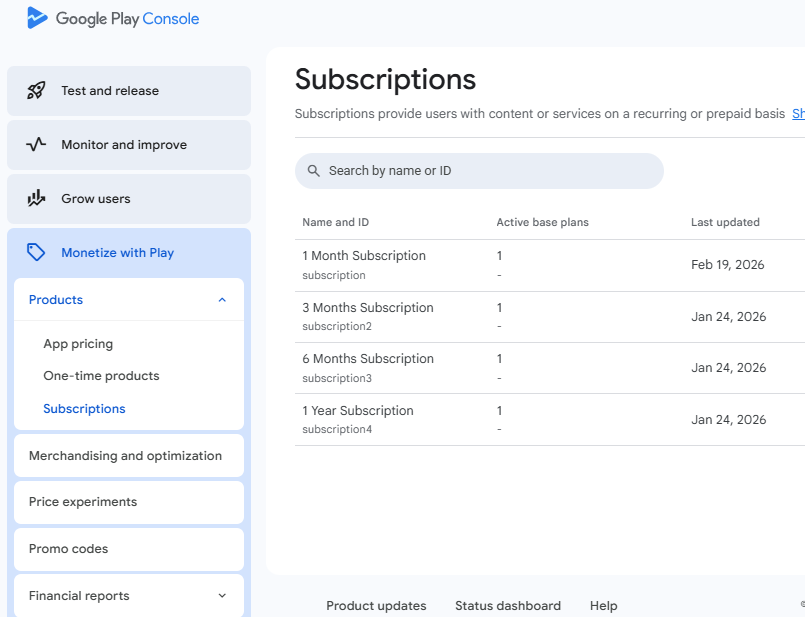
 To create Subscriptions:
Go to your play console account, click on your app, at left side select Moetize with Play
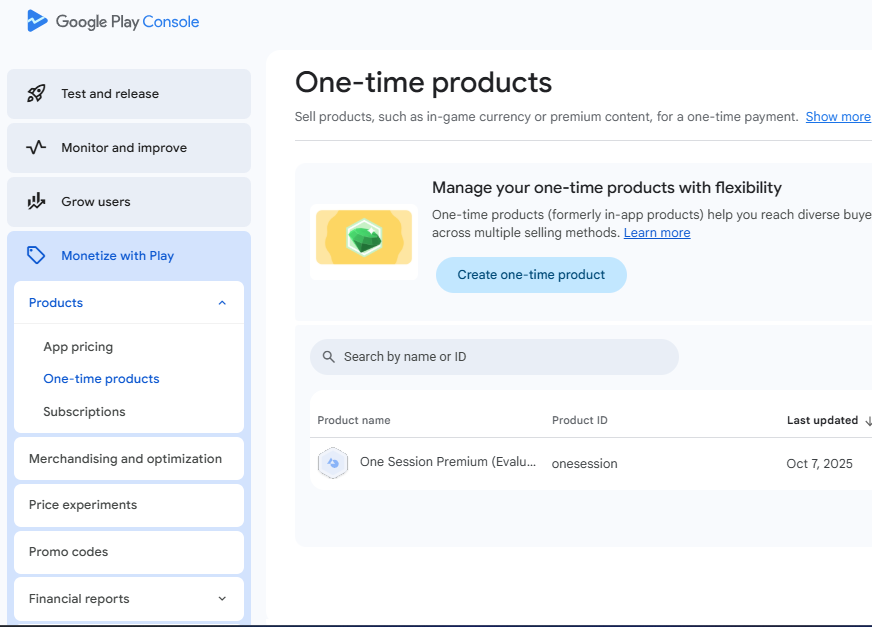
To create One-time In-app Products:
 Most Important Things To Remember:
In some countries Google allows alternative billing (i.e. you are allowed to receive payments using third party payment gateway) but it is also required to show the payment option of Google In-app Billing at top in first place then below it show any other payment option else Google may suspend the app once app reach many installs.
By Monetization with Play we can sell 2 types of digital products (Tip: Google never get's commission for physical products/services. 15% OR 30% OR Any comission is applicable only for selling digital products)  :
:
1. In-app products:
-
Non-consumable (owned forever eg. Remove Ads) → AcknowledgePurchase

-
Consumable (spent/re-purchasable eg. coins, or bullet packs in games) → ConsumePurchase

2. Subscriptions:
- Subscriptions (1 Week / Month / Year) → AcknowledgePurchase (acknowledge purchase at the same time or within 3 days else Google automatically refunds the money to the subscriber and the subscriber uses the subscription for 3 days for free. Catch: If there are more refunds then it will be considered as red flag for the app and Google may suspend the app by giving notice that fix the payment flow).
Don't miss to acknowledge after purchase successful event for one-time consumable product and any subscription else after 3 days refund will be made automatically and you will think someone has raised request for refund and Google refunded it.

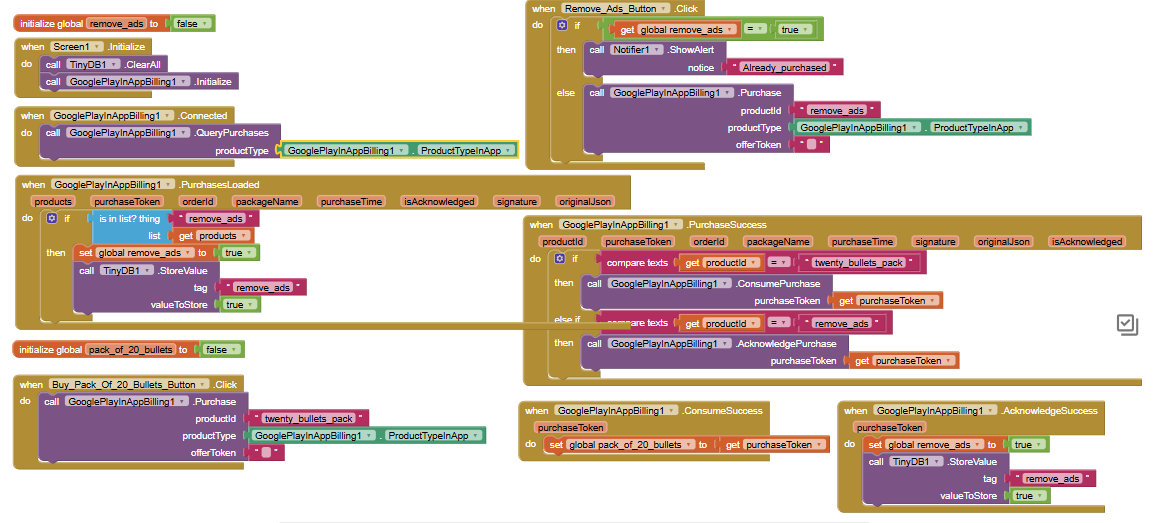
Blocks usage for purchase flow of One-time In-app Product:
In this example remove_ads is a one time purchase which a user can't purchase again even after uninstalling the app & re-installing again & pack_of_20_bullets in a game can be purchased more than once.
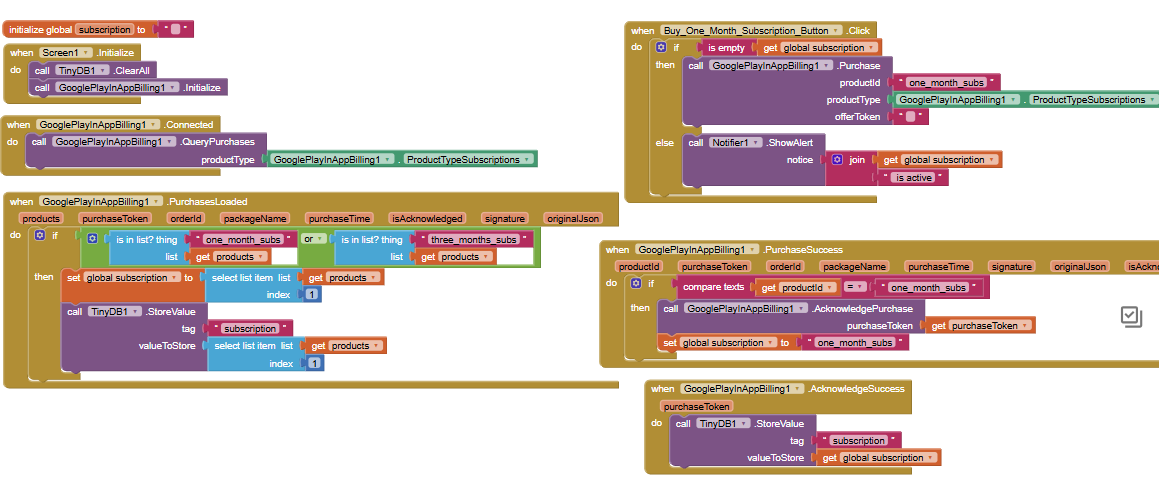
Blocks usage for purchase flow of Subscription:
Video Recording Of Live App On Google Play (Production):
The video above is recording of an App of our client which is live on Google Play 'Production Release' which asked the user to pay the money for subscruption.
Troubleshoot For Common Issues: Method=Purchase, Product type must be Subscription not In-app. Also check whether the correct product id is used or not. This extension is billing related so be very careful and conscious while setting up the blocks, kindly verify everything twice.
We've Tested It, Working Awesome

GooglePlayInAppBilling.aix (515.1 KB)
Test Yourself, Buy Only After Satisfaction... 
Buy here
Developed by  Bharat Technologies with for the beloved community.

