🚀 GoogleOneTapSignIn
An extension for MIT App Inventor, Kodular, Niotron & All AI2 Based No-code App Builders.Google One Tap Sign In - Allows users to sign in with their Google account using One Tap.
 Specifications
 Package:
 com.googleonetapsignin.ext
 Size: 574.00 KB
 Minimum API Level: 21
 Updated On: 2026-07-22
 Built & documented using: AIXER
Per Day Limit = 10,000 One Tap Sign-in (can be increased)
Events:
GoogleOneTapSignIn has total 3 events.
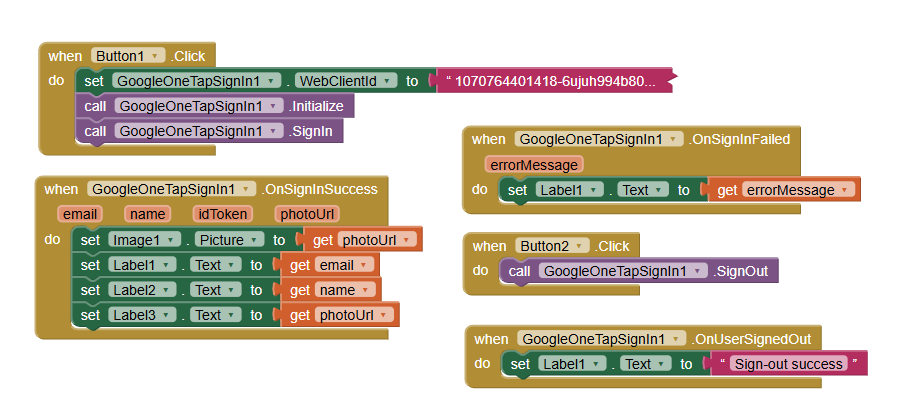
OnSignInSuccess
Fired when the user successfully signs in.
| Parameter | Type |
|---|---|
| text | |
| name | text |
| idToken | text |
| photoUrl | text |
OnSignInFailed
Fired when sign-in fails.
| Parameter | Type |
|---|---|
| errorMessage | text |
OnUserSignedOut
Fired when the user signs out.
Methods:
GoogleOneTapSignIn has total 3 methods.
 Initialize
Initializes the Credential Manager. Must be called after setting WebClientId.
SignIn
Signs in the user with Google One Tap.
SignOut
Signs out the current user.
Properties:
GoogleOneTapSignIn has total 7 properties.
 WebClientId
Sets the Web Client ID for Google Sign-In (from Google Cloud Console).
| Property | Type | Default |
|---|---|---|
| WebClientId | text |
UserId
Returns the signed-in user's unique Google ID (sub claim).
| Property | Type | Default |
|---|---|---|
| UserId | text |
UserEmail
Returns the signed-in user's email address.
| Property | Type | Default |
|---|---|---|
| UserEmail | text |
UserName
Returns the signed-in user's display name.
| Property | Type | Default |
|---|---|---|
| UserName | text |
UserIdToken
Returns the Google ID token for the signed-in user.
| Property | Type | Default |
|---|---|---|
| UserIdToken | text |
UserPhotoUrl
Returns the signed-in user's profile photo URL.
| Property | Type | Default |
|---|---|---|
| UserPhotoUrl | text |
IsSignedIn
Whether a user is currently signed in.
| Property | Type | Default |
|---|---|---|
| IsSignedIn | boolean |
All Blocks:
(IMPORTANT) Setting Up Client Id On Google Cloud Console:
Requirements:  1. App's package name 2. App's SHA-1
Follow These Steps:
1.Go to https://console.cloud.google.com/
2. Credentials - Oauth - Web App - Copy Client Id and Paste in extension's Web Client Id block.
3. Build APK
4. Go to Free Online Tool To Get SHA-1 APK Inspector — Free Android Tool | APKLint
(If you don't trust any third party online tool then you can use our offline tool to get SHA-1)
5. Now in Google Cloud create another credential for Android App (not web app) enter your package name, SHA-1 and create (don't use web client id from this in the extension)
6. Done! One Tap Sign In Activates and can be used in the app.
Setup Video:
Demo Video:
Free Trial Extension:
GoogleOneTapSignIn.aix (573.9 KB)
Price: $ 5