I am trying to connect to an HC-05 but it just does nothing when i try to connect

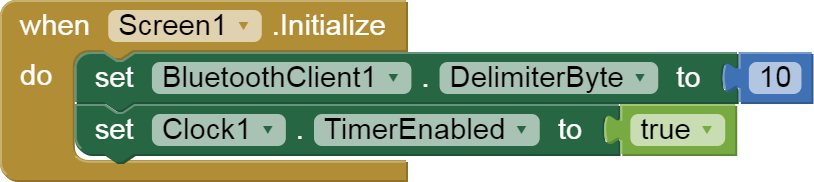
I am trying to connect to an HC-05 module but when i select the hc-05 it says its connected but it didn't connect, and here's what the code looks like:


i always when i switch the screen just get error 515.

Don't switch the screen to not loose the connection

Also remember to switch screens correctly

Taifun

1 Like

yes, dont worry ive got the screen switching down, but are you saying that if i switch screens it will break the bluetooth connection? here is the new code also on screen 1:


red is detecting bluetooth input
blue is connecting (again).

red is the after picking stuff

Yes
Taifun

1 Like

What does the HC-05 send?

I don't see you asking it for text (or bytes or anything) in Screen1.

Upload the HC-05 sketch?

ahhhhhhhh, ok. so i modified the code, in the last post, and it works!!!!! it is a little broken still, apperently the HC-05 thing is constantly sending data or it has something to do with the clock thing. either way, the bluetooth works! the HC-05 blinks slowly when paired. will have to fix the constant push of button issue.

as for ABG, the HC-05 actually sends data when the button is not being pressed,
just found that out by looking at the code, and it doesn't really matter what is being sent as long as it knows that something is getting pressed. i think.

here's my sketch:

void setup() {
  Serial.begin(9600); // Initialize hardware serial for Bluetooth communication
  pinMode(2, INPUT_PULLUP); // Set Pin 2 as input with internal pull-up resistor
}

void loop() {
  if (digitalRead(2) == HIGH) { // Check if the button is pressed (LOW because of pull-up)
    Serial.println("B"); // Send the character 'B' (or any character) followed by a newline
    delay(200); // Debounce delay
  }
}

also, once i press the pedal, it just keeps counting without stopping. i will take a better look later at the code.

so... i forgot to save my sketch, and i got another different one, this:

#include <SoftwareSerial.h>

SoftwareSerial bluetooth(10, 11); // RX, TX (Pins 10 and 11 for Bluetooth)

const int buttonPin = 2;
int buttonState = 0;

void setup() {
  Serial.begin(9600); // For debugging
  bluetooth.begin(9600); // HC-05 default baud rate
  pinMode(buttonPin, INPUT_PULLUP); // Use internal pullup resistor
  bluetooth.println("Arduino Ready");
}

void loop() {
  buttonState = digitalRead(buttonPin);

  // If the button is pressed (HIGH when using INPUT_PULLUP)
  if (buttonState == HIGH) {
    bluetooth.println("1"); // Send '1' (or any char) for button press
    delay(100); // Debounce
  }
  
  // Optionally, read incoming commands from the app (not needed for sending *to* the app)
  if (bluetooth.available()) {
    char command = bluetooth.read();
    Serial.println(command); // Print to Serial Monitor for debugging
  }
}

(don't worry, I saved it)
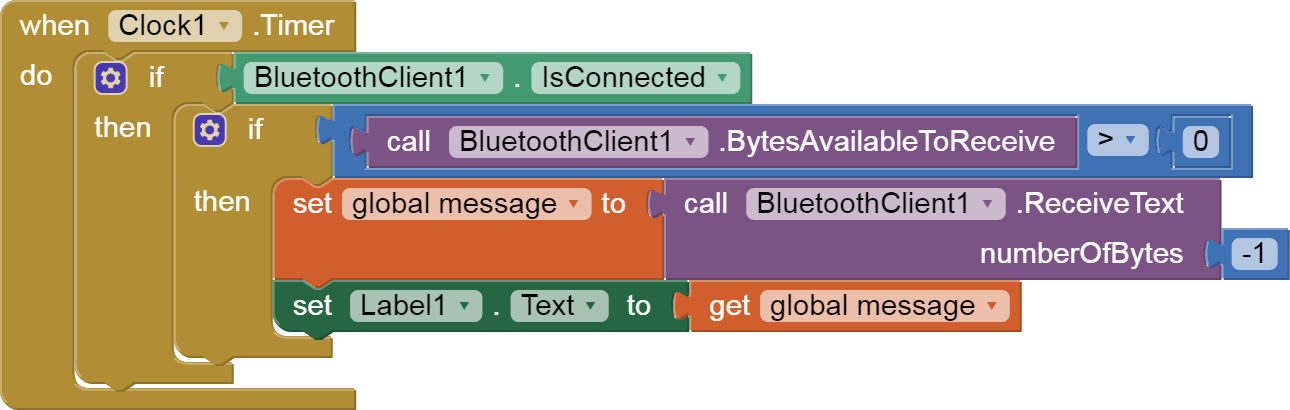
also, here is my receiving code,


i don't know if that's the right code block, (this is the first time getting into anything bluetooth) but it looked right to me. the code looks fine though, its using the right pin, it sends the right char, the app looks for the right char (or at least that i'm aware of), it looks perfectly fine (but clearly it's not).

i am having trouble using bluetooth, connecting to the hc05 is working, its just that when i press the pedal it doesn't sent number or the app is looking for the wrong thing, OR i'm using the wrong block. any help would be greatly aprieciated. a new problem has wedged itself in with the others,when i run the companian on screen one, it crashes. here is an aia file.
gcc_copy_without_bluetooth.aia (612.9 KB)

On Arduino side you send the string "1" (and not a number), therefore you'd better receive a text with the appropriate blocks on AI2 side.
Please refer to @ABG 's FAQ on the matter, here:

Here is a simple BlueTooth text receiver sample, for single value per line:
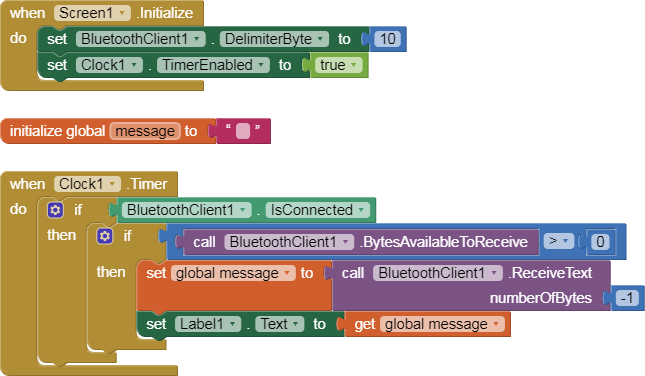
blocks
initialize global message to

...

I do not advise using a wait extension.

If you need to delay something, save future deadlines computed from Clock1.SystemTime plus whatever delay you need, in mmilliseconds, and check the deadline on following clock timer cycles.

Also, be aware that switching screens breaks Bluetooth connections, so you are better off sticking to a single screen if you use Bluetooth.
You can hide Arrangements to simulate screens.

1 Like

By continuing what @ABG has already suggested about the use of a unique screen, to avoid the BT disconnection when switching between screens, please find attached a sample .aia that shows how to use "virtual screens", made with Vertical or Horizontal Arrangments that are shown or hidden according to the needs.
SmoothFade.aia (1.4 MB) that uses a powerful extension by @shreyash, called Phase that allows to apply "fading effects" when switching beween virtual screens.
Best wishes.