im very new to this and im a beginner and im doing my first app, I need to know how if i click a button that button spawns in a draggable image in another screen
Why do you need another screen to do this? Use vertical arrangements and show hide them.
What do you mean by draggable - zoom in and out ?
so can i just make a button to spawn in the image i need bellow where i need to place the images, and i need to make the image to where it can move if i hold click on it and drag my mouse around its what my instructor said
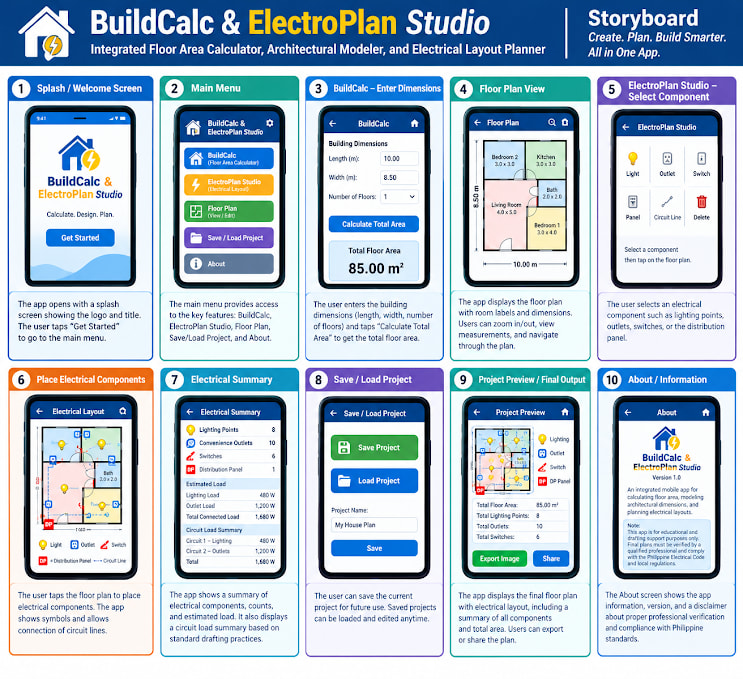
I recommend learning SVG graphics if you have to build floor plans.
You will also need Tinydb to store building details across screens.
What is the image that will be draggable?
the 6 in the 5th screen, i mustve misread it because it says i select a component, so i click on one of those 6 and i click on the floor plan
sorry for misreading it, im new to this

Please high light on your previous picture the area that is an image to be dragged to s different location on that screen. Would expect the numbers to change accordingly ?
How many people are in your project team?
Will you be required to build floor plans in the app, or can you get away with just pasting fixtures on pre existing floor plans (much easier)?