I'm making a lost and found app, and it lets user to upload a picture, fill item name, date, etc. I'm storing all of these item infos in a dictionary then store it in the firebase realtime database. How do I show the item image from the firebase RTDB in the listview? (I'm showing it alongside the item name)
Are you passing the url of the uploaded image to your firebase data along with the other infos ?
You cannot upload images directly to a firebase rtdb.
yeah I tried uploading it directly. It shows the image normally but not on another device. How do I make it visible on another device as well?
You probably only uploaded the file path (as text) which is why you can only see the image on your device (because that is where it is!).
Actually upload your image to firebase storage or some other online resource, return the direct url, and store that in the firebase rtdb
How do I do that? I tried using firebase storage but it told me to upgrade the plan. Any other alternatives? I tried converting to base64 as well, but idk how to convert it back to image synchronously with item name etc
Upgrade the plan. Unless you go viral, there is enough free space and usage for testing.
I tried and it asked for credit card (I still have none). Any other alternatives? is it possible for me to convert base64 to image and vice versa synchronously?
Yes, there are several base64 extensions available for this:
Here is mine:
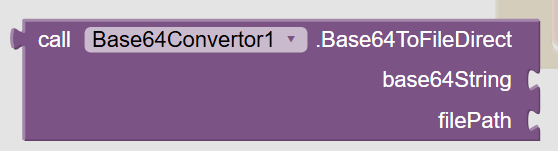
The easiest location is in the ASD.
You will need to provide an absolute path to the extension block - e.g.
/storage/emulated/0/Android/data/<packageName>/files/filename.jpg
(you can build this path using the File component)
You might be returning the image filename with your firebase data ?
You should look at using that path for the next time the image is required, instead of having to convert it each time.
thanks, I decided to use the firebase storage extension (com.mirxtremapps.FirebaseStorageNov18.aix). How do I have different projectbucket in the storage?
What about your paid plan?
I tried upgrading 
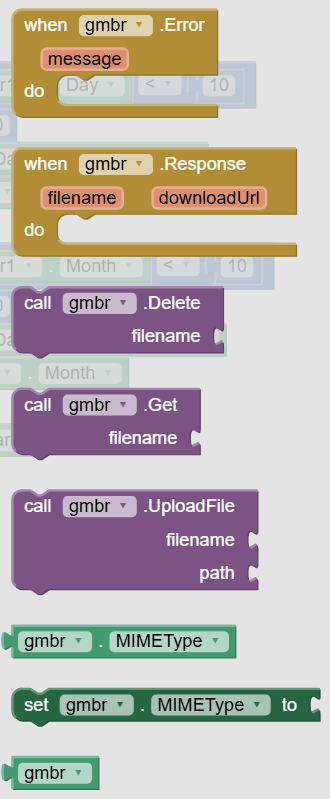
can you explain to me each of the yellow and purple blocks please and what to fill in each blanks
If you want to use an extension for Firebase Storage, i might suggest you use this one:
Alternatively, let me introduce you to the wonderful world of using Firebase RTDB and Storage with the web component:
Regarding images, where are they coming from in the first place, camera? These will be very big. Bear in mind that the listview will be displaying images, by default at @ 75x75 pixels, do your images need resizing?
(You will want ImageConvertorV3.9.aix for all features)
The listview can start to "stutter" with long lists loaded from urls, you might then want to consider using a recyclerlist extension to build your listview:
thanks I decided to use the extension for firebase storage u gave me (com.sunny.fs.aix). using that extension, how do I upload an image from image picker to the storage, then retrieve the image url to show in listview
I want to do this
See the documentation for the extension. Ask in that topic for further advice, if you get stuck.
1 Like
If You want, You can try:
Ciao
Marco
1 Like
will try, thank you!
Hi, how do I make the listview loads each image faster? (the listview loads image from the url)