Hello, how do I set my table to match to the width of the data
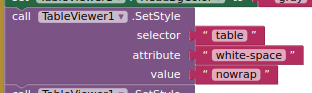
If it doesn't do it automatically, then try adding this style setting:
1 Like
Thanks, it works perfectly fine now.
By the way, is it possible to select data by row?
You should really read the documentation and everything in this topic.
There is an event block that return the row, column, and value clicked . You can either use this information to search the underlying list used for the table view, or run a JavaScript to return the data from the table view .
What im trying to create is I want to send sms using the data from the select row but when I click on the tableviewer, it clicks as a whole and not by row. It would be a great help if I can manually click on each row and also it will change the background color if it selected.
Again, read through this topic. There are examples for highlighting rows when selected.
Of more concern is that you say the entire table is selected when you click? You may need to expand more on this, show example data and relevant blocks.
And how do remove the previous selected row background colors. When I using this, it will highlight the selected row, but if theres multiple selected row, it will highlight the previous selected row. What I want is to highlight ONLY THE SELECTED row
1 Like
Hello once again, can I get a breakdown for the procedure on how to create the when table_click, I want to get the row, col, value using procedure

what I mean is how to create a procedure with row, column, value without using the tableviewer element. What im currently creating is a text message app and I want to highlight the per row everytime I send a message using the mobile number list coming from the table
You want to highlight a row (based upon its content) without physically selecting the row in the table ?
yes, exactly. in my case. I want to start sending message from the first row then move on to the next row until reached at the end of the row
im just stucked on the part on how to get the row. which is why im asking on how to get the row, col, value just like the with the tableviewer_click
Something like this, you will need to work with the underlying list of lists:
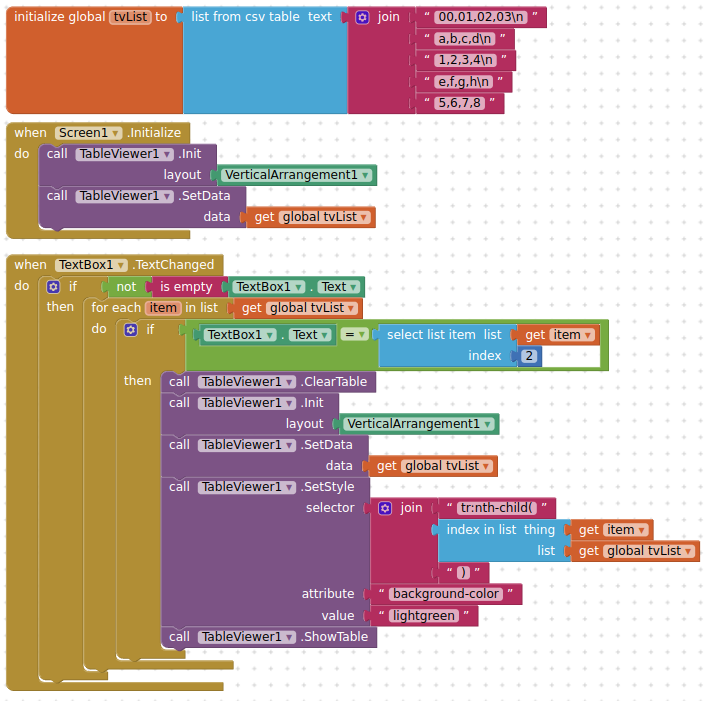
You can probably use the javascript highlight routine to save having to reload the table
2 Likes
Thanks a lot!
Does the ScrollTo not works if theres a style on table click? How can I make it to scroll to top if button is clicked? Any alternate solutions on this?
Show your relevant blocks
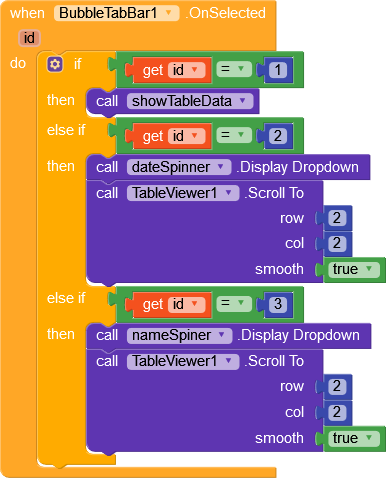
Every time I click the button for the spinner, it just wont scroll. I want to make it scroll to top everytime the spinner is clicked