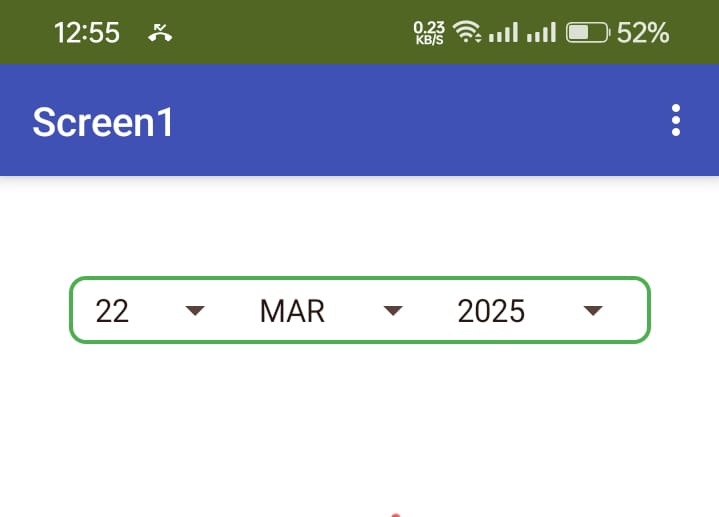
I am thrilled to bring the Wheel Calendar Picker to the MIT App Inventor community, a feature I was eager to utilize in my own apps. After much effort, I’m excited to share this customizable and interactive calendar picker that will help you easily integrate a wheel-based calendar into your app. Whether you're building a scheduling app, a form, or anything that requires date selection, the Wheel Calendar Picker offers a user-friendly interface to pick dates with ease..It is a versatile and customizable extension for MIT App Inventor that allows you to integrate a wheel-based calendar picker in your app. It enables users to easily select a day, month, and year with a smooth and intuitive scrollable interface. Perfect for apps that require date selection functionality, the extension is highly flexible and easy to use, with full control over the visual appearance and behavior of the calendar.
Key Features:
Customizable Background Color: Set a background color that matches the design of your app, providing a personalized touch.
Font Size Adjustment: Modify the font size to match your layout and design needs.
Customizable Year Range: Define a specific year range for the picker, which is ideal for apps with date constraints.
Date Selection: Users can easily select a day, month, and year, and the picker will automatically update the selected date.
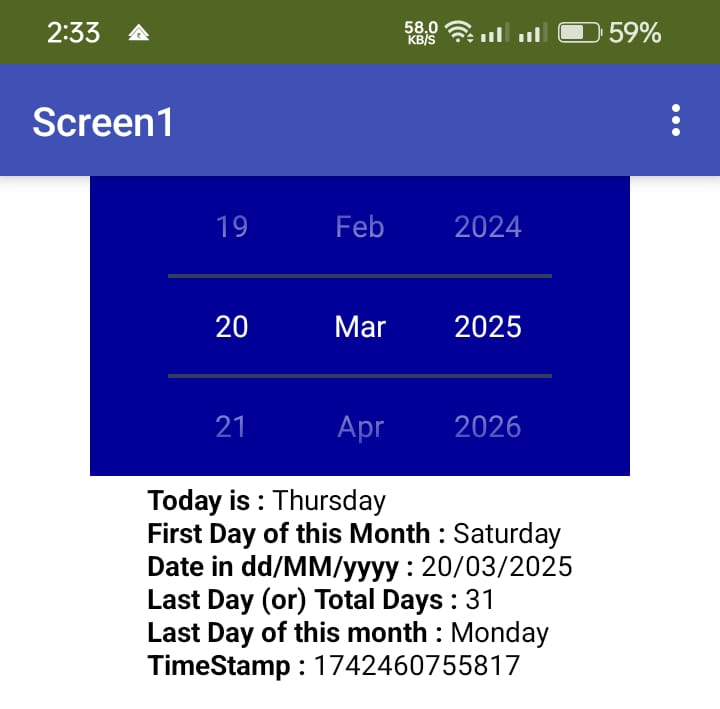
Automatic Text Color: The text color adjusts automatically when the background color is set to dark, ensuring optimal readability.
Event Handling: Trigger events when the date is changed, allowing developers to respond dynamically to user input.
Blocks Overview:
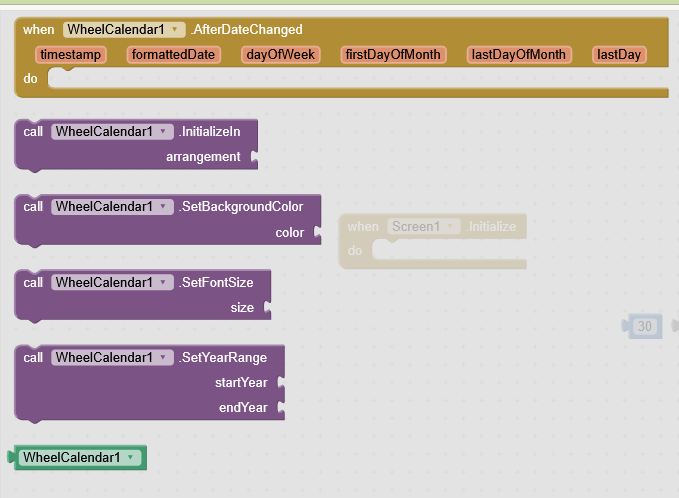
The Wheel Calendar Picker extension offers several blocks that allow developers to interact with and customize the calendar picker. Here is a breakdown of the available blocks and their functionality:
InitializeIn (Procedure)
Purpose: Initializes the calendar picker and adds it to an arrangement in your app.
Input:
hVArrangement: The arrangement (container) where the calendar picker will be placed.
Output: None (void procedure).
Usage: This block must be used to initialize the picker in an arrangement, setting it up for use in your app.
SetBackgroundColor (Function)
Purpose: Sets the background color of the calendar picker.
Input:
Color: A color value (e.g., 0xFFFFFFFF for white, 0xFF000000 for black).
Output: None (void procedure).
Usage: Use this block to change the background color of the calendar picker to match your app's design.
SetFontSize (Function)
Purpose: Sets the font size for the text within the calendar picker.
Input:
Size: An integer value representing the font size (e.g., 20 for font size 20).
Output: None (void procedure).
Usage: Use this block to modify the font size of the day, month, and year text.
SetYearRange (Function)
Purpose: Sets the range of years available for selection in the calendar picker.
Input:
StartYear: The starting year (e.g., 1900).
EndYear: The ending year (e.g., 2100).
Output: None (void procedure).
Usage: Use this block to define the minimum and maximum years users can select.
AfterDateChanged (Event)
Purpose: This event is triggered whenever the user changes the selected date (day, month, or year) using the picker.
Inputs:
TimeInMillis: The date in milliseconds (long value).
FormattedDate: The selected date formatted as a string in dd/MM/yyyy format.
DayOfWeek: The day of the week (e.g., "Monday", "Tuesday").
FirstDayOfMonth: The first day of the selected month (e.g., "Monday").
LastDayOfWeek: The last day of the selected month (e.g., "Sunday").
LastDay: The total number of days in the selected month (e.g., 28, 29, 30, or 31).
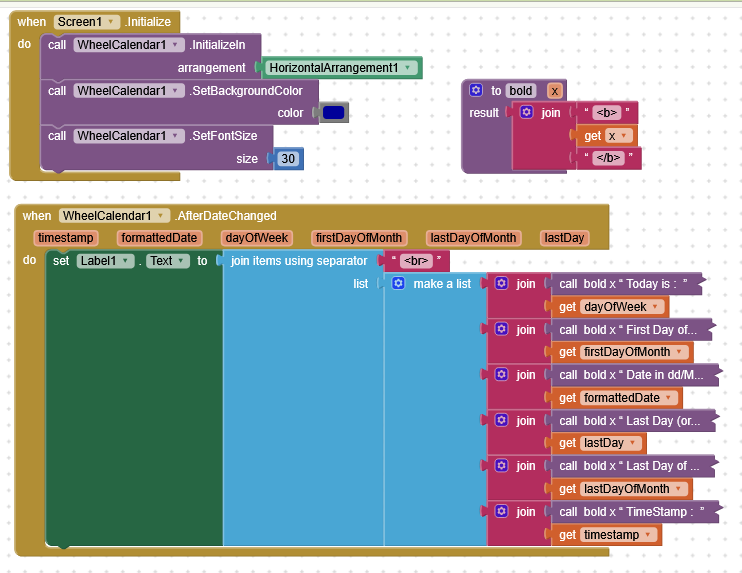
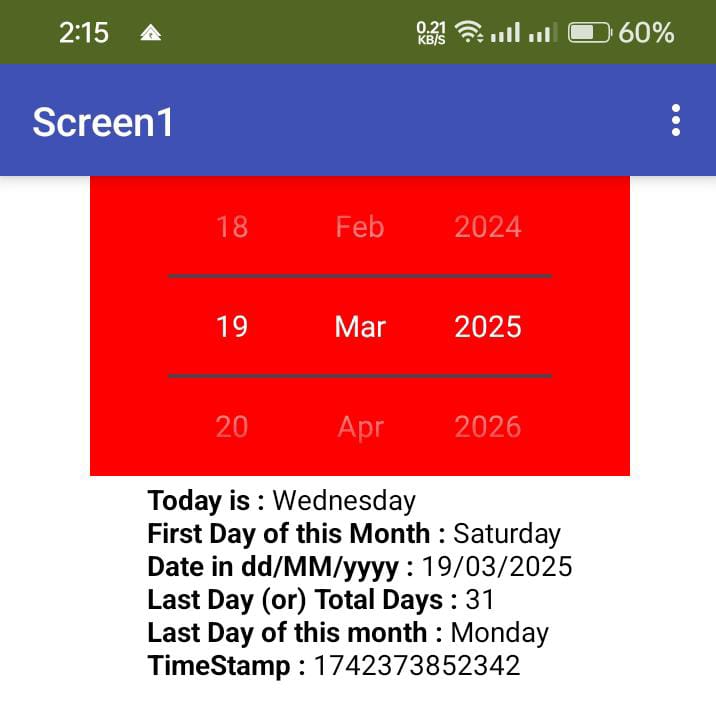
Usage: This event provides all the necessary information about the updated date. You can use it to trigger further actions, such as updating other parts of your app based on the selected date.
Yours is different, mine is different. I was trying it for last few months and unable to solve while setting the font colour. My previous code throws error so i took time. Few days back when i see your code i was surprised but i was convinced that youra is different.
May be . me too felt the same when i see your extenion. i wa thinking to give the sm for lat few month so stated to write code one after another but tarted to compiled and teted from mar 14th onwards. see this.
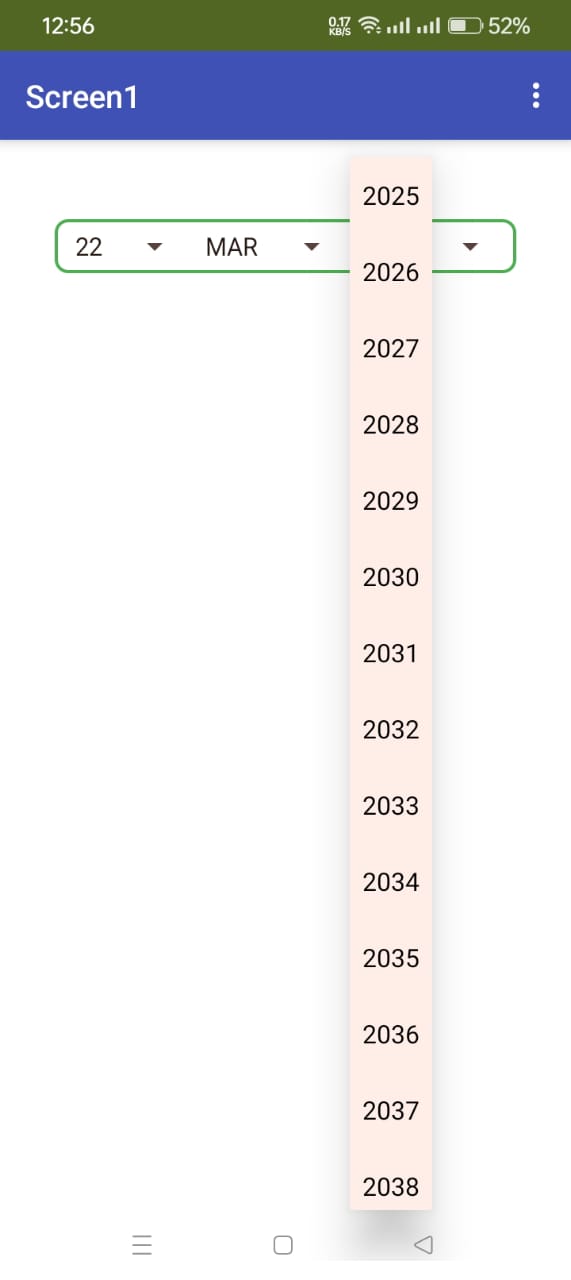
One more speciality of this spin calendar is either you can use custom HA or it will create dynamically at the end of existing native components visible in the screen..
Default year has been added (1900 to 2100)
In next version just like V1 it will be given to user preference for startYear and endYear
This looks good. Got me to thinking if it is possible to "generalise" a fork of this extension, so that one could provide the "spinner" with a list of items, instead of calendar items ?
Yea definitely it is possible. We can customize anything to come as list of itema in the spinner. I just use very basic simple code to generate numbers between 1 to 31 and 1900 to 2100.
Yea he already provided. And i had the feeling to give it in one row. But the wheel i am unable to do in java but react code it was easy to make. So i changed the design in v3 to give the calendar items in a single row and upon click it will give you list of items like number picker with all the needy items in OnDateChanged event listener. Still thinking what other forms can i make the calender to give.
Expectation : Upcoming version will support inbuild tinydb so user can store, retrieve notes. Existing infor will display on another vertical Arrangement without need of any other components
SpinCalendar V4.0 Extension - Description for Users
SpinCalendar is a powerful and customizable date picker with event management capabilities for your App Inventor apps. Unlike traditional calendars, it uses intuitive spinner controls for quick date selection - simply spin through days, months, and years. You can save events with flexible recurrence options like "every Monday to Friday for 3 months" or "every weekend forever", customize colors and text sizes, and navigate easily between months and years. All events are automatically saved and persist between app sessions. Perfect for building appointment schedulers, reminder apps, task managers, or any app that needs date-based event tracking with complex recurrence patterns!
SaveEventWithRecurrence - Complete Reference
Parameters Table
Parameter
Type
Required
Description
Examples
event
Text
Yes
The event description
"Team Meeting", "Birthday"
daysPattern
Text
Yes*
Days to repeat (*can be empty for daily/yearly)
"Mon,Wed,Fri", "Mon-Fri", "15", ""
repeatType
Text
Yes
How often to repeat
"daily", "weekly", "monthly", "yearly"
duration
Number
Yes
How long to repeat (0 = forever)
3, 6, 12, 0
durationUnit
Text
Yes
Unit of duration
"days", "weeks", "months", "years", "forever"
DaysPattern Formats
Format
Meaning
Example Usage
"Mon"
Single day
Every Monday
"Mon,Wed,Fri"
Specific days
Monday, Wednesday, Friday
"Mon-Fri"
Range
Monday through Friday
"Sat,Sun"
Weekend
Saturday and Sunday
"15"
Day of month
15th of each month
"" (empty)
Not needed
For daily or yearly recurrence
RepeatType Options
Value
Meaning
Used With
"daily"
Every day
daysPattern can be empty
"weekly"
Specific weekdays
daysPattern required
"monthly"
Specific day of month
daysPattern = day number (e.g., "15")
"yearly"
Same date every year
daysPattern can be empty
DurationUnit Options
Value
Meaning
Example
"days"
Repeat for X days
duration: 10, unit: "days"
"weeks"
Repeat for X weeks
duration: 4, unit: "weeks"
"months"
Repeat for X months
duration: 3, unit: "months"
"years"
Repeat for X years
duration: 1, unit: "years"
"forever"
Never stop
duration: 0, unit: "forever"
Usage Examples Table
Scenario
Event Text
Days Pattern
Repeat Type
Duration
Duration Unit
Work days for 3 months
"Office Work"
"Mon-Fri"
"weekly"
3
"months"
Weekends for 2 months
"Family Time"
"Sat,Sun"
"weekly"
2
"months"
Birthday forever
"John's Birthday"
""
"yearly"
0
"forever"
Gym twice weekly for 4 weeks
"Gym"
"Tue,Thu"
"weekly"
4
"weeks"
Bill payment for 6 months
"Electric Bill"
"15"
"monthly"
6
"months"
Daily medicine for 10 days
"Medicine"
""
"daily"
10
"days"
Team meeting forever
"Standup"
"Mon"
"weekly"
0
"forever"
Classes for 1 year
"Yoga Class"
"Wed,Fri"
"weekly"
1
"years"
Weekend getaway for 3 months
"Trip Planning"
"Sat"
"weekly"
3
"months"
Monthly review for 12 months
"Review"
"1"
"monthly"
12
"months"
Events (Triggered by Calendar)
Event
Parameters
Description
DateChanged
date (text), eventCount (number), millis (number), isLeapYear (boolean)
Fires when selected date changes
EventClicked
date (text), event (text), index (number)
Fires when an event is clicked
EventSaved
date (text), event (text), recurrence (text), totalEventsForDate (number)






 SaveEventWithRecurrence - Complete Reference
 Usage Examples Table
 Events (Triggered by Calendar)
 Quick Start Guide
 Notes & Tips