There was already an extension before, published on the Kodular Community for a similar extension. But this time I created my own extension where used a better library, plus you can download this without going through the hassle of logging in in their Community..Also I didn't know there was such an extension out there...
So today I present to you, MarkdownTools!
Description: Converts HTML to Markdown and vice versa (more features to be soon added)
BLOCKS
Methods
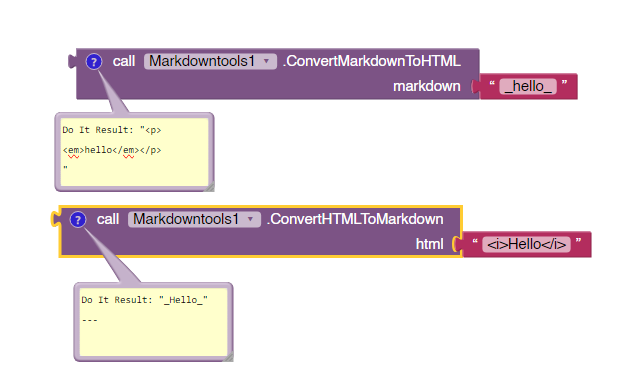
| ConvertHTMLToMarkdown | Converts HTML to Markdown and returns it as string.html | text |
| ConvertMarkdownToHTML | Converts Markdown to HTML and returns it as string.markdown | text |
| CreateHeading | Creates markdown heading from text.headingLevel | numbertext | text |
| CreateBoldText | Creates markdown bold text from plain text.text | text |
| CreateItalicText | Creates markdown italic text from plain text.text | text |
| CreateBlockquote | Creates markdown blockquote from text.text | text |
| CreateOrderedList | Creates markdown ordered list from text.listItems | listhtmlLineBreak | boolean |
| CreateUnorderedList | Creates markdown unordered list from text.listItems | listhtmlLineBreak | boolean |
| CreateCodeBlock | Creates markdown code block from text.text | text |
| CreateHorizontalRule | Creates markdown horizontal rule. |
| CreateHyperlink | Creates markdown hyperlink from URL and alt text. Alt text is optional.linkUrl | textlinkAltText | text |
| CreateImage | Creates markdown image from image link and image alt text.imgUrl | textimgAltText | text |
| CreateStrikethrough | Creates markdown strikethrough from text.text | text |
Example Output Result:
Libraries Used to make this extension:
First library needed this dependency: https://jsoup.org/
Download Link:
https://computerblade-official.github.io/posts/ai2ext/markdowntools.html#download
Second Download Link: com.puterblade.markdowntools.aix (626.8 KB)
Source Code:
[You are not allowed to redistribute it]
[I as the author of the extension give you permission to use it in Appathon projects (all years)]
Built using: Rush • A new and improved way of building extensions, thanks @shreyash.
Documentation generated with @vknow360's DocsGenerator app. I got it to know because @Kumaraswamy told me about it...
Thank you, please suggest me features and give me constructive feedback so I can improve this extension. Click the  button below if you like this extension!
I will add much more features when I get the time to do it...
Bye!