SchulteTable is a fast-paced cognitive training application built on MIT App Inventor.
Demo
All Blocks
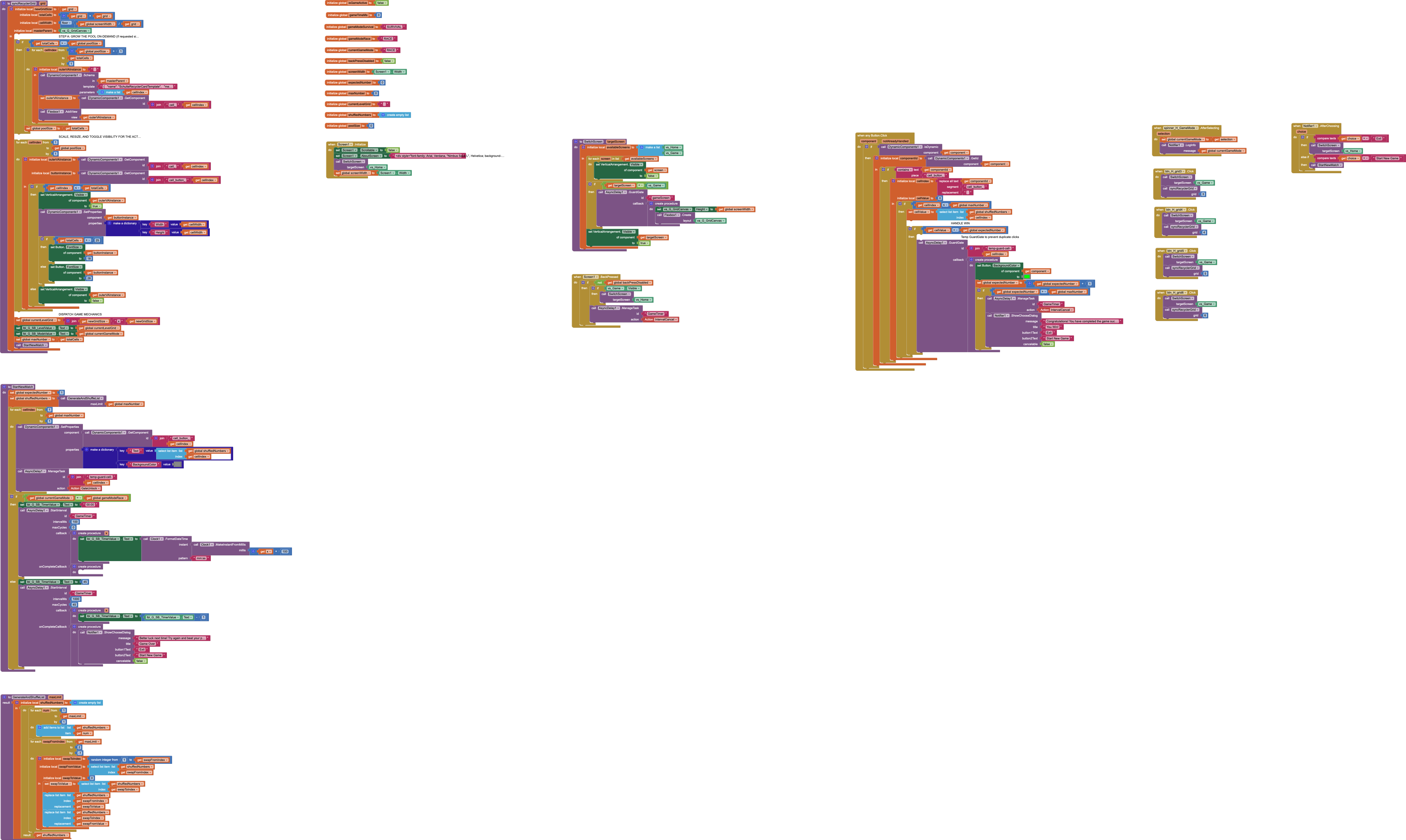
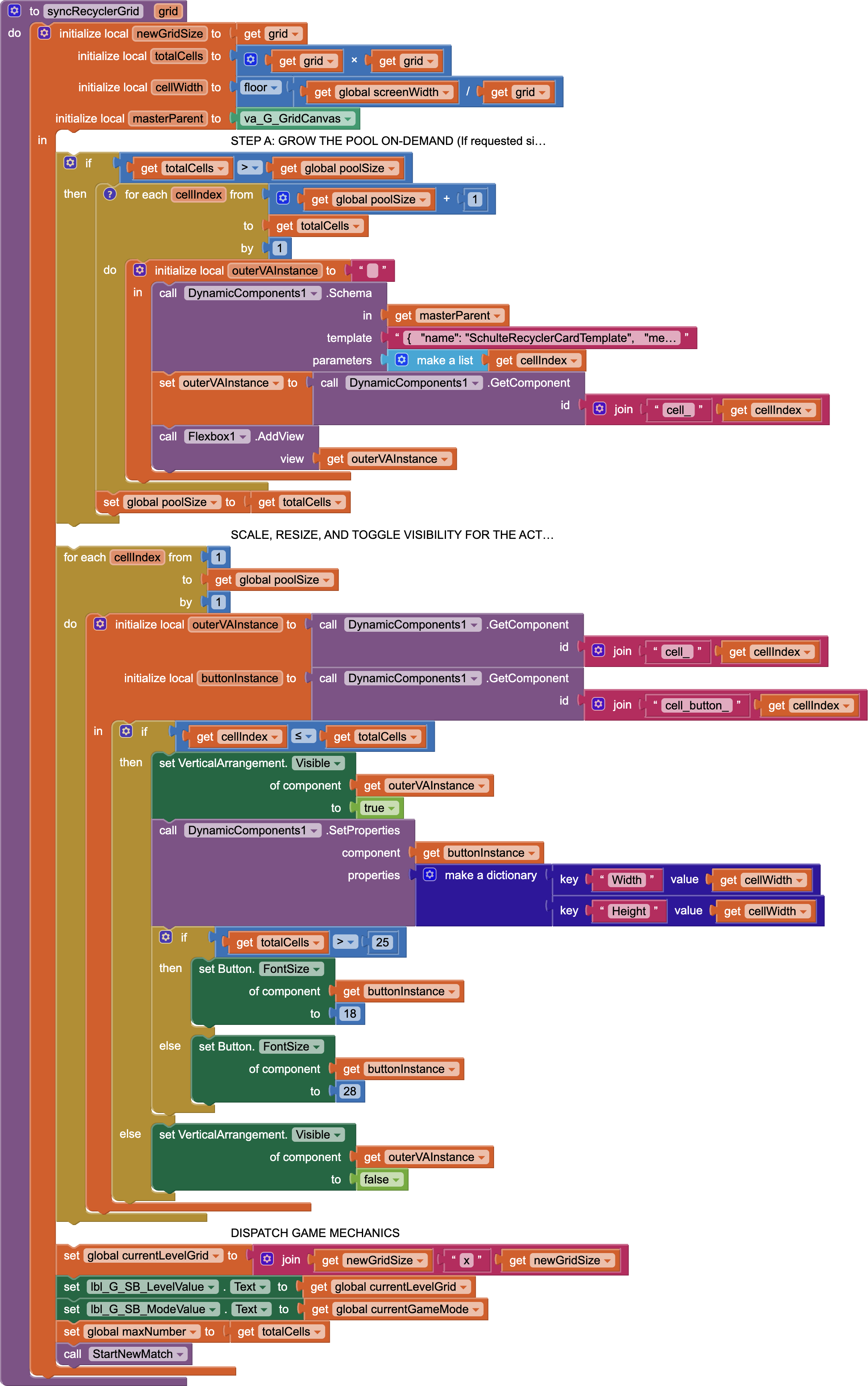
syncRecyclerGrid (Dynamic Recycler Allocation):
Generates structural layout instances on-demand, recycling existing nodes and updating layout dimensions smoothly without rebuilding views.
[Request Grid Size: N×N]
│
▼
┌───────────────────────────────────────┐
│ STEP A: Dynamic Pool Validation       │
│ Is Total Cells > Global Pool Size?    │
└──────────────────┬────────────────────┘
├─► YES: Instantly inflate missing nodes using schemas.
└─► NO : Skip inflation (Saves CPU cycles).
│
▼
┌───────────────────────────────────────┐
│ STEP B: Structural Hydration & Sizing │
│ Loop through Global Pool Size         │
└──────────────────┬────────────────────┘
├─► Index <= Total Cells ──► Set Visible = True, Compute Flex Width/Height
└─► Index > Total Cells  ──► Set Visible = False (Soft-delete to pool)
GenerateAndShuffleList:
Handles data generation and randomizes elements in memory without creating duplicate lists.
========================================================================
                 PHASE 1: LINEAR SEQUENCE GENERATION
========================================================================

  [ Create Empty List ]  ───►  Loop from 1 to maxLimit (Step +1)
                                      │
                                      ▼
                      Resulting 'shuffledNumbers' List:
                      ┌───┬───┬───┬───┬───┬───────┬───┐
        Index (1-based)│ 1 │ 2 │ 3 │ 4 │ 5 │  ...  │ N │
                      ├───┼───┼───┼───┼───┼───────┼───┤
        Stored Value   │ 1 │ 2 │ 3 │ 4 │ 5 │  ...  │ N │
                      └───┴───┴───┴───┴───┴───────┴───┘
                      (Allocated once, perfectly ordered)


========================================================================
               PHASE 2: IN-PLACE FISHER-YATES SHUFFLE
========================================================================

  The loop sets 'swapFromIndex' at the end of the list (N) and steps
  backward down to 2 (Step -1).

  EXAMPLE SNAPSHOT: Loop is currently at Index 5 (swapFromIndex = 5)

   Step A: Roll a random integer from 1 to 5.
           Let's say 'swapToInIndex' rolls a 2.

   Step B: Extract values into temporary local memory registers.
           ┌──────────────────────────────────────────────┐
           │ • swapFromValue = List[5] (Value: 5)          │
           │ • swapToValue   = List[2] (Value: 2)          │
           └──────────────────────────────────────────────┘

   Step C: Perform the atomic index swap.

                 ┌───────────────────────────────┐
                 │  [2] is written to Index 5   │
                 ▼                               │
         ┌───┬───────┬───┬───┬───────┐            │
   Index │ 1 │   2   │ 3 │ 4 │   5   │            │
         ├───┼───────┼───┼───┼───────┤            │
   Value │ 1 │   2   │ 3 │ 4 │   5   │            │
         └───┬───────┴───┰───┴───────┘            │
             │           ┃                        │
             │           ┗━━━━━━━━━━━━━━━━━━━━━━━━┛
             └───────────────────────────────────┐
                                                 ▼
                                  [5] is written to Index 2


   State After Single Swap:
   ┌───┬───────┬───┬───┬───────┐
   │ 1 │   5   │ 3 │ 4 │   2   │  <─── Index 5 is now locked!
   └───┴───────┴───┴───┴───────┘      The loop decrements to Index 4.
Asynchronous Guarded Lifecycle Loop
StartNewMatch & when any Button.Click
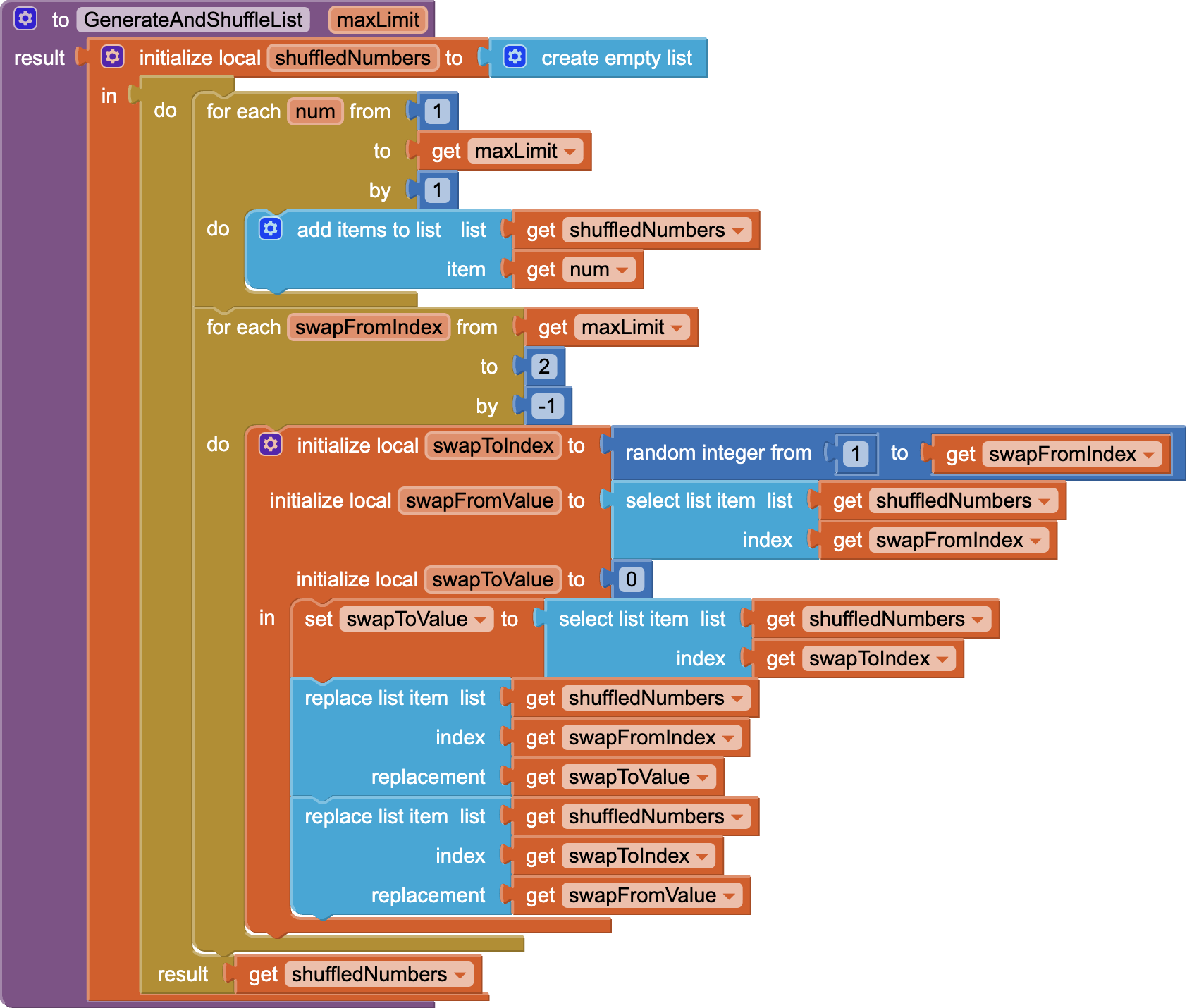
Runs isolated game timer threads and introduces non-blocking debounced interaction filters (GuardGate) to eradicate race conditions and double-click registration bugs.
MATCH INITIALIZATION
================================================================================
                        MATCH INITIALIZATION (StartNewMatch)
================================================================================

       [ Trigger StartNewMatch ]
                   │
                   ▼
       Initialize Tracking Pointer (expectedNumber = 1)
       Map Shuffled Numerical Values onto UI Grid Buttons
                   │
                   ▼
        Is Game Mode set to 'Race Mode'?
                   │
         ┌─────────┴─────────┐
         ▼ YES               ▼ NO (Survival Mode)
  ┌─────────────────┐ ┌───────────────────────────┐
  │ Reset to "00:00"│ │ Reset to "45"             │
  │ Async Timer:    │ │ Async Timer:              │
  │ Ticks @ 100ms   │ │ Ticks @ 1000ms (Max 45)   │
  └────────┬────────┘ └─────────────┬─────────────┘
           │                        │
           ▼                        ▼
  [Compute & Render]  [Decrement Display Counter]
  mm:ss on Main Thread   Loop complete -> Run Game Over
 Architectural Optimization: AsyncDelay vs. Native Clock
Used AsyncDelay extension instead of heavy native Clock components, ensuring smooth performance and preventing UI thread blocking during rapid grid updates.
 Dual-Mode Interval Routing
By moving away from standard monolithic millisecond counters, the app isolates two distinct interval engines utilizing the same background execution thread wrapper (id: "GameTimer").
1.  Race Mode (Time Attack)
Ticks every 1,000ms (1 second) to compute and display a classic Minutes:Seconds elapsed timer.
2.  Survival Mode (45s Countdown)
Ticks every 100ms (tenths of a second) to maintain high-precision countdown tracking, rendering fractional seconds (Minutes:Seconds.Tenths) smoothly without dropping frames.
// Clean lifecycle termination when the final matching sequence is met:
CALL AsyncDelay.ManageTask(id: "GameTimer", action: "IntervalCancel")
BUTTON INTERCEPTION
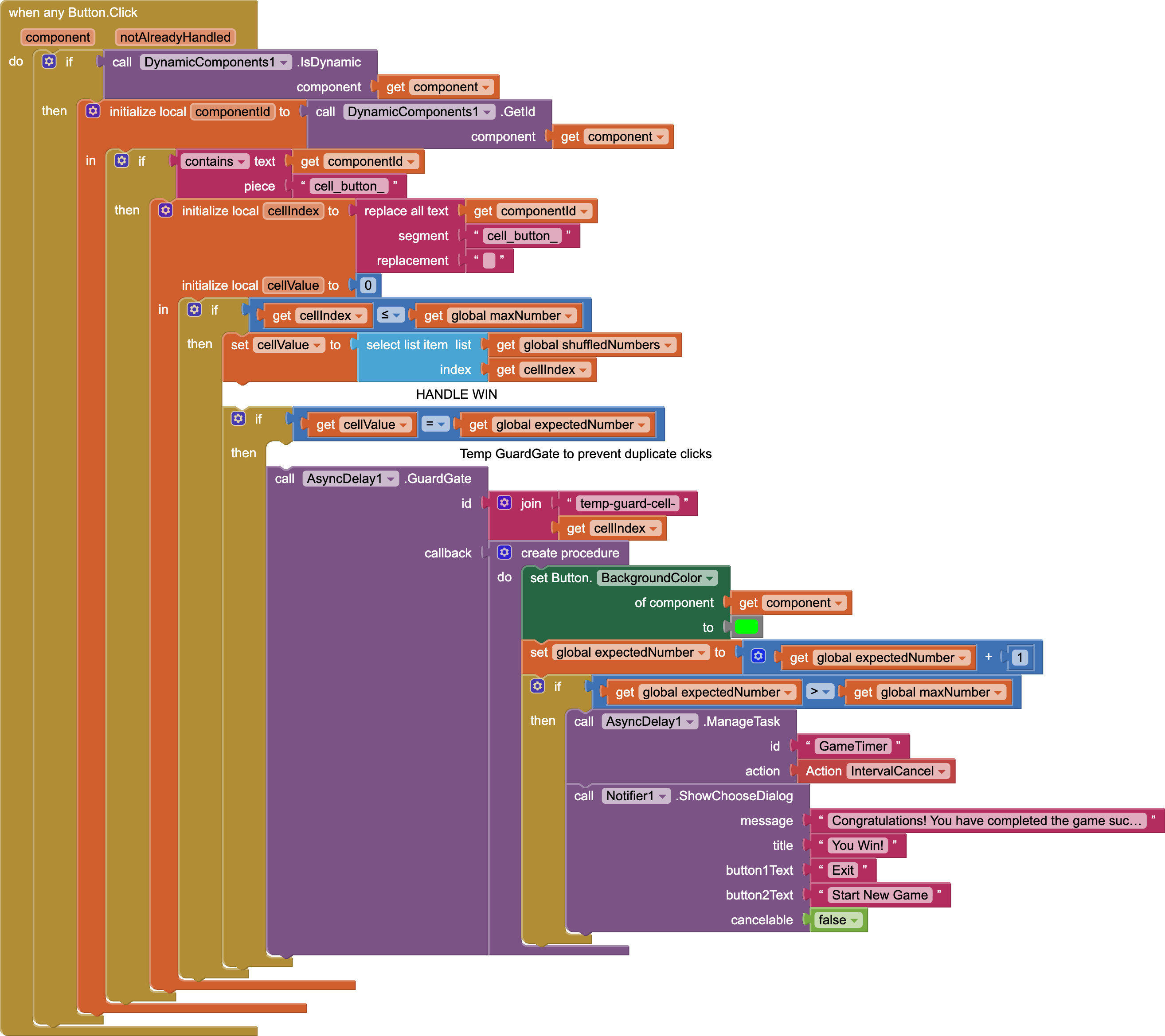
================================================================================
                   BUTTON INTERCEPTION (when any Button.Click)
================================================================================

                 [ User Taps A Grid Cell Button ]
                                │
                                ▼
                     Is Component dynamic?
                                │
                                ▼ YES
               Extract ID String & Stripped Index
               (e.g., "cell_button_14" ──► index = 14)
                                │
                                ▼
               Does Cell Value == global expectedNumber?
                                │
                                ▼ YES
             ┌─────────────────────────────────────┐
             │    AsyncDelay1.GuardGate Enters     │
             │   Target ID: "temp-guard-cell-14"   │
             └──────────────────┬──────────────────┘
                                │
             ┌──────────────────┴──────────────────┐
             ▼                                     ▼
    [ FIRST INSTANT TAP ]                [ MULTIPLE RAPID TAPS ]
   • Gate: UNLOCKED                     • Gate: LOCKED
   • Turn Button Green                  • Event Intercepted & Dropped
   • expectedNumber = expectedNumber + 1   • Zero State Corruption
             │
             ▼
    Is expectedNumber > maxLimit?
             │
             ▼ YES (Win State Reached)
   ┌──────────────────────────────────────┐
   │ 1. CALL AsyncDelay: "IntervalCancel" │ ──► Instantly Freezes
   │ 2. Pop "You Win!" Dialog Notification│     'GameTimer' Thread
   └──────────────────────────────────────┘
 Core Extensions Used
- Dynamic Components – Utilized for structural recycler pool rendering and view recycling.
- Async Delay – A custom-tailored background optimization framework for non-blocking state loops.
- Flexbox – Handles complex, responsive grid layout child arrangements seamlessly.
 Open Source & Contributions
SchulteTable.aia (427.6 KB)
Feel free to ask questions about the game
Developer: Hridoy
Architecture Pattern: Dynamic Recycler Matrix Pool