ChatFlow: The Complete Open-Source Chat Extension for MIT App Inventor
Transform Your App Ideas into Beautiful Chat Applications—All with Simple Blocks!
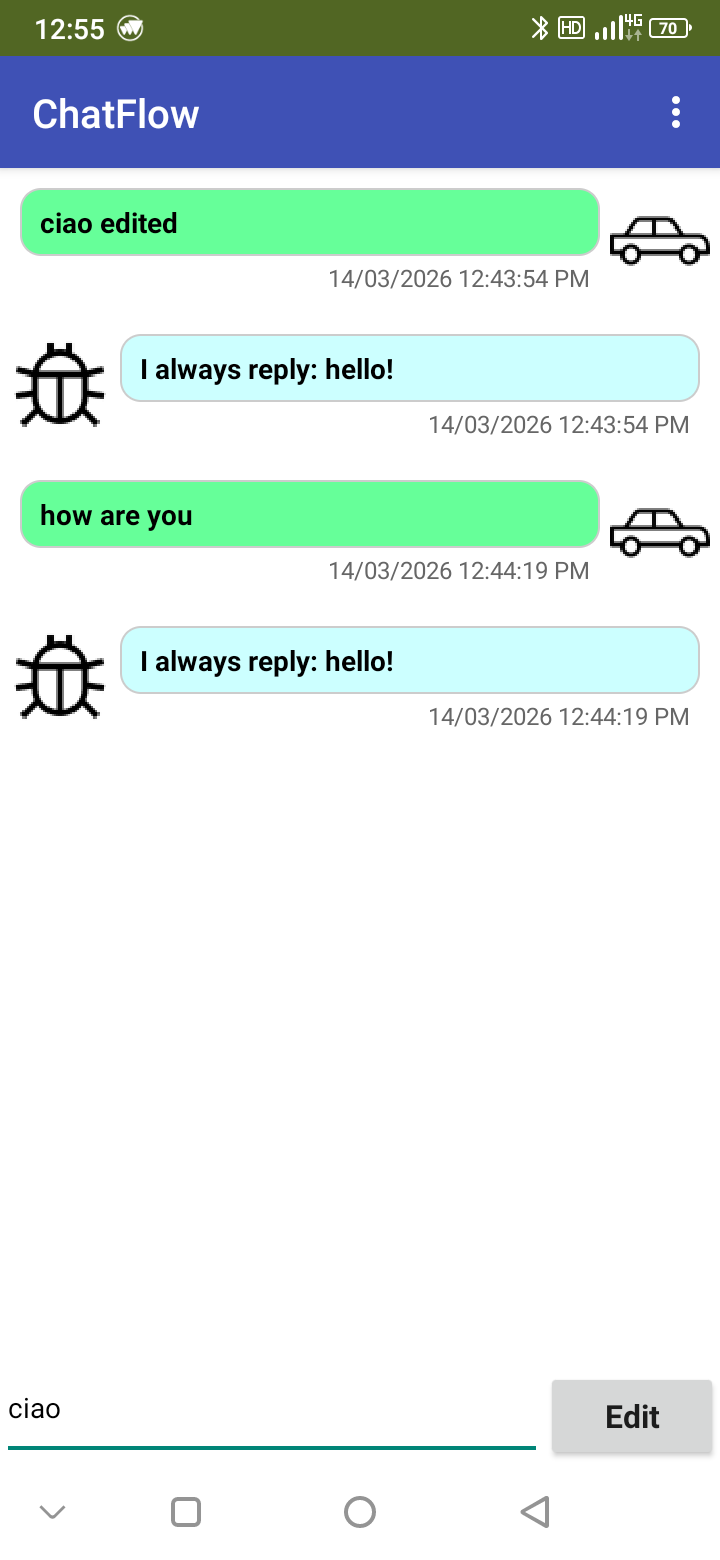
ChatFlow is a free, open-source extension block for MIT App Inventor that lets you build professional chat screens, just like the ones in popular messaging apps, using simple drag-and-drop blocks. No coding experience needed!
 What Makes ChatFlow Special?
It's Open Source & Free Forever!
- Full Transparency: The complete project code is available for everyone to see, learn from, and improve.
- Community-Driven: Developed for and by the App Inventor community.
- Visit & Contribute: Explore the code, report issues, or suggest features on our GitHub repository:
GitHub - iagolirapasssos/Chat-Flow · GitHub
Build Real Chat Apps with Simple Blocks
Imagine creating:
- A group chat app for friends with emoji reactions
- A customer support bot with formatted answers
- A story app where characters "talk" with images and styled text
- Any project where beautiful, interactive conversation is key!
 Key Features (Made Simple with Blocks)
1. Beautiful Messages Made Easy
- Left/Right Alignment: Show messages from different people (like user vs. bot)
- Add Pictures: Include profile photos and images inside the chat
- Customize Everything: Change colors, text size, and bubble shape for each message
- Show Timestamps: Add the time a message was sent
2. Magic Text Formatting (Markdown)
Write simple symbols, and ChatFlow makes text look amazing:
**text**becomes bold text*text*becomes italic text- Create lists, links, and more with easy symbols
- Turn this feature ON/OFF with one block
3. Interactive Chat Experience
- Tap Messages: Make things happen when users tap message bubbles
- Zoom Images: Open pictures in full screen with a tap
- Add Reactions: Let users tap emojis (


 ) on messages
 - Edit Messages: Change or delete messages after sending
- Copy Text: Users can copy any message with a simple menu
4. Save & Manage Conversations
- Export Chats: Save entire conversations as files
- Count Messages: See how many messages are in the chat
- Find Messages: Check if specific messages exist
- Clear Chat: Wipe the screen clean with one block
 Getting Started is Easy!
- Get the Extension: Download
ChatFlow.aixfrom our GitHub releases page - Import to App Inventor: Go to Projects → Import extension (.aix)
- Drag & Drop: Find "ChatFlow" in the Palette and add it to your Screen
- Set Up Chat Area: Use a
HorizontalArrangementorVerticalArrangement, then connect it with theInitializeblock - Start Chatting! Use the
AddMessageblock to create your first message
 Example: Building a Simple Chat
Adding a welcome message from a bot:
when Screen1.Initialize
do
  call ChatFlow1.Initialize
    container: HorizontalArrangement1
  call ChatFlow1.AddMessage
    message: "Hello! I'm your assistant. How can I help you today?"
    isUser: false
    backgroundColor: light blue
    fontColor: black
    fontSize: 16
Letting users send messages:
when ButtonSend.Click
do
  call ChatFlow1.AddMessage
    message: TextBoxMessage.Text
    isUser: true
    backgroundColor: light green
  set TextBoxMessage.Text to ""
 Useful Block Tools
GenerateMessageId→ Creates unique names for messagesCopyToClipboard→ Lets users copy message textShowFullScreenImage→ Opens images in full-screen viewDownloadImageToGallery→ Saves pictures to the phoneHexColorToInt→ Helps use custom colors (like #FF8800)
 When Things Happen (Events)
ChatFlow tells your app about user interactions:
MessageClicked→ User tapped a message bubbleImageClicked→ User tapped a chat imageReactionIconClicked→ User tapped a reaction emojiMessageAdded→ New message appears on screen
 Why Choose ChatFlow?
- 100% Free & Open: No hidden costs, completely transparent
- Block-Based Power: Professional features without complex code
- Real App Feel: Makes your project look like a modern chat app
- Total Control: Customize every aspect of your chat experience
- Community Support: Get help and share ideas with other users
Perfect For: School projects, chat apps, interactive stories, support systems, community forums, and creative communication projects!
Specifications
 Package: com.bosonshiggs.chatflow
 Size: 518,16 KB
 Minimum API Level: 14
 Updated On: 2026-02-09T03:00:00Z
 Built & documented using: FAST v5.5.0
Events:
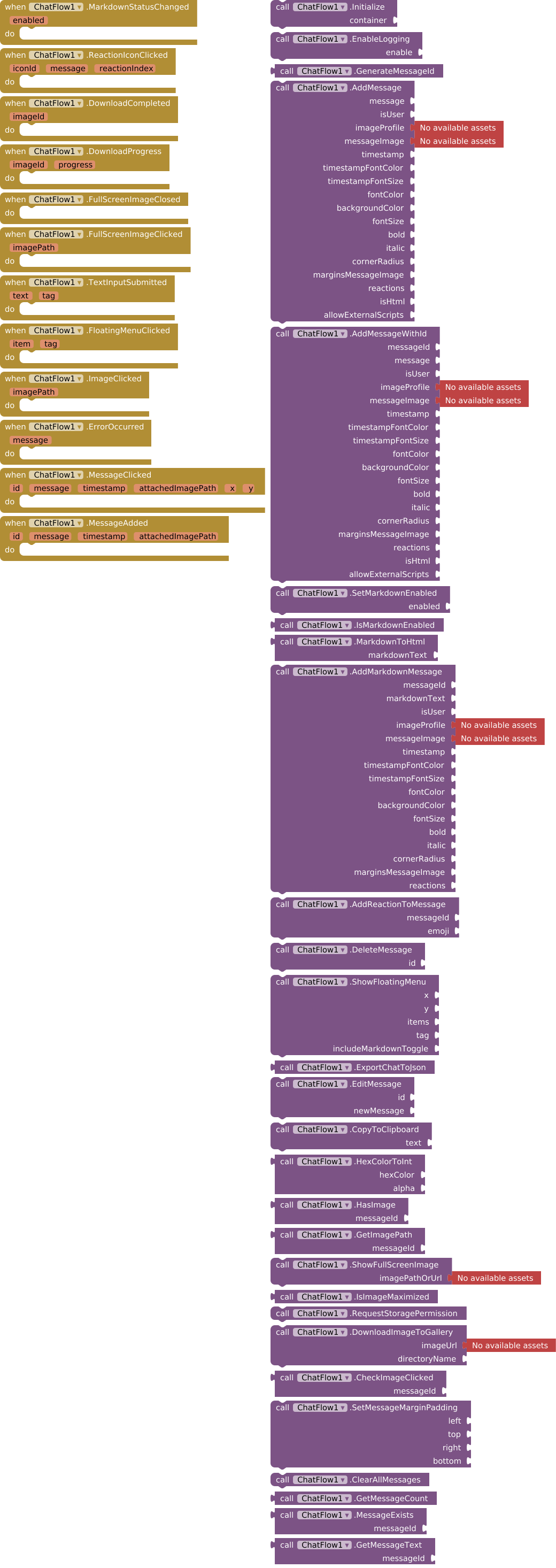
ChatFlow has total 12 events.
1. MarkdownStatusChanged
Triggered when Markdown support is enabled or disabled.
| Parameter | Type |
|---|---|
| enabled | boolean |
2. ReactionIconClicked
Triggered when a reaction icon is clicked.
| Parameter | Type |
|---|---|
| iconId | text |
| message | text |
| reactionIndex | number |
3. DownloadCompleted
Triggered when the image download is completed.
| Parameter | Type |
|---|---|
| imageId | text |
4. DownloadProgress
Triggered to show download progress from 0 to 100.
| Parameter | Type |
|---|---|
| imageId | text |
| progress | number |
5. FullScreenImageClosed
Triggered when the fullscreen image is closed by clicking outside.
6. FullScreenImageClicked
Triggered when the fullscreen image is clicked.
| Parameter | Type |
|---|---|
| imagePath | text |
7. TextInputSubmitted
Event triggered when the user submits the entered text.
| Parameter | Type |
|---|---|
| text | text |
| tag | text |
8. FloatingMenuClicked
Triggered when a floating menu item is selected.
| Parameter | Type |
|---|---|
| item | text |
| tag | text |
9. ImageClicked
Triggered when an attached image is clicked.
| Parameter | Type |
|---|---|
| imagePath | text |
10. ErrorOccurred
Triggered when an error or log message occurs.
| Parameter | Type |
|---|---|
| message | text |
11. MessageClicked
Triggered when a message is clicked.
| Parameter | Type |
|---|---|
| id | text |
| message | text |
| timestamp | text |
| attachedImagePath | text |
| x | number |
| y | number |
12. MessageAdded
Triggered when a message is added.
| Parameter | Type |
|---|---|
| id | text |
| message | text |
| timestamp | text |
| attachedImagePath | text |
Methods :
ChatFlow has total 28 methods.
1. Initialize
Initializes the Chat View within a container, such as a HorizontalArrangement or VerticalArrangement.
| Parameter | Type |
|---|---|
| container | component |
2. EnableLogging
Enables or disables logging mode.
| Parameter | Type |
|---|---|
| enable | boolean |
3. GenerateMessageId
Generates and returns a unique ID for messages. Returns a UUID string.
- Return type:
text
4. AddMessage
Adds a message to the Chat View with styling options.
| Parameter | Type |
|---|---|
| message | text |
| isUser | boolean |
| imageProfile | text (asset blocks ) |
| messageImage | text (asset block s) |
| timestamp | text |
| timestampFontColor | number |
| timestampFontSize | number |
| fontColor | number |
| backgroundColor | number |
| fontSize | number |
| bold | boolean |
| italic | boolean |
| cornerRadius | number |
| marginsMessageImage | list |
| reactions | list |
| isHtml | boolean |
| allowExternalScripts | boolean |
5. AddMessageWithId
Adds a message to the Chat View with styling options and a custom ID. If ID is empty, generates a new one.
| Parameter | Type |
|---|---|
| messageId | text |
| message | text |
| isUser | boolean |
| imageProfile | text (asset bloc ks) |
| messageImage | text (asset blo cks) |
| timestamp | text |
| timestampFontColor | number |
| timestampFontSize | number |
| fontColor | number |
| backgroundColor | number |
| fontSize | number |
| bold | boolean |
| italic | boolean |
| cornerRadius | number |
| marginsMessageImage | list |
| reactions | list |
| isHtml | boolean |
| allowExternalScripts | boolean |
6. SetMarkdownEnabled
Enables or disables Markdown support for all messages. When enabled, text will be parsed as Markdown.
| Parameter | Type |
|---|---|
| enabled | boolean |
7. IsMarkdownEnabled
Returns true if Markdown support is currently enabled.
- Return type:
boolean
8. MarkdownToHtml
Converts Markdown text to HTML. Useful for preview or other purposes.
- Return type:
text
| Parameter | Type |
|---|---|
| markdownText | text |
9. AddMarkdownMessage
Processes and adds a Markdown message directly.
| Parameter | Type |
|---|---|
| messageId | text |
| markdownText | text |
| isUser | boolean |
| imageProfile | text (asset bl ocks) |
| messageImage | text (asset b locks) |
| timestamp | text |
| timestampFontColor | number |
| timestampFontSize | number |
| fontColor | number |
| backgroundColor | number |
| fontSize | number |
| bold | boolean |
| italic | boolean |
| cornerRadius | number |
| marginsMessageImage | list |
| reactions | list |
10. AddReactionToMessage
Adds a reaction icon to a specific message by its ID and updates the view.
| Parameter | Type |
|---|---|
| messageId | text |
| emoji | text |
11. DeleteMessage
Deletes a message by its ID and updates the Chat View.
| Parameter | Type |
|---|---|
| id | text |
12. ShowFloatingMenu
Displays a floating menu at X and Y coordinates with a list of options and a tag. Optionally includes Markdown toggle.
| Parameter | Type |
|---|---|
| x | number |
| y | number |
| items | list |
| tag | text |
| includeMarkdownToggle | boolean |
13. ExportChatToJson
Exports the entire conversation in JSON format.
- Return type:
text
14. EditMessage
Edits a message by ID.
| Parameter | Type |
|---|---|
| id | text |
| newMessage | text |
15. CopyToClipboard
Copies text to the clipboard.
| Parameter | Type |
|---|---|
| text | text |
16. HexColorToInt
Converts a hexadecimal color string with alpha value to an int color for App Inventor.
- Return type:
number
| Parameter | Type |
|---|---|
| hexColor | text |
| alpha | number |
17. HasImage
Checks if a message contains an attached image.
- Return type:
boolean
| Parameter | Type |
|---|---|
| messageId | text |
18. GetImagePath
Gets the image path for a message if it exists.
- Return type:
text
| Parameter | Type |
|---|---|
| messageId | text |
19. ShowFullScreenImage
Displays an image in full screen with zoom control and a close button.
| Parameter | Type |
|---|---|
| imagePathOrUrl | text (asset blocks) |
20. IsImageMaximized
Returns true if an image is currently maximized, false otherwise.
- Return type:
boolean
21. RequestStoragePermission
Requests storage permissions required to download an image.
22. DownloadImageToGallery
Downloads an image to a specified gallery directory and updates with progress events.
| Parameter | Type |
|---|---|
| imageUrl | text (asset blocks) |
| directoryName | text |
23. CheckImageClicked
Returns the path of an attached image if clicked, otherwise returns an empty string.
- Return type:
text
| Parameter | Type |
|---|---|
| messageId | text |
24. SetMessageMarginPadding
Sets message margin and padding.
| Parameter | Type |
|---|---|
| left | number |
| top | number |
| right | number |
| bottom | number |
25. ClearAllMessages
Clears all messages from the chat view.
26. GetMessageCount
Gets the total count of messages in the chat.
- Return type:
number
27. MessageExists
Checks if a message with the given ID exists.
- Return type:
boolean
| Parameter | Type |
|---|---|
| messageId | text |
28. GetMessageText
Gets the message text by ID.
- Return type:
text
| Parameter | Type |
|---|---|
| messageId | text |
Files
AIX: com.bosonshiggs.chatflow.aix (472.0 KB)
AIA: ChatFlow.aia (475.4 KB)
Examples: [F/OS] OpenAI Agent Extension for MIT App Inventor
Deps
- core-4.6.2.aar
- commonmark-0.17.0.jar
Ready to Create Amazing Chat Experiences?
Join our growing community! Download ChatFlow, try the examples, and share what you build. Visit our GitHub to stay updated and contribute:
Support My Work
If my projects, tutorials, extensions, components, or other resources have been useful to you, consider supporting my work with a voluntary contribution.
Your support helps me continue creating, maintaining, and sharing free resources with the community.
 Click here to support my work: Click here to support my work
Thank you for your support!
Build. Share. Chat. All with the power of open-source blocks!