With App Inventor you can use
- the Map component to load a map (It uses OpenStreetMap map tiles).
- use this Block to touch on a point on the map and capture its coordinates to a Map Marker (what you call a 'Beacon')
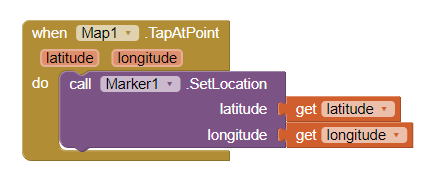
-
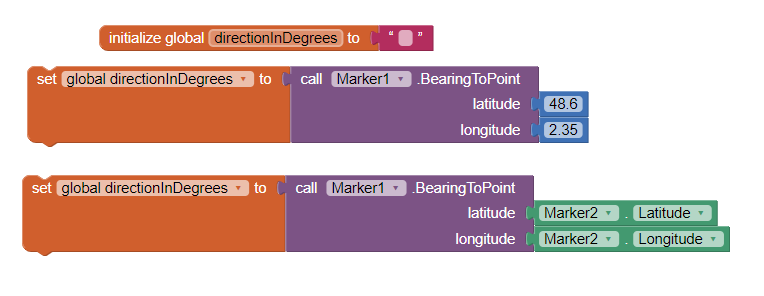
to show direction to other lat,lon coordinates (upper image); to other Marker (lower image)
-
a complex example of something similar National Park Tutorial (Markers) updated
-
a Beginner
 Here are some resources to help you learn to use the AI2 tools. A very good way to learn App Inventor is to read the free Inventor's Manual here in the AI2 free online eBook App Inventor 2 Book: Create Your Own Android Apps ... the links are at the bottom of the Web page. The book 'teaches' users how to program with AI2 blocks.
There is a free programming course here Course In A Box and the aia files for the projects in the book are here: App Inventor 2 Book: Create Your Own Android Apps
How to do a lot of basic things with App Inventor are described here: How do you...? .
Also look here App inventor español. Offline. Tutorial. Ejemplos. Instalación. Códigos. Juegos. Curso gratis de App inventor. and here Tutorials for more tutorials including Imagnity.com List Tutorial, Mirrored - @Saj
Learn about components Component Reference
and visit the Library The MIT App Inventor Library: Documentation & Support Help>Library on the MENU