This is taken from the Extensions category, where a new developer learned the hard way to read the vibe generated code for imaginary back end servers.
EDIT: [Since the problem was fixed, this edit is now removed.]
So, we've always ran into the same problem of not having a block for something once in our lives or so.
I've created PlainKotlin, a custom extension (made with vibe-coding  ) that allows you to insert Kotlin into your app.
PlainKotlinFIXED.aix (23.4 KB)
## Overview of Blocks:
whenPlainKotlin.ExecutionFailed: Does something when Kotlin execution fails.whenPlainKotlin.ExecutionFinished: Same asExecutionFailed, but does something if execution finishes instead.callPlainKotlin.RunRawKotlinCode: Runs your Custom Kotlin Code.PlainKotlin: Reporter Block for PlainKotlin.
PlainKotlin's Blocks

Example Usage:
PlainKotlin_ExampleApp_FIXED.aia (24.1 KB)
OR
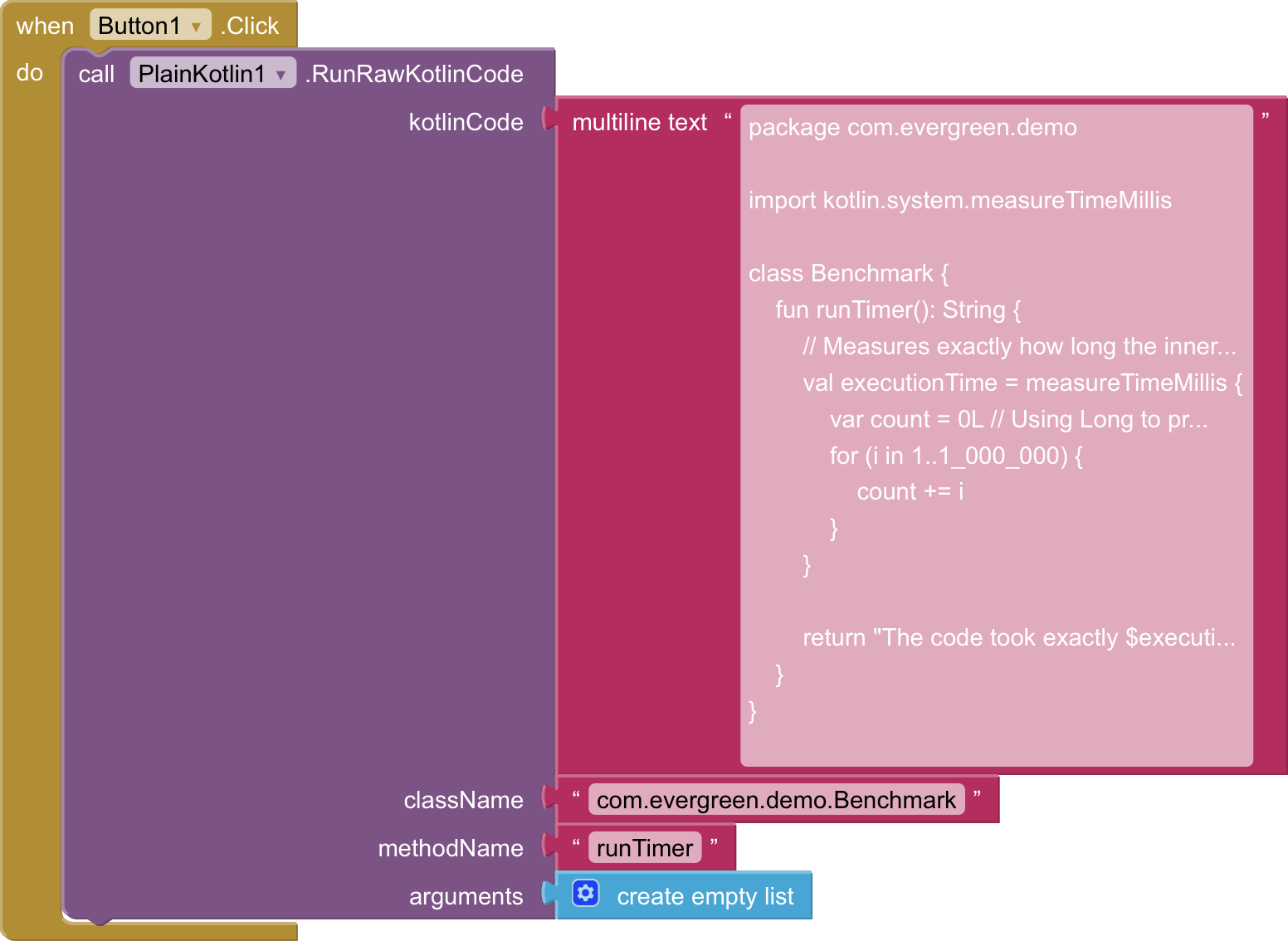
This PlainKotlin use example solves a classic of the limitations of App Inventor blocks: It can't measure the execution time of code down to the milliseconds/nanoseconds to see how fast it runs.
Even the Clock component just updates in coarse intervals!
Any other Custom Kotlin-related things?
I'm happy to accept them.
AppInventor Blocks?
Example Usage ?
(Java alternative ? )
Ok, I'll edit this to fit your standards.
EDIT:
I've finished the edited version. Please take a look.
Please provide also a screenshot of relevant blocks including the Kotlin code for those who do not want to import the aia file to see how it works
Taifun
Please list and describe all available blocks
Taifun
Taifun, I can't.
Since my post was made too long ago, It cannot be edited or deleted anymore--Not even by me!
Also, not to be impatient, but when is this topic gonna be relisted?
Your trust level was new user.
please try again,
I changed your user settings, you are now trust level basic user.
Taifun
I compiled your example into an APK and tested it in the Companion app, but the button doesn't respond. I still don't understand how this extension works or what it can do. How do I interact with other components, and how do I get feedback from the Kotlin code? What are the function's other inputs used for? On which version of Android did you test this extension?
@Taifun
Nope. I still can't.
Like I said before, now that this topic's been here long enough, I can't edit or delete it.
I vibe-coded this (), so I'm still figuring out what AI Mode just created.
So, we have an extension whose operation even the author doesn't understand? We can't publish the extension because we don't know if it actually works. Kotlin code cannot be executed without compilation. How do you compile the code?
@Patryk_F
Apparently your Kotlin must have a Package and Class (socket "className"), a function (socket "methodName") and some optional arguments (socket "arguments").
I'm still figuring out if these are optional depending on the code, so just take the above as mandatory for now :P.
If the code was generated by AI, you can post it here. We can then tell you whether it works and how it works.
ummm... here... (EDITED)
package com.evergreen.plainkotlin;

import android.content.Context;
import android.os.Handler;
import com.google.appinventor.components.runtime.util.AsynchUtil;
import android.os.Looper;
import com.google.appinventor.components.annotations.*;
import com.google.appinventor.components.runtime.*;
import com.google.appinventor.components.common.*;
import com.google.appinventor.components.runtime.util.YailList;

import java.io.BufferedInputStream;
import java.io.File;
import java.io.FileOutputStream;
import java.io.InputStream;
import java.io.OutputStream;
import java.net.HttpURLConnection;
import java.net.URL;
import java.lang.reflect.Method;
import java.lang.reflect.Modifier;
import dalvik.system.DexClassLoader;

@DesignerComponent(
    version = 4,
    description = "PlainKotlin extension to compile and execute raw Kotlin strings dynamically as statement blocks.",
    category = ComponentCategory.EXTENSION,
    nonVisible = true,
    iconName = "aiwebres/icon.webp"
)
@SimpleObject(external = true)
@UsesPermissions(permissionNames = "android.permission.INTERNET, android.permission.WRITE_EXTERNAL_STORAGE, android.permission.READ_EXTERNAL_STORAGE")
public class PlainKotlin extends AndroidNonvisibleComponent {

    private final Context context;
    private final Handler mainHandler;
    private final String COMPILER_API_URL = "https://your-kotlin-compiler-backend.com";

    public PlainKotlin(ComponentContainer container) {
        super(container.$form());
        this.context = container.$context();
        this.mainHandler = new Handler(Looper.getMainLooper());
    }

    /**
     * Statement Block: Compiles a raw Kotlin string and runs it in the background.
     * By changing the return type to void, this becomes a regular top-to-bottom puzzle piece.
     */
    @SimpleFunction(description = "Compiles and runs Kotlin code from a text block. Results are sent to the Finished event.")
    public void RunRawKotlinCode(final String kotlinCode, final String className, final String methodName, final YailList arguments) {
        // Run network compilation and dynamic loading on a background thread to prevent UI freezing
        AsynchUtil.runAsynchronously(new Runnable() {
            @Override
            public void run() {
                try {
                    File dexFile = compileCodeRemote(kotlinCode);
                    if (dexFile == null || !dexFile.exists()) {
                        postError("Compilation failed or could not fetch DEX file.");
                        return;
                    }

                    File optimizedDexOutputPath = context.getCodeCacheDir();
                    DexClassLoader dexClassLoader = new DexClassLoader(
                        dexFile.getAbsolutePath(),
                        optimizedDexOutputPath.getAbsolutePath(),
                        null,
                        context.getClassLoader()
                    );

                    Class<?> clazz = dexClassLoader.loadClass(className);
                    Object[] argsArray = arguments.toArray();

                    Method targetMethod = null;
                    for (Method method : clazz.getMethods()) {
                        if (method.getName().equals(methodName) && method.getParameterTypes().length == argsArray.length) {
                            targetMethod = method;
                            break;
                        }
                    }

                    if (targetMethod == null) {
                        postError("Method " + methodName + " with " + argsArray.length + " parameters not found.");
                        return;
                    }

                    Object instance = null;
                    if (!Modifier.isStatic(targetMethod.getModifiers())) {
                        instance = clazz.getDeclaredConstructor().newInstance();
                    }

                    final Object result = targetMethod.invoke(instance, argsArray);

                    // Send successful result back to the main UI thread
                    mainHandler.post(new Runnable() {
                        @Override
                        public void run() {
                            ExecutionFinished(result != null ? result.toString() : "Success");
                        }
                    });

                } catch (final Exception e) {
                    postError("Execution Error: " + e.getMessage());
                }
            }
        });
    }

    /**
     * Event Block: Triggered automatically when the Kotlin code finishes executing.
     */
    @SimpleEvent(description = "Triggered when the Kotlin code execution completes successfully.")
    public void ExecutionFinished(String result) {
        EventDispatcher.dispatchEvent(this, "ExecutionFinished", result);
    }

    /**
     * Event Block: Triggered if something goes wrong during compilation or execution.
     */
    @SimpleEvent(description = "Triggered when an error occurs during compilation or execution.")
    public void ExecutionFailed(String errorMessage) {
        EventDispatcher.dispatchEvent(this, "ExecutionFailed", errorMessage);
    }

    private void postError(final String message) {
        mainHandler.post(new Runnable() {
            @Override
            public void run() {
                ExecutionFailed(message);
            }
        });
    }

    private File compileCodeRemote(String sourceCode) throws Exception {
        URL url = new URL(COMPILER_API_URL);
        HttpURLConnection conn = (HttpURLConnection) url.openConnection();
        conn.setRequestMethod("POST");
        conn.setRequestProperty("Content-Type", "text/plain");
        conn.setDoOutput(true);

        OutputStream os = conn.getOutputStream();
        os.write(sourceCode.getBytes("UTF-8"));
        os.flush();
        os.close();

        if (conn.getResponseCode() == HttpURLConnection.HTTP_OK) {
            File outputDir = context.getCacheDir();
            File dexFile = File.createTempFile("dynamic_kotlin", ".dex", outputDir);

            InputStream is = new BufferedInputStream(conn.getInputStream());
            FileOutputStream fos = new FileOutputStream(dexFile);
            byte[] buffer = new byte[4096];
            int len;
            while ((len = is.read(buffer)) != -1) {
                fos.write(buffer, 0, len);
            }
            fos.close();
            is.close();
            return dexFile;
        }
        return null;
    }
}
This topic on an extension meant to be an easy way to get custom kotlin into your app... seems to be getting funky real quick.
We do not publish suspicious or unusual extensions. Your extension uses an external compilation server: https://your-kotlin-compiler-backend.com.
Is this your server? Is it actually running? Based on my tests, the extension doesn't work; it returns no result. Also, starting with Android 14, DEX files loaded into the DEX loader must have the read-only flag set. The AI generated extension code for you that might work—provided you’ve actually launched a compilation server at the address mentioned above.
Yes, sorry, you need trust level 2 - member to be able to edit your own posts.
I now changed your user settings accordingly. Please try again.
Taifun
The domain “your-kotlin-compiler-backend.com” does not exist…( as said in the note you should provide a valid one )
Oops, I think that was supposed to be a placeholder. Google's AI Mode apparently leaves blanks for me to fill in for things like .aix JSON.
He created an extension for you that should work after a few minor tweaks. However, you still need a build server to complete the setup. I’m not sure if ready-made servers like that exist... You’d probably have to build one yourself—purchase hosting and a domain, and write the code for the build process. I think AI could even generate the server code itself.