@TIMAI2 @Patryk_F @Taifun @davidefa
Dear all, if you're not asleep, seeing that it's 12:17 AM where I am...
I've made the finished topic desc, and I put a warning label (EDIT:...) on my placeholder mistake.
Please take a look.
@TIMAI2 @Patryk_F @Taifun @davidefa
I've made the finished topic desc, and I put a warning label (EDIT:...) on my placeholder mistake.
Please take a look.
I tested your extension. As far as I can tell, nothing has changed. Your extension still doesn't work. We cannot publish an extension that doesn't work.
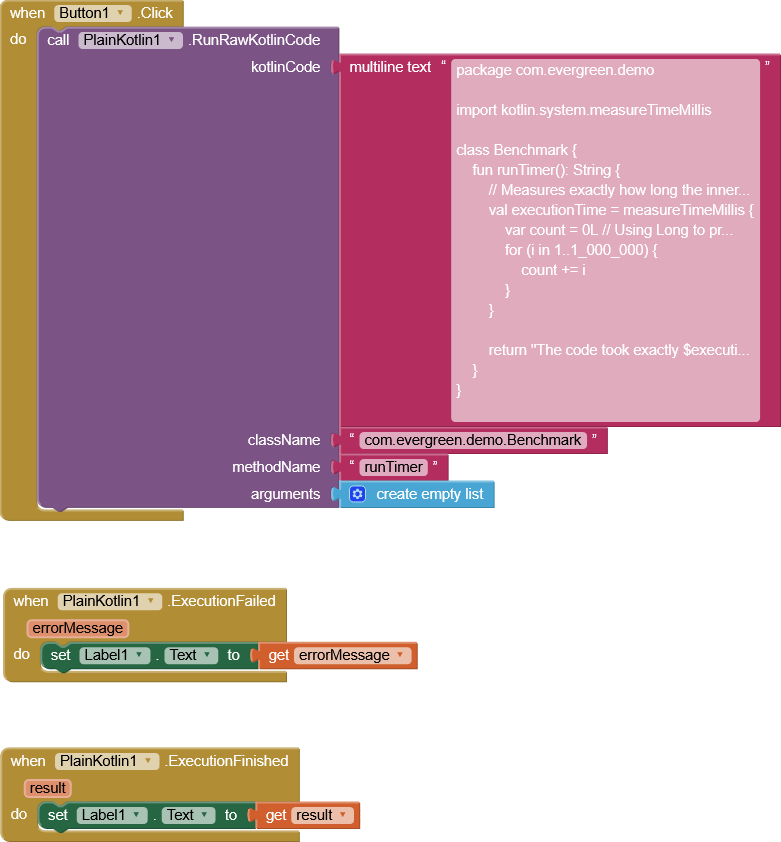
Let's assume your extension technically would work, then your example Kotlin code would return the time it takes to sum the numbers from 1 to 1,000,000, expressed in milliseconds. How would that be helpful for anything?
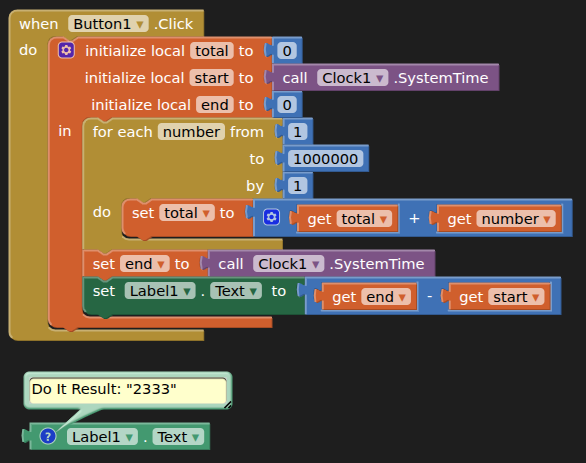
If you are interested to get the execution time of sone App Inventor code, usually you would store the start time, then execute some blocks and after that calculate end time - start time to get the execution time
Taifun
I got this to demonstrate an example of what App Inventor blocks can't do.
Well, as already explained, your example is useless.
Before being abke to publish your extension, you should be able to
Taifun
You are wrong
Just do it like this
Taifun
@TIMAI2 @Taifun @davidefa @Patryk_F @ABG
I'm working on a fix right now, so please be patient.
I'm assuming the Example didn't work since it was reading from placeholders.
PlainKotlinFIXED.aix (23.4 KB)
Take a look.
This is an educational site.
And you're learning.
So that's okay
Yep.
I'm totally new to this place.
@Patryk_F @ABG @Taifun @TIMAI2 @davidefa
Take a look.
For my understanding. You are new to the world of App Inventor but made an extension for it using vibe coding? Since this is a learning place, as ABG points out, do you understand the code the AI is generating for you?
I was meaning the App Inventor Community.
And, I really need to understand this.
I also hope to publish a webpage tool that allows users to write their own .aix files---with code!
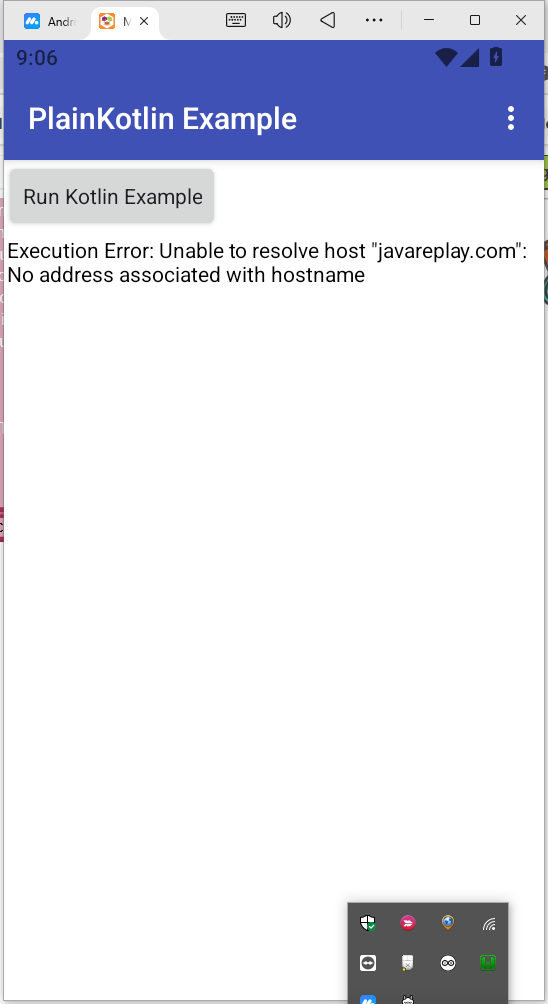
This is the output of the example aia.
Did you run the example aia you posted?
How do you get an output from the example?
P.S.
also as @Taifun said, not sure this example measure a delta time?!
This is a candidate
Never let a good mistake go to waste.
Regardless of whether or not it ends up working, the story of its development needs to be told.
she's all yours.
That updated AI-Gen Code for you to inspect (missing kotlite.jar).
package com.evergreen.plainkotlin;

import android.content.Context;
import android.os.Handler;
import android.os.Looper;
import com.google.appinventor.components.annotations.*;
import com.google.appinventor.components.runtime.*;
import com.google.appinventor.components.common.*;
import com.google.appinventor.components.runtime.util.AsynchUtil;
import com.google.appinventor.components.runtime.util.YailList;

import java.io.BufferedInputStream;
import java.io.File;
import java.io.FileOutputStream;
import java.io.InputStream;
import java.io.OutputStream;
import java.net.HttpURLConnection;
import java.net.URL;
import java.lang.reflect.Method;
import java.lang.reflect.Modifier;
import dalvik.system.DexClassLoader;

// Import the embedded Kotlite interpreter classes
import app.kotlite.interpreter.KotliteInterpreter;
import app.kotlite.model.KotliteValue;

@DesignerComponent(
    version = 6,
    description = "PlainKotlin extension to compile and execute raw Kotlin strings dynamically both online and locally offline.",
    category = ComponentCategory.EXTENSION,
    nonVisible = true,
    iconName = "aiwebres/icon.webp"
)
@SimpleObject(external = true)
@UsesPermissions(permissionNames = "android.permission.INTERNET, android.permission.WRITE_EXTERNAL_STORAGE, android.permission.READ_EXTERNAL_STORAGE")
public class PlainKotlin extends AndroidNonvisibleComponent {

    private final Context context;
    private final Handler mainHandler;
    private final String COMPILER_API_URL = "https://javareplay.com";

    public PlainKotlin(ComponentContainer container) {
        super(container.$form());
        this.context = container.$context();
        this.mainHandler = new Handler(Looper.getMainLooper());
    }

    /**
     * Statement Block: Compiles a raw Kotlin string and runs it in the background via remote server.
     */
    @SimpleFunction(description = "Compiles and runs Kotlin code from a text block. Results are sent to the Finished event.")
    public void RunRawKotlinCode(final String kotlinCode, final String className, final String methodName, final YailList arguments) {
        AsynchUtil.runAsynchronously(new Runnable() {
            @Override
            public void run() {
                try {
                    File dexFile = compileCodeRemote(kotlinCode);
                    if (dexFile == null || !dexFile.exists()) {
                        postError("Compilation failed or could not fetch DEX file.");
                        return;
                    }

                    File optimizedDexOutputPath = context.getCodeCacheDir();
                    DexClassLoader dexClassLoader = new DexClassLoader(
                        dexFile.getAbsolutePath(),
                        optimizedDexOutputPath.getAbsolutePath(),
                        null,
                        context.getClassLoader()
                    );

                    Class<?> clazz = dexClassLoader.loadClass(className);
                    Object[] argsArray = arguments.toArray();

                    Method targetMethod = null;
                    for (Method method : clazz.getMethods()) {
                        if (method.getName().equals(methodName) && method.getParameterTypes().length == argsArray.length) {
                            targetMethod = method;
                            break;
                        }
                    }

                    if (targetMethod == null) {
                        postError("Method " + methodName + " with " + argsArray.length + " parameters not found.");
                        return;
                    }

                    Object instance = null;
                    if (!Modifier.isStatic(targetMethod.getModifiers())) {
                        instance = clazz.getDeclaredConstructor().newInstance();
                    }

                    final Object result = targetMethod.invoke(instance, argsArray);

                    mainHandler.post(new Runnable() {
                        @Override
                        public void run() {
                            ExecutionFinished(result != null ? result.toString() : "Success");
                        }
                    });

                } catch (final Exception e) {
                    postError("Execution Error: " + e.getMessage());
                }
            }
        });
    }

    /**
     * Executes raw, human-readable Kotlin code directly from a Text Block entirely offline.
     */
    @SimpleFunction(description = "Interprets raw Kotlin script text blocks locally without any server compilation.")
    public String EvaluateLocalKotlin(String kotlinSourceCode, String functionToCall, YailList arguments) {
        try {
            // 1. Initialize the lightweight on-device Kotlin environment
            KotliteInterpreter interpreter = new KotliteInterpreter();

            // 2. Feed the raw string code directly into the interpreter engine
            interpreter.eval(kotlinSourceCode);

            // 3. Convert App Inventor's list arguments to standard objects
            Object[] nativeArgs = arguments.toArray();

            // 4. Call the desired function directly from the parsed runtime engine
            KotliteValue result = interpreter.callFunction(functionToCall, nativeArgs);

            return result != null ? result.toString() : "Success: Block executed with no return value.";
        } catch (Exception e) {
            return "Local Interpreter Error: " + e.getMessage();
        }
    }

    @SimpleEvent(description = "Triggered when the Kotlin code execution completes successfully.")
    public void ExecutionFinished(String result) {
        EventDispatcher.dispatchEvent(this, "ExecutionFinished", result);
    }

    @SimpleEvent(description = "Triggered when an error occurs during compilation or execution.")
    public void ExecutionFailed(String errorMessage) {
        EventDispatcher.dispatchEvent(this, "ExecutionFailed", errorMessage);
    }

    private void postError(final String message) {
        mainHandler.post(new Runnable() {
            @Override
            public void run() {
                ExecutionFailed(message);
            }
        });
    }

    private File compileCodeRemote(String sourceCode) throws Exception {
        URL url = new URL(COMPILER_API_URL);
        HttpURLConnection conn = (HttpURLConnection) url.openConnection();
        conn.setRequestMethod("POST");
        conn.setRequestProperty("Content-Type", "text/plain");
        conn.setDoOutput(true);

        OutputStream os = conn.getOutputStream();
        os.write(sourceCode.getBytes("UTF-8"));
        os.flush();
        os.close();

        if (conn.getResponseCode() == HttpURLConnection.HTTP_OK) {
            File outputDir = context.getCacheDir();
            File dexFile = File.createTempFile("dynamic_kotlin", ".dex", outputDir);

            InputStream is = new BufferedInputStream(conn.getInputStream());
            FileOutputStream fos = new FileOutputStream(dexFile);
            byte[] buffer = new byte[4096];
            int len;
            while ((len = is.read(buffer)) != -1) {
                fos.write(buffer, 0, len);
            }
            fos.close();
            is.close();
            return dexFile;
        }
        return null;
    }
}
So each time you call orocedure
the code will be sent to a server to get compiled before anything can be returned?
Do you really think, this can be useful somehow?
Btw. your example Kotlin code is stiill the same ... as already mentioned earlier
Taifun
PS: it looks like this thread is a complete waste of time for everyone
It would be a good example of vibe coding gone wrong, on the discussions section.