I create a app few yeras back can select customer & items from a google sheet then send message to a group throug whatsapp using WhatsApp Tool extention. the app was working successfully until my Samsung A06 last update security patch level 5 March 2026. I check the same app on another Samsung A06 phone (which have security patch level 1 January 2026) it still works fine. Please note that both phone’s Android version is 16. Please help me to sortout this issue
As per your example, yes I can send WhatsApp message to specific number using activityStarter. could you please tell me how to send a message to whats group which already created?
There is no public URL scheme (like wa.me) that allows users to send a direct message to a WhatsApp group from a browser or external app without first joining the group. WhatsApp’s official Click to Chat feature (https://wa.me/number?text=message) only supports 1:1 conversations with individual phone numbers.
To interact with a group via a link, you must use the Group Invite Link format:
Function: This link allows users to join the group. Once joined, they can send messages within the app. It does not pre-fill a message or open a chat window for an outsider.
Technical Alternatives for Developers
If you need to programmatically send messages to a group, you must use the WhatsApp Business API or third-party libraries, not a simple URL.
WhatsApp Business API:
You can send messages to a group by making a POST request to the API endpoint, specifying the Group ID (not the invite link).
Android Intents (App-to-App):
You can use an Android Intent to open a specific group if you have its invite link, but this only opens the group window; it does not send a message automatically.
Uri uri = Uri.parse("https://chat.whatsapp.com/uniqueId");
Intent i = new Intent(Intent.ACTION_VIEW, uri);
startActivity(Intent.createChooser(i, ""));
Third-Party Tools:
Services like Ultramsg or browser extensions like WA Group Sender can facilitate sending messages to groups by integrating with the WhatsApp Web interface or API, but these require specific setup and are not standard URL-based solutions.
Summary
For Users: Share the https://chat.whatsapp.com/... link to let people join, then they can message you.
For Developers: Use the WhatsApp Business API with the group’s unique ID to send messages programmatically.
I believe this is the best you can hope for using the activityStarter. You could possibly use a clipboard extension to capture your custom message in the app, then paste this once whatsapp opens.


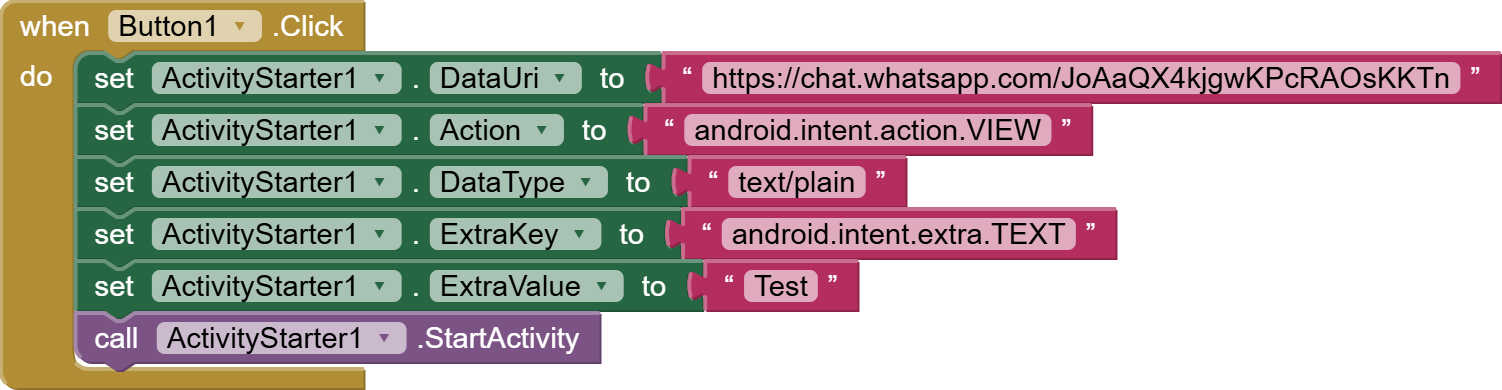
 )
)