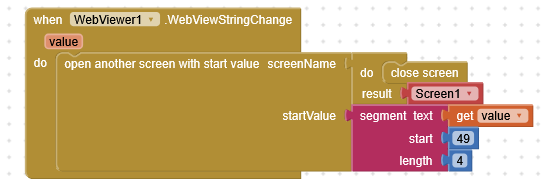
Can I read two values with the WebViewStringChange event at same time?
I want to store two values which i get before with JavaScript and Webviewer.setWebViewString () ;
Can I read two values with the WebViewStringChange event at same time?
I want to store two values which i get before with JavaScript and Webviewer.setWebViewString () ;
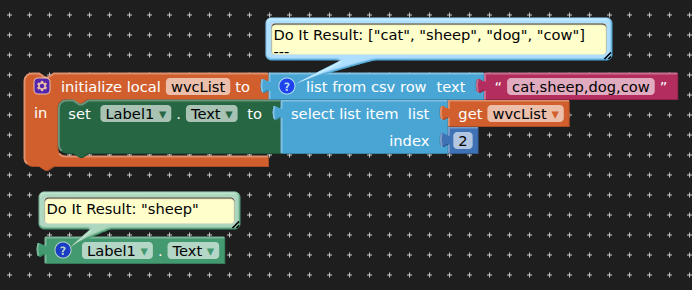
In the webviewstring you can include as many “elements” as you want.
Is up to you how to do it:
but it must all be a single text string:
"cat,sheep,dog,cow" > comma separated string
"cat|sheep|dog|cow" > symbol separated string
'["cat","sheep","dog","cow"]' > stringified json array
'{"cat":4,"sheep":7}' > stringified json
i can include several text strings with setWebViewString(), but how can i read each with get start value in initial block of other screen after WebViewStringChange() event?

The strings shall all be from js Code getwebviewstring() reading different elements by id.
How can I write these elements into csv list?
Show the input, we can show you how to get the output.
If you want to simply pass different values from js to app inventor:
P.S.
@TIMAI2 already showed how to do this using a simple list, you access elements by its position
web02.aia (2.4 KB)
@davidefa Thank you, i will try with dictionary block, i never used it
Can i also save an element from Js method getElementById() to TinyDB?
you can save the element's value /innerText/innerHTML, but not the element itself.
How can I use the dictionary between 2 screens?
Use tinydb on both screens. Save the dictionary to tinydb on one screen, access it from tinydb on the other screen. You can modify the dictionary on both screens as long as you save it back to the tinydb when finished editing. Use the same namespace for tinydb on both screens.
The dictionary works fine now between 2 screens using this js object.
const obj = {Name: "Walter", Alter: 60, Wohnort: "Stuttgart"}; const myJSON = JSON.stringify(obj); window.AppInventor.setWebViewString(myJSON);

But how can i create the js object {} dynamically instead of fixed values?
Will this work too?
const Name = "Walter";
const Alter = 60;
const Wohnort = "Stuttgart"
const obj = {Name, Alter, Wohnort}; const myJSON = JSON.stringify(obj); window.AppInventor.setWebViewString(myJSON);
You can simply join strings together ( I prefer create a template string and substitute the tags inside )
js02.aia (2.4 KB)
The Web component has blocks to convert structures (lists and dictionaries) to and from JSON text also.
This topic was automatically closed 7 days after the last reply. New replies are no longer allowed.