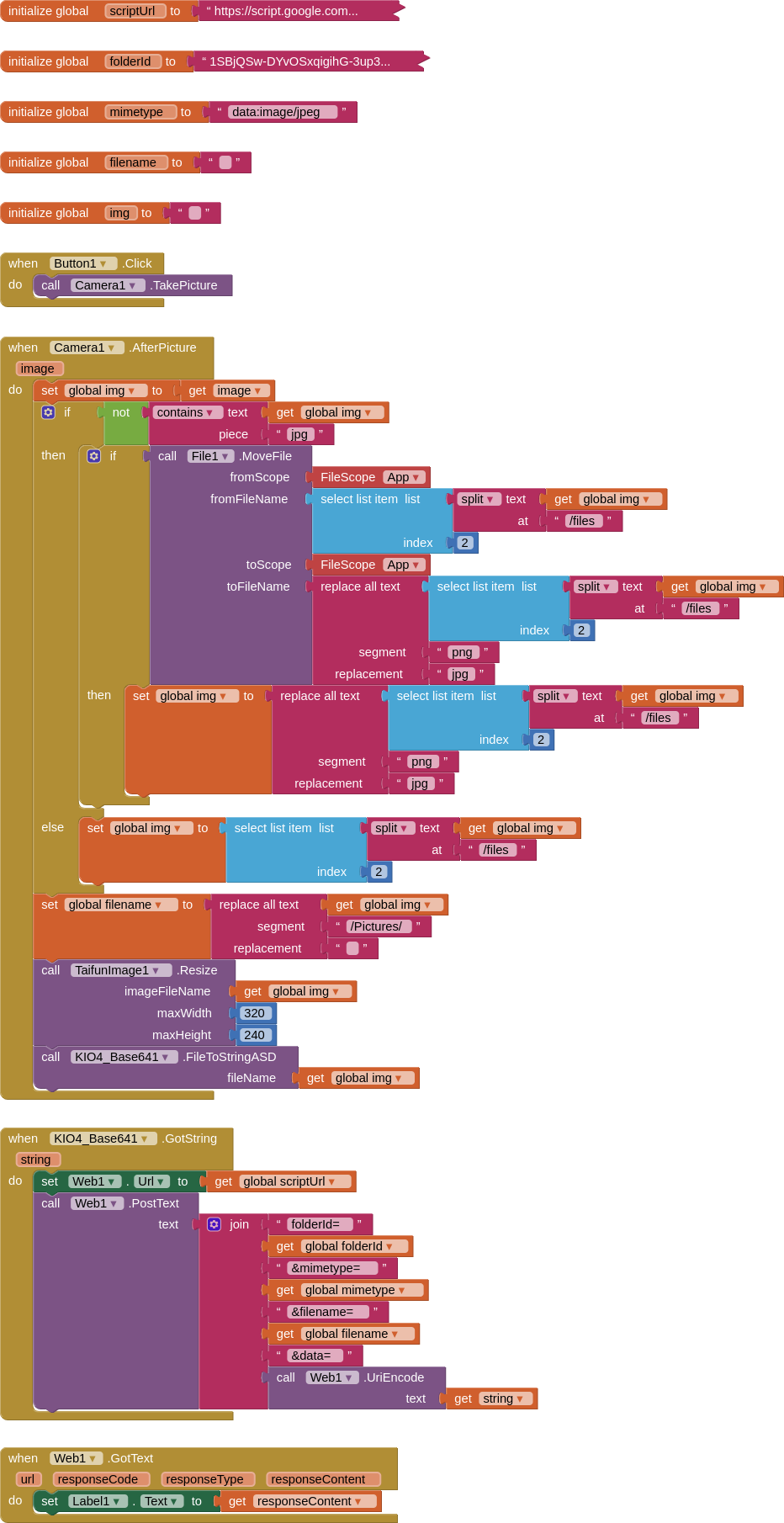
In order to:
- Take a Picture
- Rename that picture to have a jpg extension (this handles a naming bug in AI2 at time of writing)
- Resize the picture (using Taifun's Image extension)
- Convert picture to a base64String (using Juan Antonio's Base64 extension)
- Upload the picture to Google Drive (using the script below, and a designated folder)
- We know the mime-type will be jpeg because we have a .jpg image file
- We use the camera assigned filename because of the timestamp
...
SCRIPT
function doPost(e) {
    var data = Utilities.base64Decode(e.parameters.data);
    var blob = Utilities.newBlob(data, e.parameters.mimetype, e.parameters.filename);
    var fileID = DriveApp.getFolderById(e.parameters.folderId).createFile(blob).getId();
    return ContentService.createTextOutput(fileID);
    }
...