Me too Maciej.  I would not attempt to track changes on webs using App Inventor 2 at all. If it can be done to your satisfaction (and it depends on exactly what you want to do and the specific web page (some web pages cannot be 'scraped' at all), the code will be very complex).
Those Blocks are >
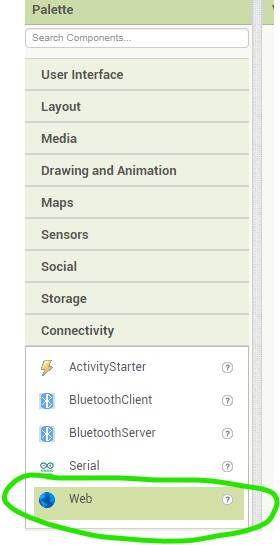
Here is a simple example you can experiment with to view a Web page's source code. You need to find what is contained on a Web page, then compare what is there to a later version of the Web to discover if any changes have been made since you last checked.
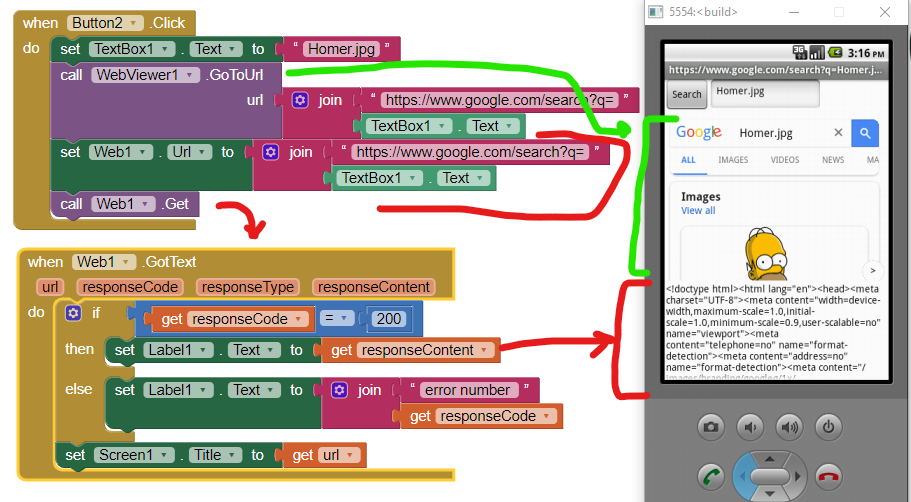
The example does not track changes. The example allows you to search for a image file on the Web using the WebViewer. Perform the search and it allows you to inspect the source of the Web. That could allow you to determine what is on the Web page you searched. Try coding and see what happens. Good luck.
Here are some resources to help you learn to use the AI2 tools. To try to do what you want to do you are going to have to learn App Inventor programming is to read the free Inventor's Manual in the AI2 free online eBook App Inventor 2 Book: Create Your Own Android Apps ... the links are at the bottom of the Web page. The book 'teaches' users how to program with AI2 blocks.
There is a free programming course here Course In A Box and the aia files for the projects in the book are here: App Inventor 2 Book: Create Your Own Android Apps
How to do a lot of basic things with App Inventor are described here: How do you...? .
Also look here App inventor español. Offline. Tutorial. Ejemplos. Instalación. Códigos. Juegos. Curso gratis de App inventor. and here Tutorials for more tutorials.
Learn about components Component Reference
and visit the Library The MIT App Inventor Library: Documentation & Support Help>Library on the MENU