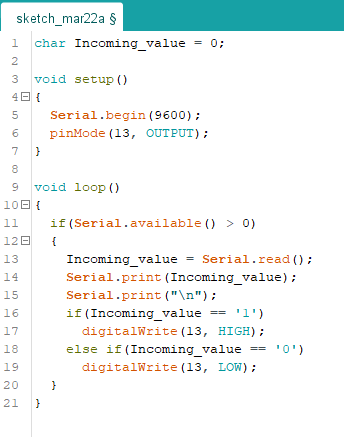
if using the app “Serial Bluetooth Terminal” I can succesfully connect and send data (here: 0 and 1) to the Bluetooth-Module connected to an Arduino Uno. The BT module is called “HC-05” however it turns up under “Bluetooth LE” and not “Bluetooth Classic”, so I think it is one of those weird “HC-05”-thingies with BLE instead of BT classic.
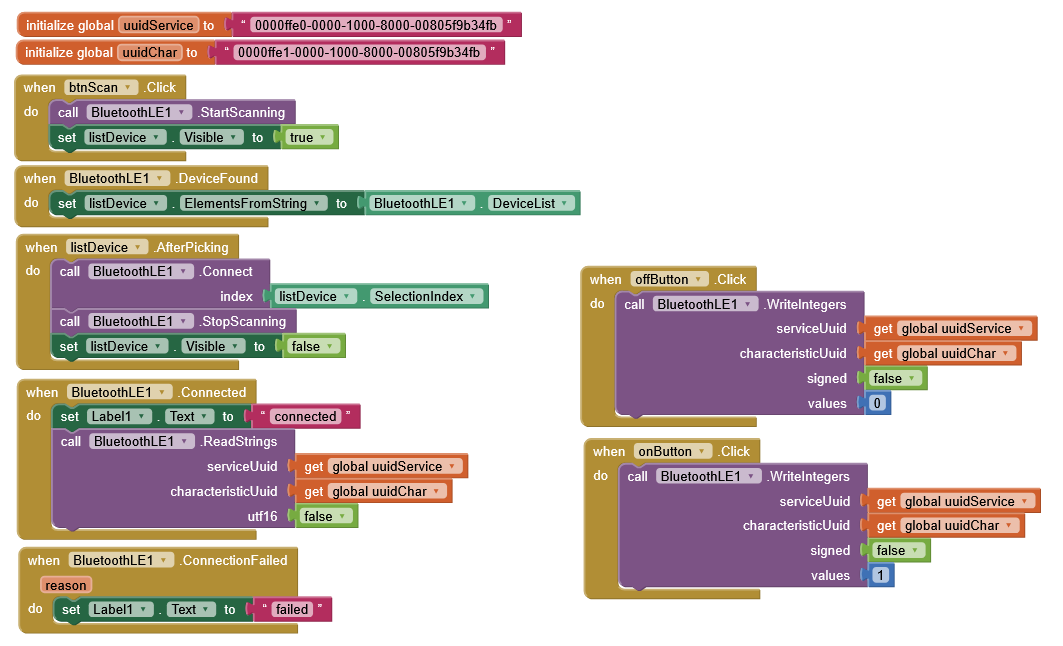
If using the MIT App I can succesfully connect but I assume I can not send succesfully as the built-in LED 13 on the Arduino does not react as expected.
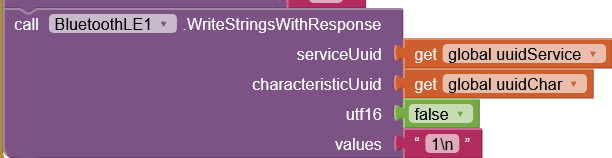
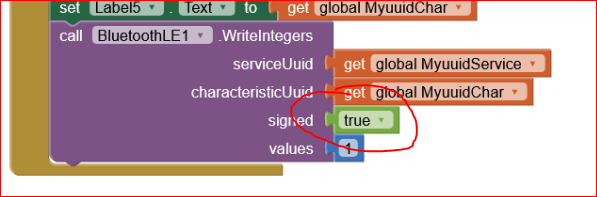
Please see attached screenshots and codes. I have tried changing the block “call BluetoothLE1.WriteIntegers” to “call BluetoothLE1.WriteStrings” without success as I was thinking of the Arduino not being able to understand the “1” or “0” correctly.
Do you mean “call BluetoothLE1.WriteStrings”? Have tried that one as well. Note: in Screenshot, I have also tried with and without Response, with and without a \n
First of all: where have you found those UUID values for Service and Characteristic ? Do you have a HC05 datasheet that defines those values ?
When you use the SoftwareSerial please take care of the pins connection: you shall connect the Tx pin of the HC05 to the Rx pin of the UNO board. In your case pin 10.
When you hit the buttons on your phone, does the Serial Monitor of the Arduino system write somerthing on the PC screen ? This grants a functioning connection, else if the Serial Monitor does not write anything, this means that the connection is not working.
In any case, as @ABG has already said, you could stil incur in a type mismatch. Instead of comparing the input stream against a ‘1’ or ‘0’ , please try also “1” and “0”. Strings in C are arrays of characters ended with a \0, so probably by comparing with a single char (‘1’) the comparison fails.
Consider also that the arduino sketch you are using seems bluetooth classic ( which agrees with the hc-05 ) and not ble ( double check this ). So, I’d say, you have to use “bluetooth classic” even on the ai2 side
The uuid-values are some kind of “standard” for all those cheap modules from China, so chances are high all those cheap thingies have them. Here, I have double-checked them with nRF-Connect-App (UUID: 0xFFE1 with properties NOTIFY, WRITE)
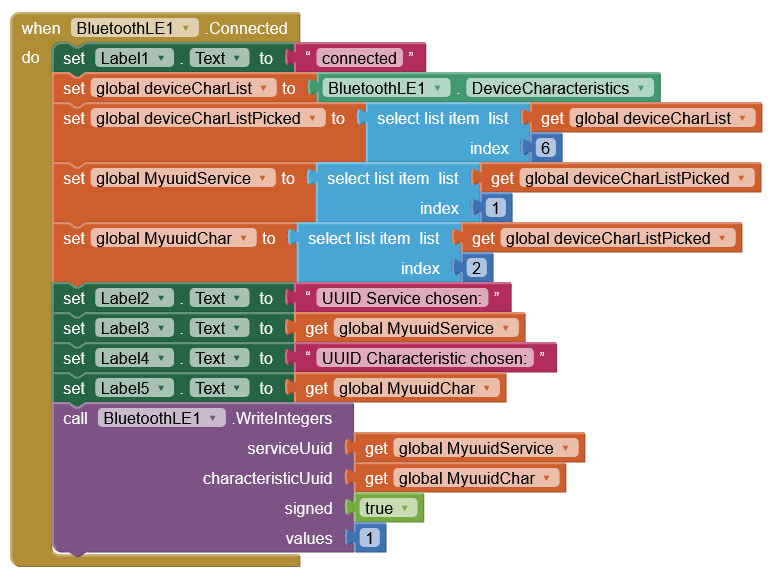
So, the MIT App can connect to the module, I can then list all DeviceCharacteristics. But whatever I want to send does not trigger the Arduino. And nothing on the serial monitor.
Attached, please see a new approach which gets the uuid dynamically from the DeviceCharacteristics.list and sends the integer 1 that should somehow “reach” the serial monitor of the Arduino Uno. But it does not.
But, with this Arduino code, if you use the Serial Bluetooth Terminal app, and you send 1 or 0 what do you read on the Serial monitor (or still nothing) ?
in my post #6 I’ve added an interesting link to a HC09 that behaves like your “fake/weird” HC05. It seems that there are rubbish commands that seem to be irrelevant for a proper working, while on the contrary they are necessary (don’t ask me why ).
Last,but not least, be sure to use the latest BLE extension. In the same thread there is the link.
Installed is latest BLE extension 20240822. The Serial BT Terminal app works fine, LED turns on/off and the 1/0 ist being printed on the serial monitor.
So, this means that on Arduino side everything seems ok. One other issue could be caused by the Android permissions: to let the BT work, one shall grant BT and Geolocalization permissions. Did you grant them ?
OK, the articles were just for information, no hurry in reading them.
But, to be sure that the permissions are granted (I’ve not seen an explicit declaration in your screen1.initialization blocks) please unistall your app from your phone, completely, and re-install it, so to force the Android OS to ask you to grant permissions again. And also unpair your HC05 from the availabe BT devices. Then pair it again.
Unfortunately all the HC05 that I have in my drawers ( ) are “old and good” classic BT shields, therefore my hints seem to be inconsistent…have you had a look to the search function by tagging HC05 and BLE ? Best wishes until I’ll buy a fake BLE HC05…..
 ).
). ) are “old and good” classic BT shields, therefore my hints seem to be inconsistent…have you had a look to the search function by tagging HC05 and BLE ? Best wishes until I’ll buy a fake BLE HC05…..