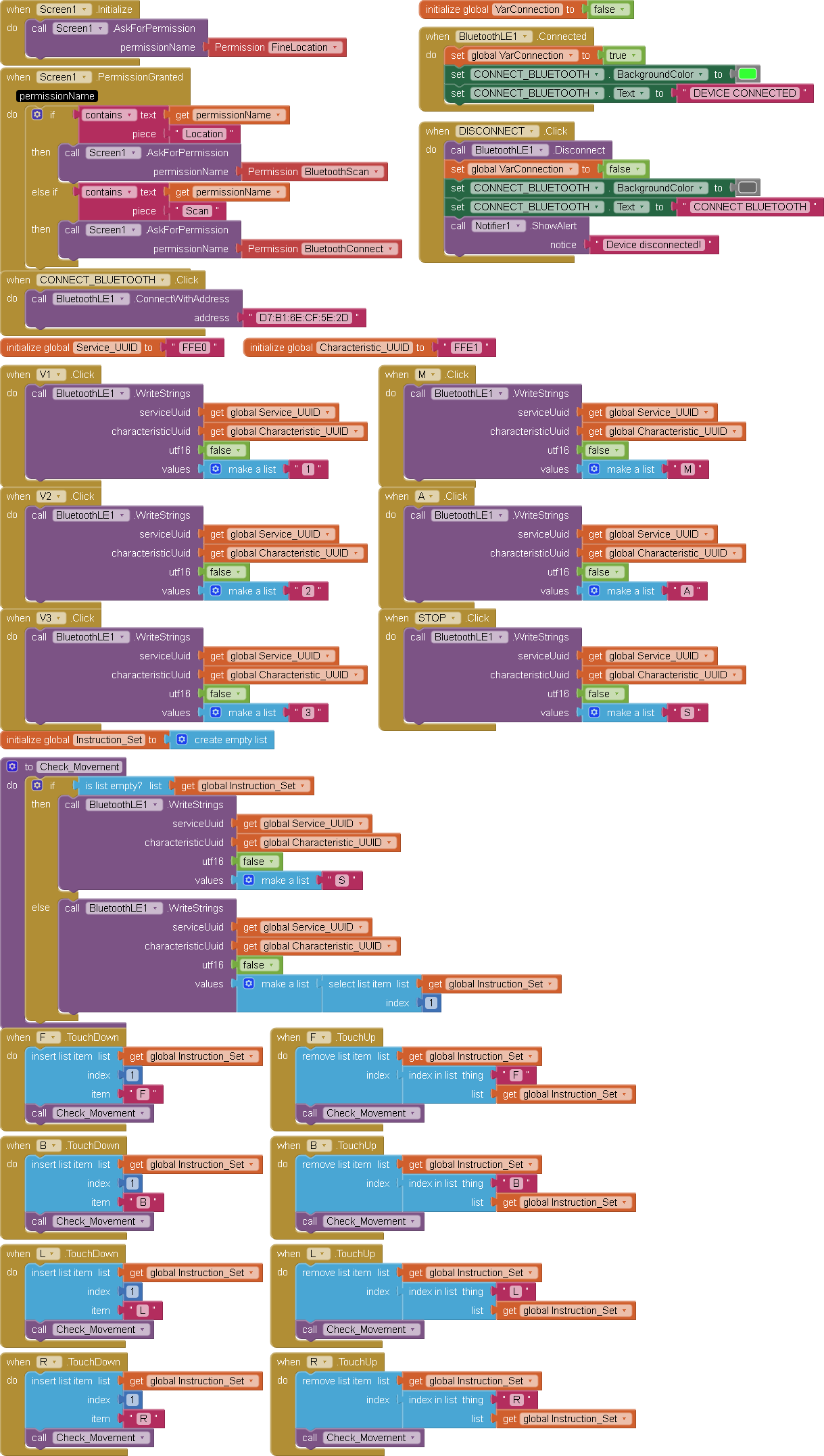
Hello, I am trying to build an app that’s is going to be a controller for a car made in an arduino project. I’m using an HC-05 Bluetooth module that connects correctly only via Bluetooth Low Energy. Like a controller should work, I want o send characters like “F” so the car can move foward, “B” to move backwards etc.. As the block diagram shows, I am using the WriteString block to send the characters, but the car does not receive correctly, although it’s connected to the mobile phone.
Dear @Frytz, the car does not receive correctly means:
it receives rubbish? (in this case could be a problem of baudrate between CPU board and HC05)
does not receive anything ? (in this case the problem is related to a lack of communication at all).
Case 1) check whether you find somewhere which is the baudrate at which the HC05 wants to work towards the CPU board (datasheet or other documentation)
Case 2) start praying...
Jokes apart, the BLE is a real nightmare, so first of all verify if the service and characteristics UUID are correct for the HC05 you are using. To check this there are really a lot of topics on this matter in the forum. Do a search with the tags HC05 and BLE.
Many users have fought with the same problem in the past weeks, so you'll find plenty of comments and hints to get a solution.
Moreover, to have a greater possibility to get help, please post also the .ino file, so to have a check on that part of the code, as well.
Best wishes
The project works on the Serial Bluetooth Terminal, so I think that the arduino sketch, and the all the physical component is okay. I notice that Mr. Edumarca uses WriteStringWithResponse, but I still don't understand where he got the green block TxtMessage.Text from, maybe I'm using other version of the BLE Extension. Don't know if it can help but here's the arduino code (I do not have the .ino file itself in this computer). Thank you!
#include <avr/io.h>
#include <avr/interrupt.h>


#define TRIG1 PD4
#define ECHO1 PD2 // (INT0)
#define TRIG2 PD5
#define ECHO2 PD3 // (INT1)
#define LED_VERDE    PC0
#define LED_VERMELHO PC1
#define BUZZER       PC2
#define LED_PISCA    PC3 // O LED de 1HZ

// motores dianteiros
#define IN1 PD6 //frente dir
#define IN2 PD7 //ré dir
#define IN3 PB3 //frente esq
#define IN4 PB4 //ré esq
//motores traseiros
#define IN5 PB5 //frente dir
#define IN6 PB0// ré dir
#define IN7 PC4  //frente esq
#define IN8 PC5 //ré esq
// enables
#define ENA  PB2 //rodas esquerdas
#define ENB  PB1 //rodas direitas

#define calibrador 40


volatile int echoFlag1 = 0, echoFlag2 = 0;
volatile uint8_t pulso1 = 0, pulso2 = 0; // limitei pulso a 8 bits para nao bloquear timer2
volatile char comando_recebido = '0'; // '0' para começar parado
volatile int modo = 0;
volatile int vel1, vel2;
volatile int flag_comando;


 void Usart_init() {
        unsigned int ubrr;
        ubrr = 103;
        UBRR0H = (unsigned char)(ubrr >> 8);
        UBRR0L = (unsigned char)ubrr;
        UCSR0B = 0b10011000; // Habilita receptor e interrupção
        UCSR0C = 0b00000110; //8 bits de dados
 }


     ISR(USART_RX_vect) {
       char letra = UDR0;
        flag_comando = 0;
       if (letra == '\n' || letra == '\r' || letra == ' ') {
        return;
    }
        if (letra == 'A'){
            modo = 1; // automatico
        }
        else if (letra == 'M'){
            modo = 0; // manual
            comando_recebido = '0';
        }
        else if (modo == 0) { // apenas recebe comandos no modo bluetooth
            comando_recebido = letra;
        }
    }

void inicio () {

    DDRD = 0b11110000; // triggers e motores como saída
    DDRC = 0b00111111; // LEDs e buzzer como saída
    DDRB = 0b00111111; // pinos motores e enables como saída

    TCCR1A = 0b10100001;
    TCCR1B = 0b00000011;
    OCR1A = 0; // velocidade inicial 0
    OCR1B = 0;

    TCCR2A = 0b00000000; // modo normal
    TCCR2B = 0b00000111;// prescaler 1024
    TCNT2 = 0; // contador a zero

    EICRA = 0b00000101; // qualquer mudança logica
    EIMSK = 0b00000011; //  INT0 e INT1

    Usart_init();
    sei();
}

    void motores_frente() {

    PORTD |= (1 << IN1);
    PORTD &= ~(1 << IN2);
    PORTB |= (1 << IN3);
    PORTB &= ~(1 << IN4);
    PORTB |= (1 << IN5);
    PORTB &= ~(1 << IN6);
    PORTC |= (1 << IN7);
    PORTC &= ~(1 << IN8);
}

void motores_re() {

    PORTD |= (1 << IN2);
    PORTD &= ~(1 << IN1);
    PORTB |= (1 << IN4);
    PORTB &= ~(1 << IN3);
    PORTB |= (1 << IN6);
    PORTB &= ~(1 << IN5);
    PORTC |= (1 << IN8);
    PORTC &= ~(1 << IN7);
}


void virar_direita() {
   //direita anda devagar
    PORTD |= (1 << IN1);
    PORTD &=~ (1 << IN2);
    PORTB |= (1 << IN5);
    PORTB &=~ (1 << IN6);
   // esquerda anda mais depressa
    PORTB |= (1 << IN3);
    PORTB &=~ (1 << IN4);
    PORTC |= (1 << IN7);
    PORTC &=~ (1 << IN8);

    OCR1A = vel1/2;
    OCR1B = vel2;
}

void virar_esquerda() {
    //direita anda mais depressa
    PORTD |= (1 << IN1);
    PORTD &=~ (1 << IN2);
    PORTB |= (1 << IN5);
    PORTB &=~ (1 << IN6);
   // esquerda anda mais devagar
    PORTB |= (1 << IN3);
    PORTB &=~ (1 << IN4);
    PORTC |= (1 << IN7);
    PORTC &=~ (1 << IN8);

    OCR1A = vel1;
    OCR1B = vel2 /2;
}

void motores_stop() {

    PORTD &= ~(1 << IN2);
    PORTD &= ~(1 << IN1);
    PORTB &= ~(1 << IN3);
    PORTB &= ~(1 << IN4);
    PORTB &= ~(1 << IN6);
    PORTB &= ~(1 << IN5);
    PORTC &= ~(1 << IN7);
    PORTC &= ~(1 << IN8);
    OCR1A = 0; // velocidade 0
    OCR1B = 0;

}

void modo_lento() {
    vel1 = 100 - calibrador; // velocidade lenta
    vel2 = 100;
    OCR1A = vel1;
    OCR1B = vel2;
}

void modo_medio() {

    vel1 = 170  - calibrador; // velocidade média
    vel2 = 170;
    OCR1A = vel1;
    OCR1B = vel2;

}

void modo_rapido() {

    vel1 = 220  - calibrador; // velocidade rápida
    vel2 = 220;
    OCR1A = vel1;
    OCR1B = vel2;
}
 void guarda_velocidade (){
    OCR1A = vel1;
    OCR1B = vel2;
 }


void delay_10us() {

    OCR0A = 159; // valor calculado para gerar 10us
    TCNT0 = 0; // zera o timer0
    TCCR0A = 0b00000010; // modo CTC
    TCCR0B = (1 << CS00);  // prescaler 1
    TIFR0 = (1 << OCF0A);  // limpa a flag
    while ((TIFR0 & (1 << OCF0A)) == 0); //Aguarda
    TCCR0B = 0;  // para o timer0
    }

void delay_1ms(unsigned int a) {
        for (unsigned int i = 0; i < a; i++) { // loop para gerar atraso de a ms
        OCR0A = 249; // valor calculado para gerar 1ms
        TCNT0 = 0;
        TCCR0A = 0b00000010;
        TCCR0B = (1 << CS01) | (1 << CS00); // prescaler 64
        TIFR0 = (1 << OCF0A); // limpa a flag
        while (!(TIFR0 & (1 << OCF0A)));   // aguarda
        TCCR0B = 0;        // para o timer0
    }
}

void sinalpulso(int pinotrigger) {
    PORTD |= (1 << pinotrigger);   // liga o trigger
    delay_10us();      // espera 10us
    PORTD &= ~(1 << pinotrigger);  // desliga o trigger
}

ISR(INT0_vect) {
    if (PIND & (1 << ECHO1)) { // verifica se é borda de subida
        TCNT2 = 0;  // zera o timer2
        echoFlag1 = 1;  // borda de subida
    }
    else if (echoFlag1 == 1) { // verifica se é borda de descida
        pulso1 = TCNT2; // armazena o tempo do pulso
        echoFlag1 = 0;  // reseta a flag
    }

}

ISR(INT1_vect) { // mesma lógica do INT0
    if (PIND & (1 << ECHO2)) {
        TCNT2 = 0;
        echoFlag2 = 1;
    }
    else if (echoFlag2 == 1) {
       pulso2 = TCNT2;
       echoFlag2 = 0;
    }

}


void sistema_alerta (int distancia) {
    if (distancia <= 20) { // verifica a distância é menor ou igual a 10 cm
        PORTC |= (1 << BUZZER); // liga o buzzer
        PORTC &= ~((1 << LED_VERDE)); // desliga o led verde
    }

    else if (distancia <= 30) {
        PORTC |= (1 << LED_VERMELHO); // liga o led vermelho sem piscar
        PORTC ^= (1 << BUZZER);
        PORTC &= ~((1 << LED_VERDE)); // desliga o resto
    }

    else if (distancia <= 50) {
        PORTC |= (1 << LED_VERDE); // liga led verde
        PORTC &= ~((1 << LED_VERMELHO) | (1 << BUZZER));
    }

    else {
        PORTC &= ~((1 << LED_VERDE) | (1 << LED_VERMELHO) | (1 << BUZZER)); // desliga tudo
    }
}

void led1Hz_ledSA (int obstaculo){
      static int contador_led = 0;
        contador_led++;
        if (contador_led >= 4 ){
            PORTC ^= (1 << LED_PISCA); // tooggle do led
            contador_led = 0;
            }
        if (obstaculo == 1){ // apenas acionado quase esteja obstaculo no sistema autonomo
               PORTC ^= (1 << LED_VERMELHO); // pisca o led vermelho
        }
    }


void sistema_autonomo(int d){
    if (d > 50) {
        motores_frente();
        modo_rapido();
    }
    else if (d > 40) {
        motores_frente();
        modo_medio();
    }
    else if (d > 20) {
        motores_frente();
        modo_lento();
    }
    else {
        motores_stop();
        motores_re();
        modo_medio();
        for (int i = 0; i < 6; i++){
            delay_1ms (125);
            led1Hz_ledSA(1);
        }

        motores_stop();
        for (int i = 0; i < 2; i++){
            delay_1ms(125);
            led1Hz_ledSA(1);
        }

        virar_direita();
        modo_medio();
         for (int i = 0; i < 10; i++){
            delay_1ms (125);
            led1Hz_ledSA(1);
        }
        motores_stop();
        for (int i = 0; i < 2; i++){
            delay_1ms(125);
            led1Hz_ledSA(1);
        }

    }
}


void sistema_bluetooth(int frente, int tras) {
    if (frente<=20 && (comando_recebido == 'F')) { //proibe de andar para frente se tiver obstaculo mesmo que se carregue no F
        motores_stop();
    }
    else if (tras<=20 && (comando_recebido == 'B')) { //proibe de andar para tras se tiver obstaculo mesmo que se carregue no B
        motores_stop();
    }
    else {
    switch (comando_recebido) {
        case 'F':

            motores_frente();
            guarda_velocidade();
            break;
        case 'B':
            motores_re();
            guarda_velocidade();
            break;
        case 'L':
            virar_esquerda();
            guarda_velocidade();
            break;
        case 'R':
            virar_direita();
            guarda_velocidade();
            break;
        case 'S':
            motores_stop();
            break;
        case '1':
            modo_lento();
            break;
        case '2':
            modo_medio();
            break;
        case '3':
            modo_rapido();
            break;
    }
    }
}

 int main() {

    int distancia1, distancia2, distanciaMin;
    inicio();
    modo_medio();
    while (1) {

        sinalpulso(TRIG1);
        delay_1ms(62);
        distancia1 = (pulso1 * 64) / 58;

        sinalpulso(TRIG2);
        delay_1ms(62);
        distancia2 = (pulso2 * 64) / 58;

       if (distancia2 == 0) { // if else para verificar a menor distancia e 0 como sem leitura
            distanciaMin = distancia1;
       }
        else if (distancia1 == 0) {
            distanciaMin = distancia2;
        } else if (distancia1 < distancia2) {
            distanciaMin = distancia1;
        } else {
            distanciaMin = distancia2;
        }

    sistema_alerta(distanciaMin);

  if (distanciaMin <= 20 ) {
            led1Hz_ledSA(1); // Atualiza Azul + Pisca Vermelho
        } else {
            led1Hz_ledSA(0); // Atualiza Azul + Desliga Vermelho
        }

/*if (modo == 0){
    flag_comando++;
     if (flag_comando > 4){
        comando_recebido = 'S';
        flag_comando = 0;
    }
}*/


    if (modo == 1) { // modo automatico

    sistema_autonomo(distancia1);

    }
    else { // modo bluetooth

    sistema_bluetooth(distancia1, distancia2);

    }


    }

}
is a reference to the text in a Textbox component.
That app wants to allow the user to type in what to send, so it has a Textbox component for that purpose.
The green .text is most probably the text that the user sends to his Arduino system, tehrefore you can put in that block exactly the command that you want to send (be careful to append the \n to terminate the string).
Last hint is: for your head's sanity ( ), please start with a super simple .ino, just trying the connection and displaying on the Serial Monitor of the Arduino system (i.e. connected to the development PC) what it is receiving. After you are done with that, you can add everything you want, but, believe me, is far better to start in a simpler way.
If you still get lost, you can have a look to @ChrisWard's web site: professorcad.co.uk where you can find a huge amount of examples.
Now I remember also another thing: the HC05 BLE must be set in the proper BLE functioning mode (using the AT commands) It should be set as "peripheral", and not "central" (or visa-versa, unfortunately I'm not pretty sure which one of the two, but for sure if the HC05 is set in the wrong mode it won't work)
 ), please start with a super simple .ino, just trying the connection and displaying on the Serial Monitor of the Arduino system (i.e. connected to the development PC) what it is receiving. After you are done with that, you can add everything you want, but, believe me, is far better to start in a simpler way.