What have you tried? This Project is not difficult to code.
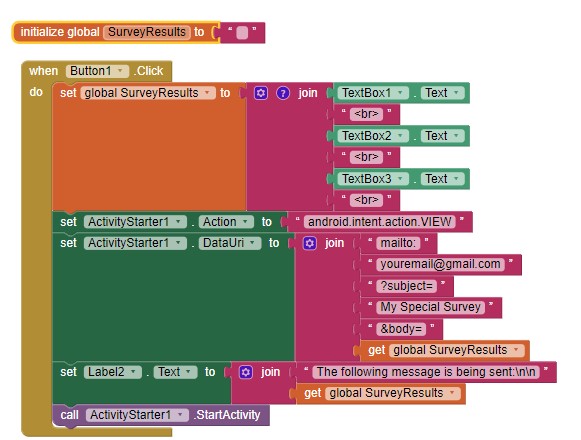
Sending the eMail
This example works to send eMail . You must run this in a real Android device (not an emulator). Most emulators will not support the ActivityStarter action. So far, it has ‘never failed.’ to transfer the Subject and content to gmail. Try coding the ActivityStarter using the example. Tell us what happens. The SurveryResults contain the vallues of
- level of fuel (sliding bar) - [slide value]
- level of water (sliding bar) - [slide value]
- number of hatches - [insert value]
after you provide the code.
The way to create this app is to learn to use a slider, TextBox etc., then learn to create an eMail containing the values. Alternatively, when you are more experienced in coding, you can send the values to a Shared GoogleSheet on your GoogleDrive.
Creating the sliders and TextBoxes
You need to acquire some basic App Inventor 2 coding skills. One way to do that is to use these resources to help you learn to use the AI2 tools. A very good way to learn App Inventor is to read the free Inventor's Manual here in the AI2 free online eBook App Inventor 2 Book: Create Your Own Android Apps ... the links are at the bottom of the Web page. The book 'teaches' users how to program with AI2 blocks.
There is a free programming course here Course In A Box and the aia files for the projects in the book are here: App Inventor 2 Book: Create Your Own Android Apps
How to do a lot of basic things with App Inventor are described here: How do you...? .
Also look here App inventor español. Offline. Tutorial. Ejemplos. Instalación. Códigos. Juegos. Curso gratis de App inventor. and here Tutorials for more tutorials.