Hello Chris I change modification that you and Ugo pointed out ,
So how could I say that speed is same as previous without effect your hart
Dayan
Hello Chris I change modification that you and Ugo pointed out ,
So how could I say that speed is same as previous without effect your hart
Dayan
I could not found the code tag
Speed can be increased by the following method
Above block added to change the background color in randomly when press the button , So only few colors are changing .
Hi Dayan
Ah no, that's wrong.  However, added Serial.println()s will slow things - where do those messages go?
To speed things up, you can tweak the milliseconds of the Sketch Loop and the App, but 20 milliseconds is real fast already.
What are you using to power the servo motors? They are a very hungry type of motor, usually requiring between 0.5 and 1.0 amps each. I mentioned before about requiring precisely the right amount of power, signal interference, heat dissipation - all of these factors slow things down if not dealt with. Getting the power right for the gripper is super important.
Well, I would concentrate on getting the technical side to be the best it can be, without worrying about decoration. What you have added there - is it important? Not really.
Two golden rules in programming (and other industry):
KISS, an acronym for keep it simple, stupid, is a design principle noted by the U.S. Navy in 1960. The KISS principle states that most systems work best if they are kept simple rather than made complicated; therefore, simplicity should be a key goal in design, and unnecessary complexity should be avoided.
Yes I agreed with you 100%
Servo Motors power by D Cube Motor Driver , It has a buck converter LM2596 ADJ only for Servo motors. Voltage set to 5.25v by the pot.
I change the if ((millis() - lgUpdateTime) > 20) even reduce from 20 to 1 too, but speed did not reduce nothing ,
I check the servo motors that is getting heat but i did not feel for my fingers
You would need to tweak the App time interval and the Sketch time interval together, but given that even 100 milliseconds is very fast, that may not be the issue.
That's a power regulator, right? That is only going to optimal if there is an adequate power supply in the first place - what is supplying the power?
The main power supply is BAKU BK-1502DD power supply (2A) Supply voltage Set to 11.1v
OK, that's a posh desktop power supply, mainly for hardware development and such - perhaps not what you will use for the final, finished robot arm? In any event, how much power does each servo require? Are they all actually getting the power level required?
Edit: Actually, the 1502DD has some bad reviews from buyers. It would be a good idea to use a multimeter at the servo to see exactly what volts + amps each is receiving.
Yes
I used my Digital multimeter for adjust the voltage and I set it to 5.25v
And current it shows in the BAKU power supply 0.25A during the Servo is rotation and during other time 0.16A which consume power supply arduino board and Bluetooth module
in above case the switch structure execute only upon receiving something from serial?
In the below case switch structure to execute every time loop() runs
Based on what I see, the switch should run only on reception of new serial data
Can you elaborate what is the wrong
We can clearly see that the switch does not know data is received.
That's incorrect too - switch is only used if data is available.
Do you want to post your latest Sketch here for me to see?
This is low speed with some vibration
F4.txt (2.7 KB)
This is faster than above and speed is beautiful
F3.txt (2.7 KB)
Hi Dayan
I'm surprised that F4 is 'low speed', however, because it is, that's where the vibration manifests - the values arrive as a pulsed signal. If the App timer interval was reduced to, say, 30 milliseconds, I think we would see improvement.
F3 would be unsuitable for many projects, but it does suit yours - If the 'in' value is not read, switch works with it's current value. Since your system is streaming values at a fast rate, that does not matter. It could matter if you need to stop abruptly, but I think stopping within such a short time should be fine. It also means on the App side you could simply have Button click blocks instead of Button hold-down blocks, but probably holding the buttons down is more intuitive in this case.
Looks like your Project is well on the way to completion!
... I think I will build one of these with my grandaughter. I can't see her at the moment because of the Covid situation, but hopefully this time next year at least 
I get the error: Is the device connected? Even Bluetooth and location is turned on.
Is it an error or is a reminder message? It normally refers to the target device - in this case, the Robot Arm's Arduino.
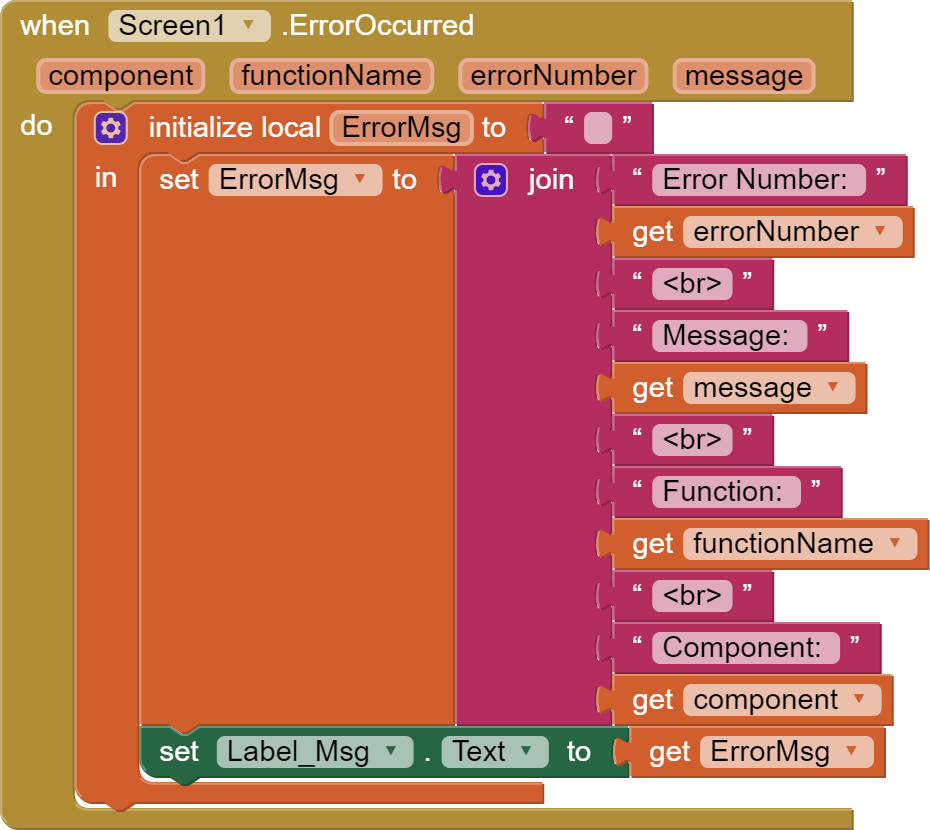
Lets Move another step
Following block I captures the block that you sent me Name " BT Basic setup send "
Can you please more elaborate the purpose of this block
Thanks in advanced
Simply that, if their is an error of some kind, this block traps it. As it is, it will simply report the error as Android does, but your code can decide what to do next. For example, if the App could not send data, you will get one of the 500 codes (see my site, link below). You could code to try again or ask the User to try to reconnect.