Some components that require translations have extra complications in their blocks' parameters.
For example, I found it hard to translate Notifiers that offer choices, because the choice text values had to match across the issuance of the choice to the user and the event that received the choice and fed it to an if/then tree to check the user choice value against text constants in the appropriate language.
I have found trying to debug the code of people who spoke non-English languages the most frustrating when i encountered variable names and Label Texts out of the reach of my available translation tools.
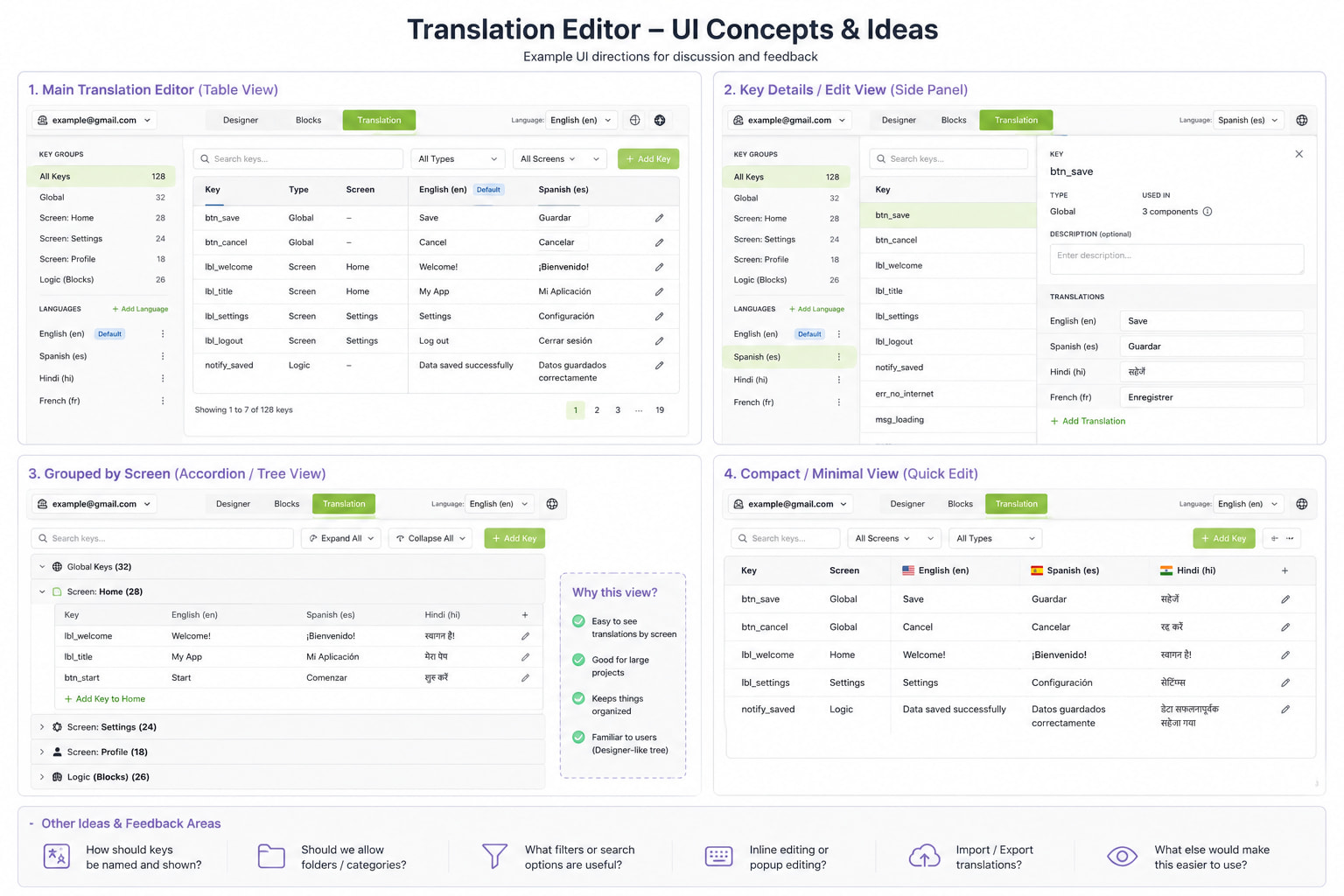
I feel compact UI is much better and identical to that of Android Studio.
I've personally used Android Studio's translation feature and find it quite intuitive. The workflow is simple, you write text in your primary language and then handle i18n through strings.xml. But the best part is that Android Studio automatically suggests extracting string literals from your code so you don't have to manually create resource IDs yourself. Something like this in App Inventor would be really helpful.
I think auto-generated but editable is the way to go. Auto-generation reduces friction, but letting users rename them keeps things manageable.
A table layout works well for displaying translations. Keys should be fixed on the left while language columns are scrollable, similar to what @hridoyhb mentioned. There will often be keys with no translation for certain languages. The UI should handle this clearly.
Like keys should be fixed and then the languages or table header should be expandable and scrollable so that one can add languages easily. It might also be possible that there can be no translation for multiple keys in some languages. It is necessary to handle this.
Manually creating keys is the biggest pain point. If it can auto-detect text across components and suggest keys automatically, that would make the whole feature much more beginner-friendly.
Thanks for the earlier feedback on the Translation Management UI. I wanted to share a small update on the current prototype and ask for more UI/UX suggestions.
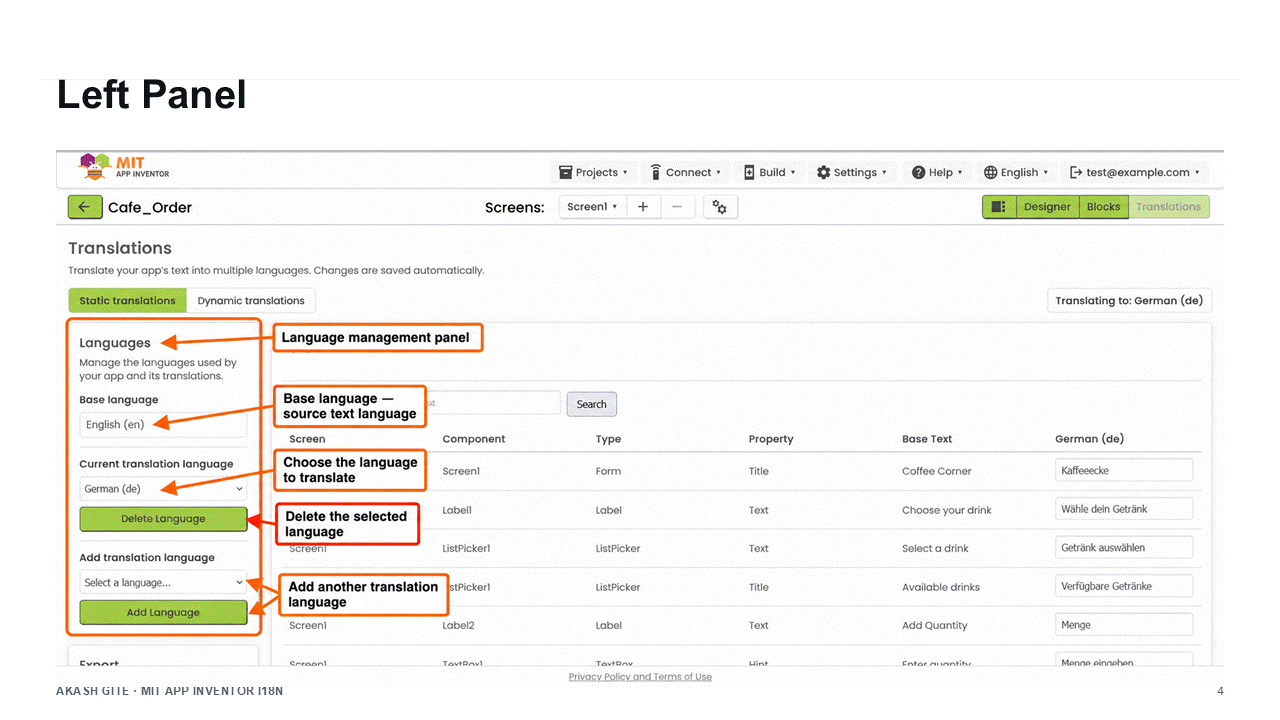
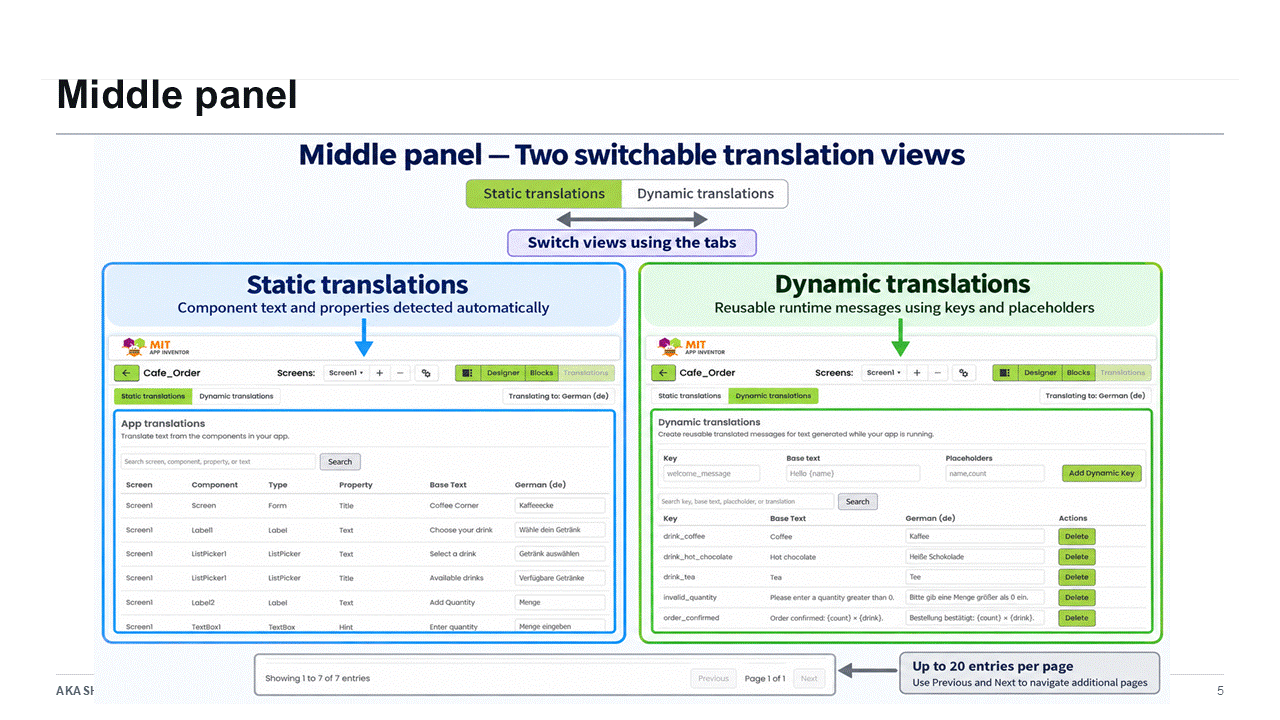
I now have a basic Translations tab inside the App Inventor Designer. The current setup shows translatable Designer properties in a table, including:
Screen
Component
Component type
Property
Internal translation key
Base text
Translation columns for added languages
For example, component text such as Button text, Label text, and Screen titles can be translated from this table.
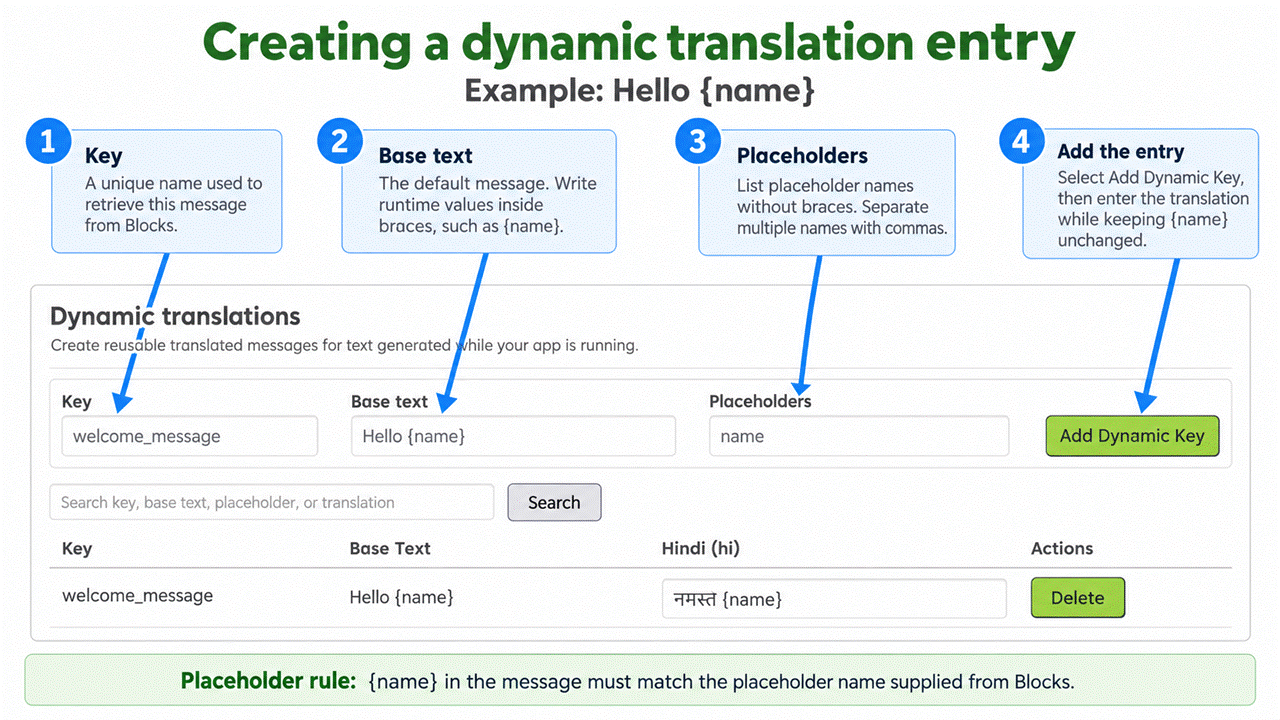
I have also started experimenting with dynamic translation keys for runtime messages. These are user-defined keys like:
welcome_message
with base text such as:
Hello {name}
and placeholders like:
name
These dynamic keys also appear in the same translation table and can be translated per language. There are also basic controls for adding/deleting languages, saving JSON, and exporting translation JSON.
This is still an early UI prototype, so I would really appreciate feedback on the current direction.
Some specific questions:
Does this table layout feel understandable for App Inventor users, especially beginners?
Should static Designer translations and dynamic/runtime message translations be shown in the same table, or should they be separated?
Is the dynamic key form clear enough, or should it be moved into a popup/dialog instead of being shown at the top?
Should internal keys be visible by default, hidden, or editable?
How should missing translations be shown visually?
What would make adding and managing multiple languages easier?
Should there be import/export buttons for JSON, CSV, or both?
Are there any parts of the UI that feel too technical or confusing?
I’m especially interested in suggestions for improving the UI side before polishing the implementation further.
Screenshots of the current prototype are attached below.
Could this scheme allow for multiple choices of translatable text for the same component, like a Button whose text switches between Start and Stop depending on whether or not it is running something?
Yes, that is exactly one of the cases I’m trying to support through the dynamic/user-defined message keys.
For the current static Designer properties, the table mostly represents the default text of a component, so a Button’s Designer Text property would have one default translation entry.
But for runtime-changing text, like a Button switching between Start and Stop, the idea would be to allow multiple dynamic keys, for example:
start_button_text = Startstop_button_text = Stop
Then in the app logic, the Button text could be set using the translated value for the appropriate key depending on the current state.
So instead of treating the Button as having only one fixed text value, the translation system would also support extra message keys used by Blocks/runtime logic.
One possible UI improvement could be to make this more component-friendly, for example:
or provide an “Add alternate text” action next to a component/property row, so users do not have to manually think too much about key naming.
So yes, the current scheme can support it, but I think the UI needs to make this use case clearer. Your example is a very good one, and I’ll keep it in mind while improving the dynamic key workflow.
Over the past few months, I have been working on a project-level Translation workflow for applications built with MIT App Inventor. The goal is to let creators manage multilingual application content from one place while keeping the experience consistent across the Designer, Blocks, Companion, exported projects, and compiled applications.
The Translation panel supports two complementary workflows:
Static translations for text assigned through Designer properties.
Dynamic translations for messages created while an application is running.
This post explains the complete workflow, when to use each type, how language fallback works, and how translations are preserved when a project is exported and imported again.
Note: This post demonstrates the current implementation under review. Some interface details may change before the feature becomes generally available.
The Translation workspace is a project-level editor located alongside the Designer and Blocks workspaces.
When it is opened for the first time, the creator configures:
The project’s base language.
One or more target languages.
The language currently being edited or previewed.
The base language identifies the language already used by the project’s original Designer text and dynamic-message base text.
For example, if the existing application contains:
Coffee Corner
Place order
Add sugar
then English should be selected as the base language.
Selecting Hindi as the base language does not automatically translate those English strings into Hindi. The base-language selection describes the existing source text; it does not perform machine translation.
Static translations are used for text that already exists in the Designer.
Examples include:
Screen.Title
Label.Text
Button.Text
TextBox.Hint
CheckBox.Text
ListPicker.Title
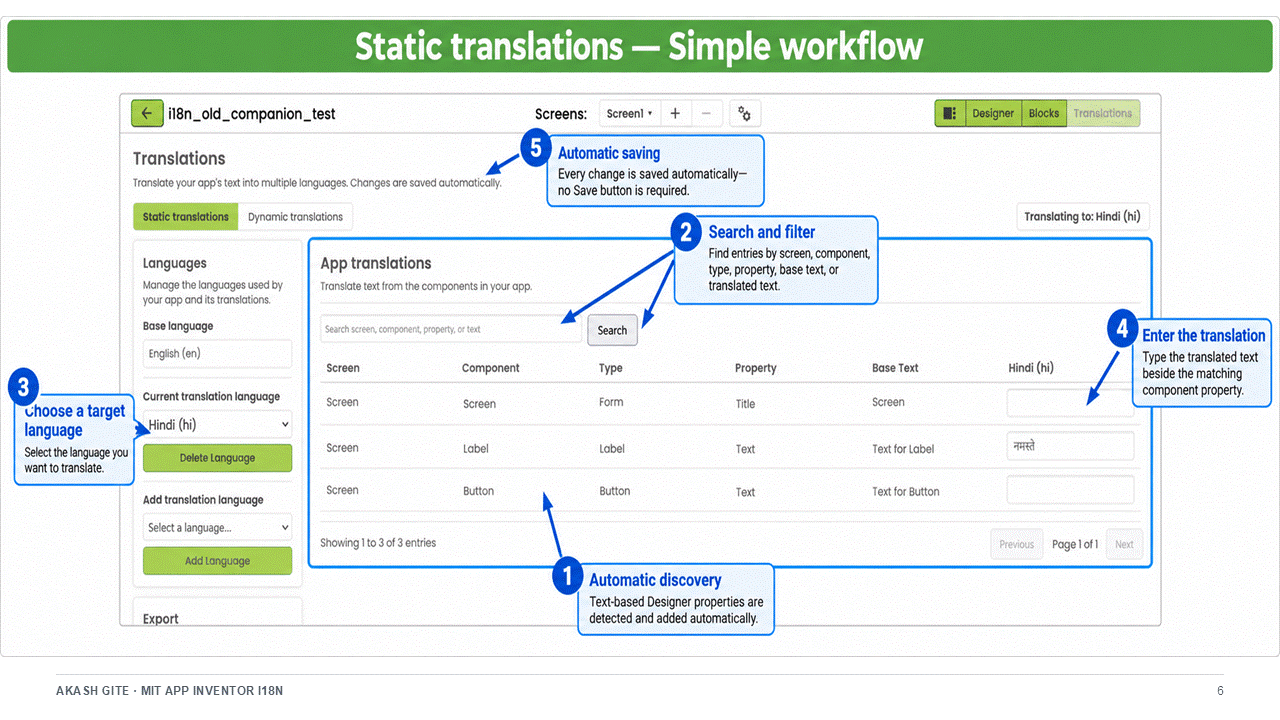
The Translation panel discovers supported text properties from the project’s screens and components. Creators do not need to manually create translation keys for these values.
Component: Button1
Property: Text
Base text: Place order
After adding Hindi and German as target languages, the creator can enter:
Hindi: ऑर्डर करें
German: Bestellung aufgeben
The complete workflow is:
Create the application interface in the Designer.
Open the Translation workspace.
Select the base language.
Add the required target languages.
Open Static translations .
Select the language to edit.
Enter translations for the discovered component properties.
Preview the selected language through Companion.
Build the application.
Changes made to supported Designer text are reflected in the Translation workspace, allowing the translation data to remain aligned with the application interface.
When should static translations be used?
Use static translations when the text is known while designing the application.
Good examples include:
Screen titles
Navigation labels
Form instructions
Button captions
Input hints
Checkbox labels
Fixed informational text
2. Dynamic translations
Not every message exists as a Designer property. Applications frequently construct text in Blocks while they are running.
Examples include:
Welcome, Akash!
Your order contains 3 items.
The total price is ₹450.
The meeting starts at 10:30.
The final text depends on values such as a user’s name, item count, price, date, or time. These messages cannot be reliably discovered from Designer properties, so they use the Dynamic translations workflow.
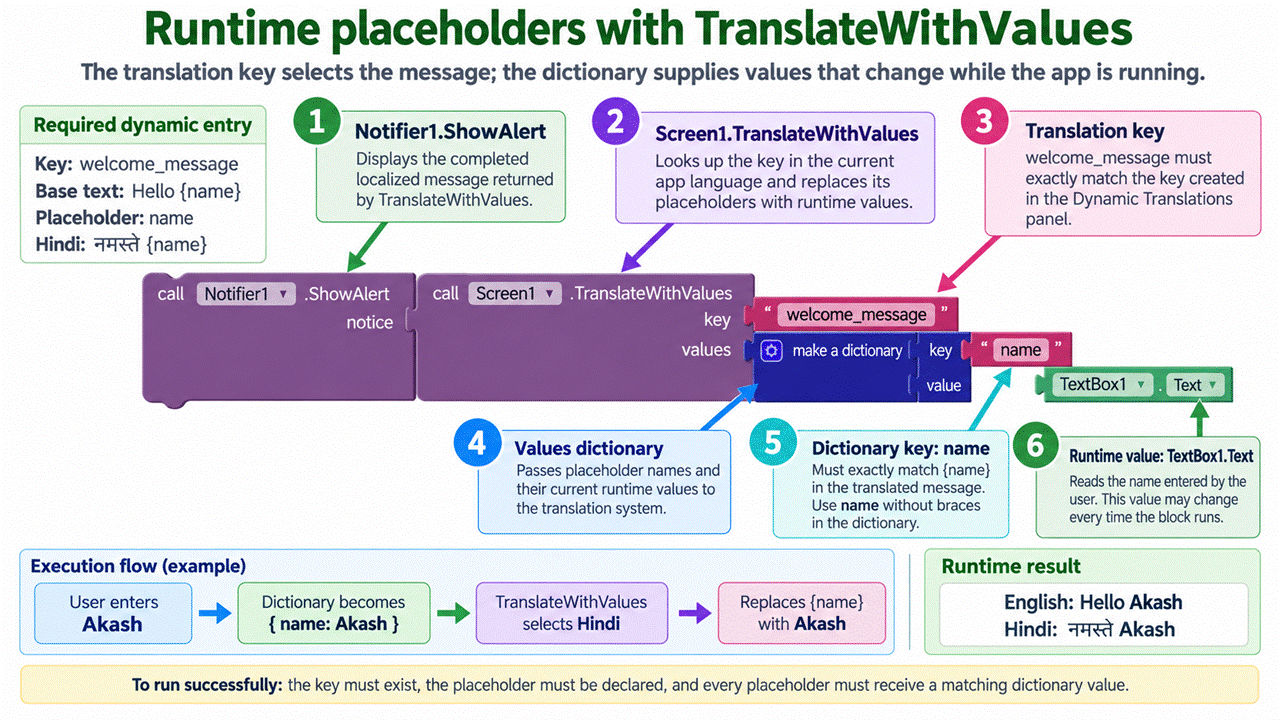
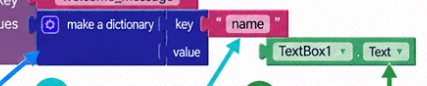
In Blocks, the application requests the translation using its key. If the entry contains placeholders, the application also supplies a dictionary containing the runtime values.
Conceptually:
Translation key: welcome_user

Values:
name → contents of NameTextBox
If the user enters Akash , the final results can be:
English: Welcome, Akash!
Hindi: स्वागत है, Akash!
German: Willkommen, Akash!
The same key is reused everywhere the message is needed. The application supplies only the values that change at runtime.
Why must placeholders also appear in the base text?
The base text defines the message’s fallback template and placeholder contract.
For example:
Hello, {name}!
declares that the message expects a value named name .
Every translation should use the same placeholder name, although its position may change:
English: Hello, {name}!
Another language: {name}, hello!
If a required value is not provided at runtime, the unresolved placeholder remains visible instead of silently deleting part of the message. This makes configuration problems easier to detect.
When should dynamic translations be used?
Use dynamic translations for:
Personalized greetings
Notifications
Validation messages
Scores and progress
Item counts
Prices and totals
Dates and times
Messages assembled from user input
Any text created in Blocks while the application is running
Static versus dynamic translations
Question
Static translation
Dynamic translation
Where does the text originate?
Designer property
Blocks/runtime logic
Is it discovered automatically?
Yes
No
Does the creator define a key?
No manual key required
Yes
Can it contain runtime values?
Normally no
Yes
Does it support placeholders?
Not required
Yes
Typical example
Button text
Welcome, {name}!
Both workflows use the same base language, target languages, preview selection, persistence, and runtime fallback rules.
Previewing translations with Companion
A connected Companion can receive:
The selected preview language.
The project’s current translation data.
This allows creators to inspect translations without rebuilding the application after every change.
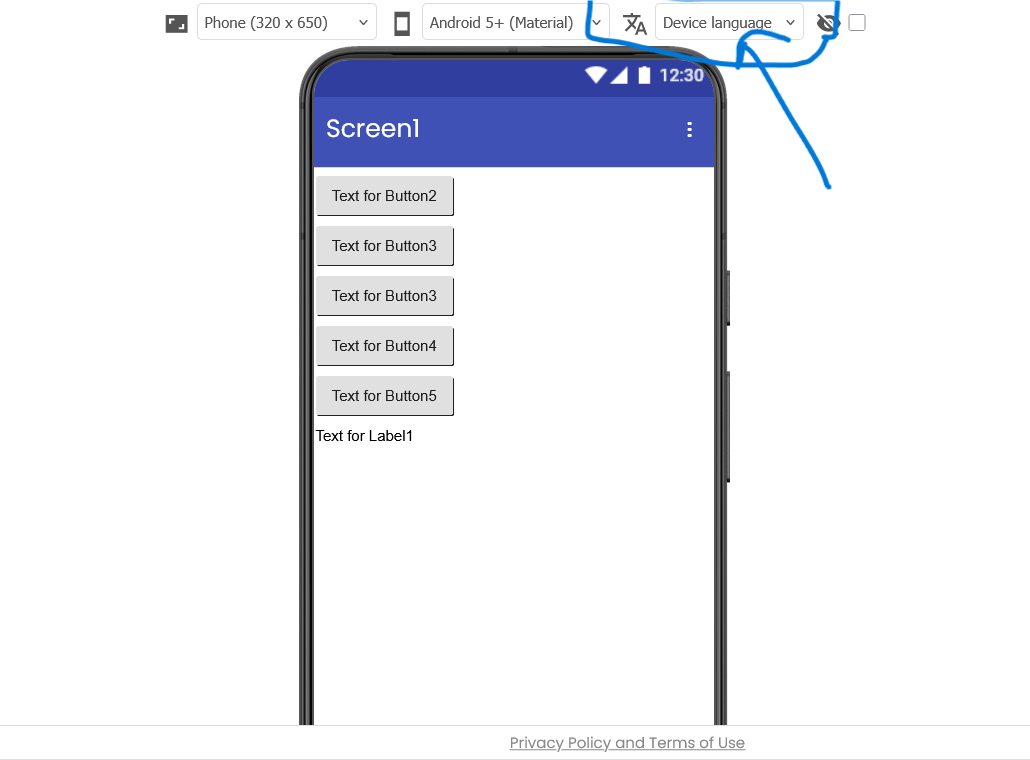
The preview-language selection is separate from the language used by the App Inventor website interface.
Changing the project preview to Hindi does not change the App Inventor editor itself to Hindi. Likewise, changing the website interface language does not change the application’s selected target language.
The resolver does not select an unrelated regional variant. For example, en-AU does not automatically select en-GB .
Fallback happens per entry. A screen may therefore display translated German text for completed entries while showing the base-language text for entries whose German translation is still missing.
Saving, exporting, and importing translations
Translation data is saved as part of the project settings.
When the project is exported as an .aia file, the translation configuration is included with the rest of the editable project.
This includes:
Base language
Target languages
Static translations
Dynamic keys
Base text
Placeholder definitions
Target-language values
When the .aia is imported again, App Inventor restores both the project and its translation data. Creators do not need to recreate their language configuration or re-enter translations.
The import workflow is:
Export the translated project as an .aia .
Open the App Inventor project list.
Select Import project .
Choose the exported .aia .
Open the imported project.
Open the Translation workspace.
Verify the restored static and dynamic translations.
Preview or rebuild the application.
An .aia file is an editable App Inventor project archive. It should not be confused with an .aab , which is a compiled Android App Bundle and cannot be imported as an editable project.
One shared translation source is used throughout the project, reducing duplicated configuration between platforms.
Frequently asked questions
Does App Inventor automatically translate my text?
No. The Translation panel manages creator-provided translations. It does not use automatic or machine translation.
What should I select as the base language?
Select the language already used by the project’s original Designer text and dynamic-message base text.
If the application currently contains English text, select English. Selecting Hindi while leaving the original text in English only labels that English text incorrectly; it does not convert it to Hindi.
What happens when a translation is missing?
The application displays the entry’s base text.
This applies independently to every static and dynamic entry.
Can I use regional locale tags?
Yes. Locale tags such as en-GB , pt-BR , zh-Hans , and es-419 can represent regional or script-specific translations.
The runtime first tries the exact tag and then its language-only form.
Will en-AU fall back to en-GB ?
No. Regional variants are not treated as interchangeable.
If en-AU is unavailable, the runtime tries en . If en is also unavailable, it displays base text.
Can I translate text created in Blocks?
Yes. Create a Dynamic translation entry and look it up using its key from Blocks.
Use named placeholders when part of the message changes at runtime.
Can placeholders appear in a different order?
Yes. A translation can reorder placeholders to follow the grammar of the target language, but it must preserve the placeholder names.
What happens if a placeholder value is missing?
The unresolved placeholder remains visible. This prevents the runtime from silently removing meaningful parts of the message.
Are static translations updated when Designer text changes?
The Translation workspace discovers supported Designer text properties and rebuilds its static entries from the current project structure. Creators should review existing translations whenever the corresponding base text changes.
Can I preview translations without rebuilding the app?
Yes. The connected Companion can receive the selected preview language and current translations.
Are translations preserved when I export the project?
Yes. Translation data is included in the exported .aia and restored when that project is imported again.
Does this require an internet connection at runtime?
No. Compiled translation assets are packaged with the application.
Does it work on Android and iOS?
The project uses a shared translation source for both platforms. Platform-specific build and runtime code loads that shared data using consistent locale-resolution and base-text fallback rules. The cross-platform implementation is currently being reviewed and tested.
Will existing applications stop working?
No. Applications without translation configuration continue using their original Designer and Blocks text. The feature is designed to remain backward compatible.
Is the App Inventor website language the same as my application language?
No. They are independent:
The website interface language controls App Inventor’s own menus and labels.
The project language controls the application being created.
Final thoughts
The Translation workspace is intended to make multilingual application development approachable without hiding the distinction between fixed interface text and runtime-generated messages.
Static translations provide a straightforward workflow for Designer properties, while dynamic translations give creators explicit control over keys, variables, and messages created in Blocks.
Together with Companion preview, locale fallback, cross-platform runtime support, and .aia persistence, these workflows provide an end-to-end foundation for building multilingual applications with MIT App Inventor.
I would appreciate feedback from educators, application creators, translators, and contributors—particularly on the clarity of the two workflows, placeholder handling, locale fallback, and how this feature could be explained to first-time App Inventor users.
This required more than my usual glance and reply.
For the sake of my smaller screen / laptop compatriots, consider changing the 6 column sheet of screen/component name (component type) / attribute / attribute treatment columns into something more nested, like a pretty printed JSON path/value scheme.
Also, for narrative's sake, consider doing a global rename of 'name' to 'username', to disambiguate data from meta-data. I was easily led down the wrong path, trying to figure out if 'name' referred to the dynamic user data value, or was an attribute of part of the translation mechanism.
Thanks for the feedback! Please feel free to tag other power users so they can share their thoughts too.
For the screen size issue, I agree we need to accommodate laptop and mobile users. Instead of changing the data structure entirely, I will try adding a CSS wrapper for small screens. I also want to add a filter in the upper panel so users can select or unselect which specific columns (screen info, component type, etc.) they want to see in the middle panel. Let me know if you think this filter idea works.
Good catch on the "name" field. I agree it’s confusing, so I will change it to "username" globally to fix that.
Tagging all the power users for their opinions on this feature. If anyone has any suggestions, improvements, or anything else they'd like to share, I'd love to hear it!