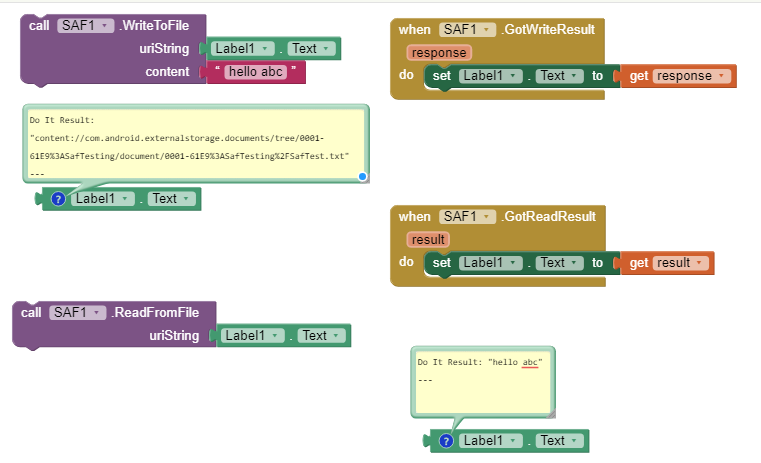
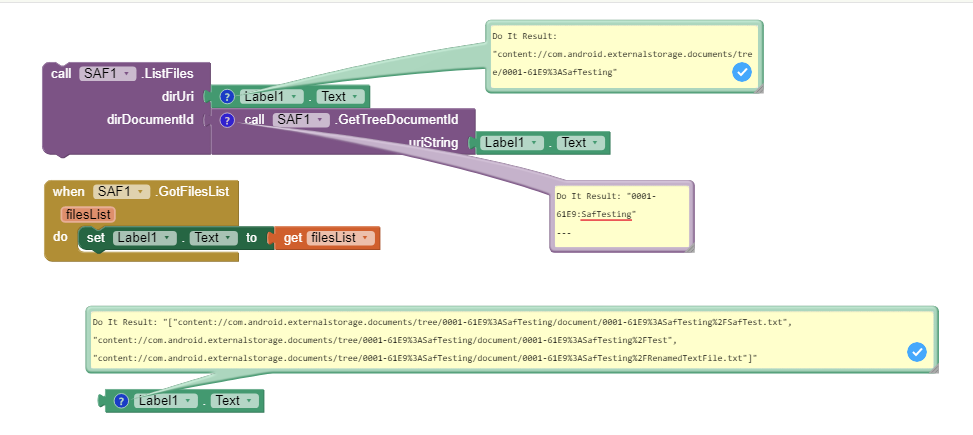
Example 2
-
Open document picker and create document
(Since you now know how to take persistable permission, so I'll skip that part) -
Read and write to document
-
List files
Example 2
Open document picker and create document
Read and write to document
List files
Developers might also find these links about SAF useful in addition to your nice explanation.
Thanks @vknow360 for your explanations, making more sense now as to what one can do with your extension.
Well I have fallen at the first hurdle....
Following your first image, when I click the button I am taken to the device's default file manager (or what looks like it), I went to the root folder, the file manager asked me to give permission to this area (to MIT Companion App), then returns me to the project with this error:
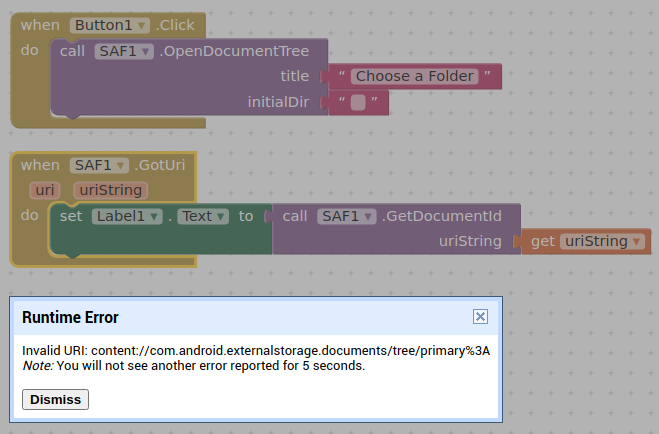
I forget to mention that direct child's id should be obtained using GetTreeDocumentId method.
Sorry, I used the wrong block 
OK that all works. 
Is there no way then, in order to get started, other than the user going into their file manager and granting a permission, to get the root or other folder (tree)? (Open Document Tree)
Perhaps a uri for the ASD ?
I can see how one can traverse through a file list to find sub (folders) trees, and then list files again and so on. An image component accepts a content uri to display an image. Is this going to be the same for other components needing a file?
No, user must grant access through Documents Picker.
I am not sure about this.
Image component works fine.
Same should be correct for audio and video player.
Understood 
SAF is only needed for → non-media files. Media files (jpg, png, mp3, m4a, mp4,...) can be accessed from all paths (outside of the ASD or privateDir) with READ permission.
The question was just about the content uri being read by other components, e.g. it works with the image component:
not had a chance to test some of the others yet.
Could you please provide an example of how one uses the flags in order to set persistent permissions? I presume this saves the user having to visit the document picker again when restarting the app?
With this extension you really have to bite through and some users might lose teeth in the process. 

I am prepared to champion those users, in order to save their teeth ;), and ask Sunny how all the various elements of this extension work.
Sure, here it is:
Also data gets kind of binded to the app and you don't lose access to it even after multiple reboots.
Epic work 
Thank you..
What is the syntax for setting an initialDir?
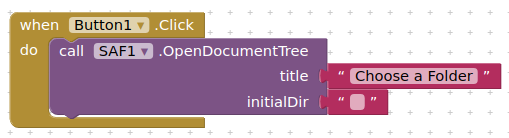
Whatever I put in here, I am just taken to the last location I selected in the document picker ?
Ah, i just tried a full uri and this worked, e.g.
content://com.android.externalstorage.documents/tree/primary%3A/document/primary%3AMusic
opened at the Music folder
will this part be the same on all devices:
content://com.android.externalstorage.documents/tree/primary%3A/document/primary%3A
If I select the ASD I get a different path:
content://com.android.externalstorage.documents/tree/primary%3AAndroid%2Fdata%2Fedu.mit.appinventor.aicompanion3%2Ffiles/document/primary%3AAndroid%2Fdata%2Fedu.mit.appinventor.aicompanion3%2Ffiles
this is all using the companion...
Yes, it doesn't matter whether there is an empty string or a special path there.
... and you cannot select
/storage/emulated/0 and
/DownloadBut you can select /Downloads.