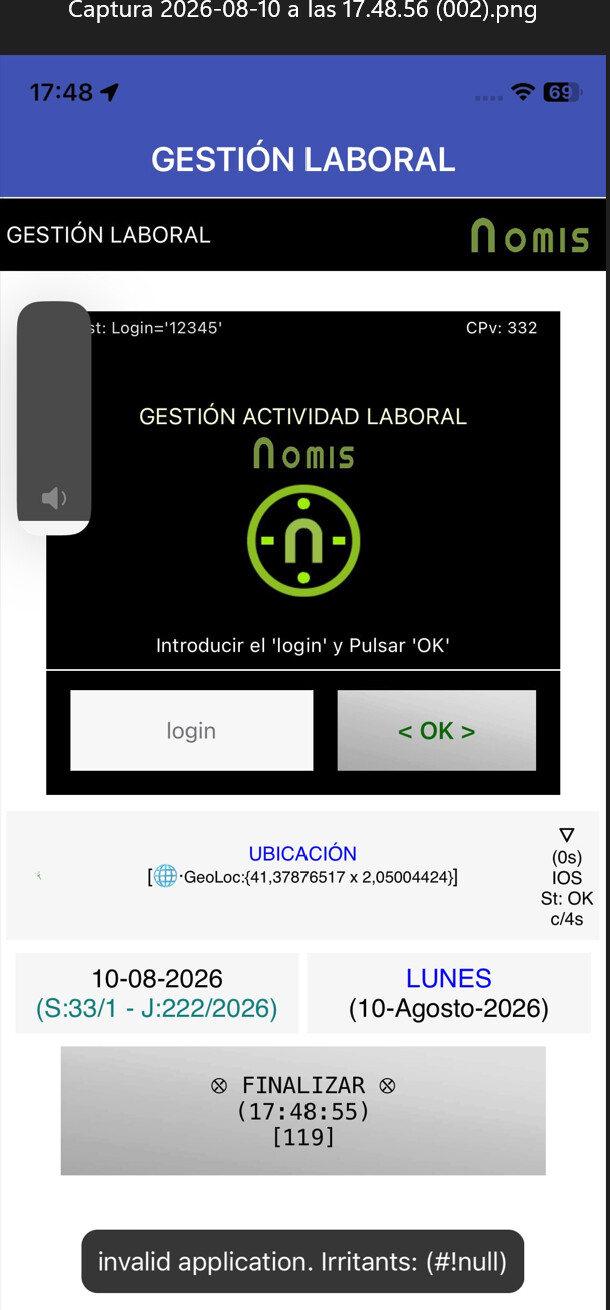
In the main caller screen (Screen1) when we open other screen we receive a runtime error. In Android the same .aia runs well.
The app open the new called screen and it runs well, but in the main screen we have this runtime error.
In the main caller screen (Screen1) when we open other screen we receive a runtime error. In Android the same .aia runs well.
The app open the new called screen and it runs well, but in the main screen we have this runtime error.
I'm not getting an error, neither with Companion nor with the IPA.
Post a test aia that reproduces the problem.
Hello Anke,
It happens only when I run the ipa. It is my real app. And to detect it is difficult to see the error because it happens only when in the app you select one icon to open a new screen and you can see the error only one second (more or less) while the second secreen is been open. I can only send my aia by PM.
You can believe the error because I prior send a image with this screenshot mistake. It happens when I open for anyone secondary screen from the basic Screen1. You can see ONLY in theScreen1 (not in the new secondary open screen) -is necesary to do a speed backupdown.
Hello @ewpatton
In the attached video you can see the runtime error. Keep attention when after select the icon to open a new screen you can see on the down screen the black runtime popoup before open the new screen (only 1 second). And also you can see that in iOS as @anke had detect on the past the change screens is a very slow process delayed every time for more 2 o 3 seconds.
I think this is a timing issue related to running events on the two screens. In particular, that an event running on the previous screen may try to fire, but the event handler to it has been garbage collected at the point at which it fires. Are there any components that might be firing regular events, like the Clock or LocationSensor, running on the first screen?
Before the event Open Other Screen I had closed all the Clocks Timer and Locations sensors.
As I said, we need a test aia.
When I return to screen1 from the new open secondary screen, the main screen continues to function fine despite the previous error when I went to a secondary screen. I reopen all the Clocks and GPS sensors.in this main screen when I’m again in this main screen. I report this issue to can help a better AI2 for iOS.
Hello @ewpatton
I've identified the cause of this error (only on iOS).
There were two possible causes:
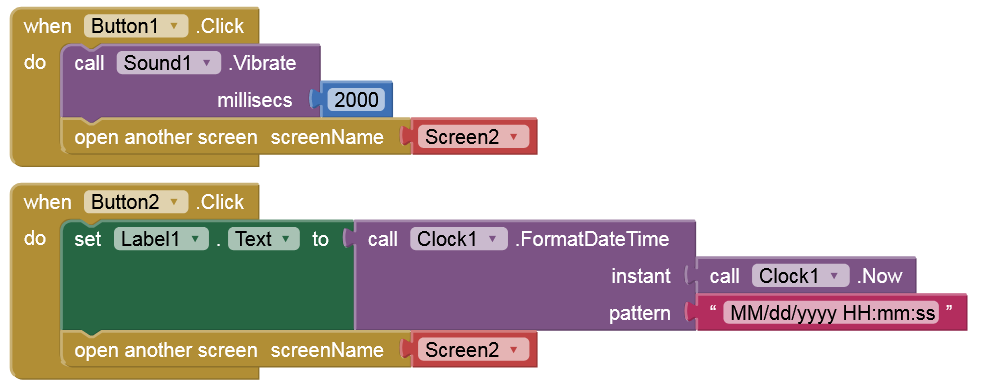
The app executes the Sound Vibrate event before calling Screen2, and this is what causes the runtime error on Screen1 when calling Screen2 on iOS.
Additionally, a Timer is also executed before calling Screen2, and although this Timer closes before calling Screen2, I assume the first cycle of the Timer remains in iOS memory and also causes the runtime error. Interestingly, these issues don't cause any runtime errors on Android; they only occur on iOS.
When testing this on iOS to avoid runtime errors and ensure the fastest transition from Screen 1 to Screen 2, it is HIGHLY recommended that you do not execute ANY instructions after calling the Open Another Screen event. My impression is that on Android, after the Open Another Screen event, the app correctly executes any instructions that may follow it, but this does not happen on iOS, which is why you get runtime errors with subsequent instructions.
I’d like to reproduce this issue on my iOS test devices. So, please post a test app (aia).
Sorry, I have not a test aia. I have tested this issue only whit my production aia. It would be very difficult to reproduce this problem with all my possible scenarios. The most important topic is verify do not execute any block or event after active the event Open Other Screen (included to have prior deactivated all the sensors).
Hmm, as far as I can see, you were talking about just two scenarios: sound/vibrate, and timers that were enabled but then disabled before switching to another screen.
not only these cases (sound/vibrate/timers/locations,…) but ANY instruction or block placed/executed after the Open Other Screen event. In Android it is not a problem, but in iOS yes.
The problem is only for AFTER the Open Another Screen event not before. I had AFTER.
For example this:
What sense would it make to execute that after the "open another screen" method?
Besides, the problem only occurs if Screen1 isn't closed.
I always close Screen1 because the screen transition is faster on iOS that way.
In my app I can not close the main Screen1 when I call the Screen2 because when I return of the Screen2 I need to be on the Screen1 caller position execution..
I wanted to have two threads of execution. In Android is ok, but in iOS is not possible.
Means?