READ_MEDIA_IMAGES and READ_MEDIA_VIDEO permissions in the app manifest

I can no longer update my app on the Play Store; I receive this message:
Invalid use of photo and video access permissions
Apps that access photos only once or infrequently cannot include the READ_MEDIA_IMAGES and READ_MEDIA_VIDEO permissions in the app manifest. Instead, they need to migrate to a system photo picker.

If the app's core functionality requires broad access to these permissions, update the photo and video access permissions declaration.


But I don't use any kind of sharing, nor file access, much less images...
I've already removed extensions and nothing solves it... Could someone give me a tip on how to change these permissions? Because I don't use them...

Possibly this ?

1 Like

Which components and extensions are you using? For extensions always use the latest versions

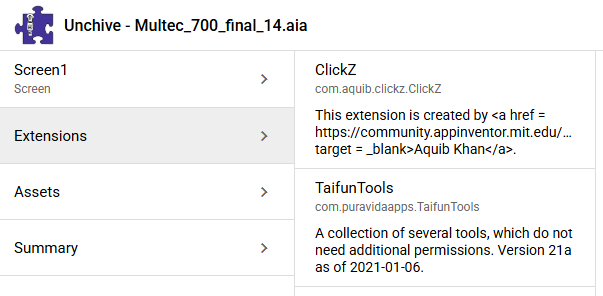
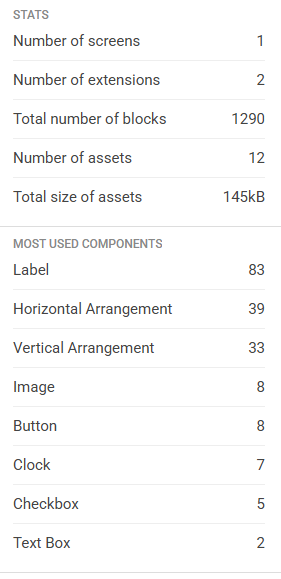
Upload your app to https://unchive.kodular.io to get some statistics of your project and post the statistics overview

Taifun

1 Like

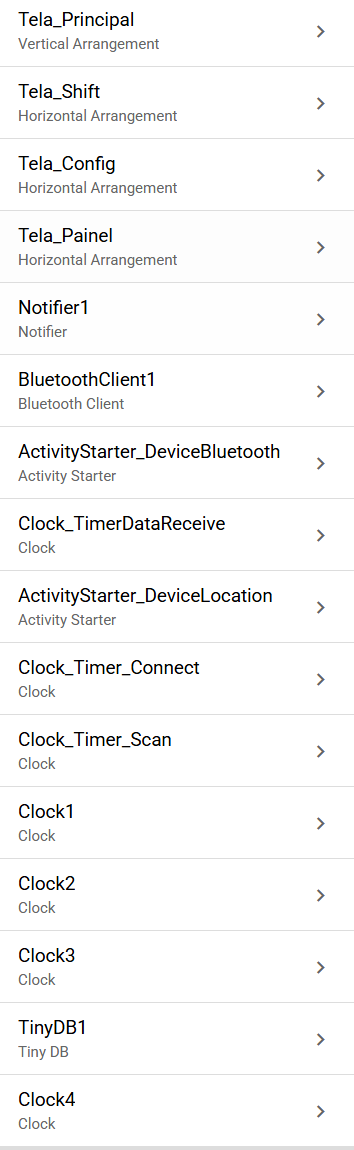
These two extensions appear in the report, but it's strange because I removed them from the project and apparently they're still there...

Did you read the post that @TimAi2 referred to carefully?

I have already pointed out several times—and not just in this post—that the FileScope = Shared block automatically declares all storage permissions in the Manifest. And this happens even when this block is disabled.

<uses-permission android:name="android.permission.READ_MEDIA_AUDIO"/>
<uses-permission android:name="android.permission.READ_MEDIA_VIDEO"/>
<uses-permission android:name="android.permission.INTERNET"/>
<uses-permission android:name="android.permission.READ_MEDIA_IMAGES"/>
<uses-permission android:name="android.permission.READ_EXTERNAL_STORAGE"/>
<uses-permission android:maxSdkVersion="29" android:name="android.permission.WRITE_EXTERNAL_STORAGE"/>

@ewpatton


If you don't use the File component, send me your aia via PM. I can take a look.

1 Like

You forgot to post the statistics overview of your project
This would show us the components you are using

EDIT: the 2 extensions you are using don't seem to be the issue

Taifun

1 Like

Yes Anke, I read the post and from my understanding the problem would occur if I had the block declared in the project, but I don't have the "fileScope" block.

And also in the Project properties, "DefaultFileScope" is already set to Legacy.

Sorry, I misunderstood. I thought the problem was only with the extensions.

These are the permissions of your app declared in the Manifest:

    <uses-permission android:name="android.permission.BLUETOOTH_SCAN"/>
    <uses-permission android:name="android.permission.INTERNET"/>
    <uses-permission android:name="android.permission.BLUETOOTH_ADMIN"/>
    <uses-permission android:name="android.permission.BLUETOOTH"/>
    <uses-permission android:name="android.permission.BLUETOOTH_CONNECT"/>
    <uses-permission android:name="android.permission.READ_EXTERNAL_STORAGE"/>
    <uses-permission android:name="android.permission.WRITE_EXTERNAL_STORAGE"/>

Since you have set DefaultFileScope = Legacy (for whatever reason), WRITE_EXTERNAL_STORAGE permission is being declared in this strange way. It should be:
<uses-permission android:maxSdkVersion="29" android:name="android.permission.WRITE_EXTERNAL_STORAGE"/>


So READ_MEDIA_IMAGES and READ_MEDIA_VIDEO is not declared in the Manifest. Are you absolutely sure that it is the same app you uploaded to the Play Developer Console? I don't think so.

1 Like

@Maiko_Herrmann
Also we can see some Bluetooth permissions in the manifest
Did you drag a Bluetooth component into the working area without using it?
For unused components, remove those from the working area

Taifun

1 Like

Bluetooth is used in the application; I believe the cause of the error is something related to the project properties.

Anke, after reading your message, I decided to try changing the DefaultFileScope properties again and testing as: APP
The error persisted when trying to publish again.

Then I changed it back to: Legacy
And now the publication was accepted.

I believe something prevented the previous manifest from being updated.
Now it worked. Thank you all for your attention.
I took a look at your app. DefaultFileScope plays no role in this.

I can't tell you what else it could be, as that was the only change I made for the publication to be accepted.

Hmm, strange. :person_shrugging:

This topic was automatically closed 7 days after the last reply. New replies are no longer allowed.